How to share your public resume
A public resume has its own short web address. You can put it in an email, a message, or the contact line of the resume itself.
-
Make the resume public first. See how to make your resume public. Publishing is included on every paid plan.
-
On your resumes, the address now sits beside the Public badge, with a copy button next to it. One click copies it.
-
Or open the card's ⋯ menu and choose Share. That copies the same address and tells you it has.
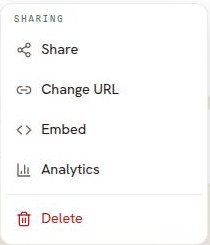
Share, Change URL and Embed wake up once the resume is public. Until then each is greyed out and says why. -
Paste the address wherever you need it.
What the person you send it to sees
Your resume, in the template you chose, on a page that reads well on a phone or a computer. There is a button to download it as a PDF. They do not need a Resumonk account.
Good to know
- The address is short on purpose, so it survives being read out or typed by hand.
- On a paid plan you can choose the address yourself. See how to change the URL of your public resume.
- On the free plan the public page carries a small Resumonk footer. Upgrading removes it.
- Want to know whether anyone opened it? See analytics for your public resume.
- Older Resumonk links that start with /r/ still work. They send the reader to the same page.