How to rename a section
Section headings are yours to word. Call Experience "Work history", call Education "Academic background", or write the heading in your own language.
-
Open your resume in the editor and stay on Edit.
-
Click the section heading in the page itself, not the name in the list on the left.
-
The heading becomes editable where it sits. Type the new name.
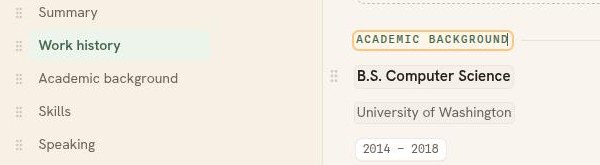
The heading edits in place. The list on the left updates as you type. -
Click anywhere else to finish. The new name is stored as you type, and the indicator beside the resume title reads Saved.
The contact labels too
The four labels beside your contact details work the same way. Click Email, Phone, Website, or Address and type over it. "Website" becomes "Portfolio", and any of them can be translated.
Good to know
- A heading can be written in any language. It prints exactly as you type it.
- Renaming changes the heading only. Your entries stay where they are.
- Summary is the one heading that cannot be renamed, and it cannot be deleted either.
- The bin icon at the right of the heading rule deletes the whole section, not the name.