Complete 4-step Guide on How to Use AI to Create a Resume (& 24 Timeless Tips)

Imagine this: you’ve just found your dream job posting, but your resume hasn't been updated in ages. You’re not alone in this. Crafting a resume that represents you while standing out is no easy feat. Now, here’s the kicker: what if AI could help? The world of job hunting is rapidly evolving, and knowing how to use AI to create a resume can be a game-changer. This article will help you optimize your resume to get closer to landing that dream job.
Resumonk’s AI resume builder is your shortcut to resume success.
Complete 4-step Guide on How to Use AI to Create a Resume
Are you ready to craft an impressive resume with the help of AI technology? Resumonk brings you these features:
- Improve with AI: Better wording for a single entry or your whole resume, with every fact kept.
- Rewrite for a job: A separate job version of your resume for a role you are applying to, with your original left as it was.
- Seamless Import Options: Import your LinkedIn profile or upload a PDF, DOCX or plain-text resume to streamline the resume creation process.
In this step-by-step tutorial, we will guide you through using Resumonk’s AI Resume Builder, a simple yet powerful tool that eases the resume creation. This tutorial will keep things practical and actionable, ensuring you have a polished resume ready in no time to land your dream job.
Getting started
- Go to the Resumonk start page to access the AI resume builder. It is free to start, and you are not asked for any payment details.
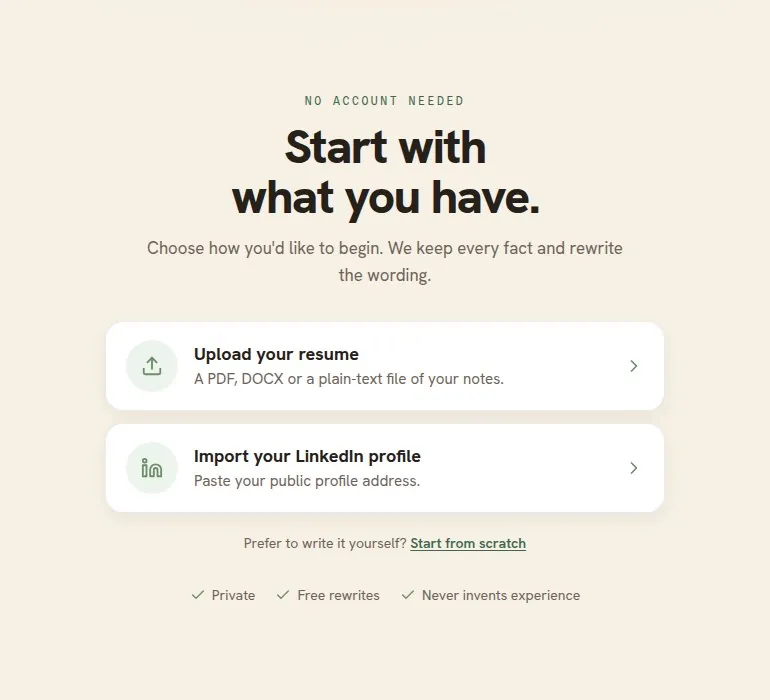
- You do not need to sign up first. You sign in at the end, when you want to keep your resume, with one of these options:
Create resume
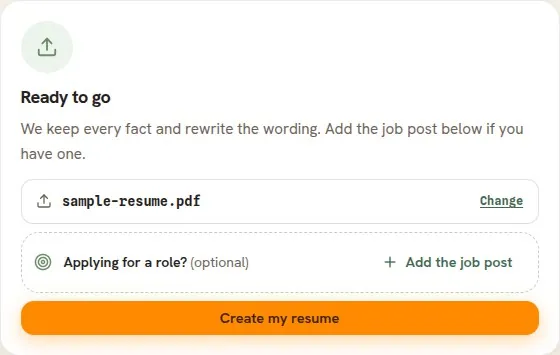
On the start page, choose how you want to begin. Resumonk rewrites what you give it into a polished first draft: it improves the wording and keeps every fact. If you are applying for a particular role, click “Add the job post” and paste the job post (or a link to it) before you continue, and Resumonk also writes a job version of your resume for that role.
- Import your LinkedIn profile -> Paste your LinkedIn profile link and click “Import profile”. Resumonk uses your profile information to write a first draft. Your email address, phone number and skills do not come across, so add them in the editor.
- Upload your resume -> Choose a PDF, DOCX or plain-text file and click “Create my resume”. Resumonk reads it and rewrites the wording, keeping every fact.
- Start from scratch -> Sign in, and the editor opens with a blank resume for you to fill in.
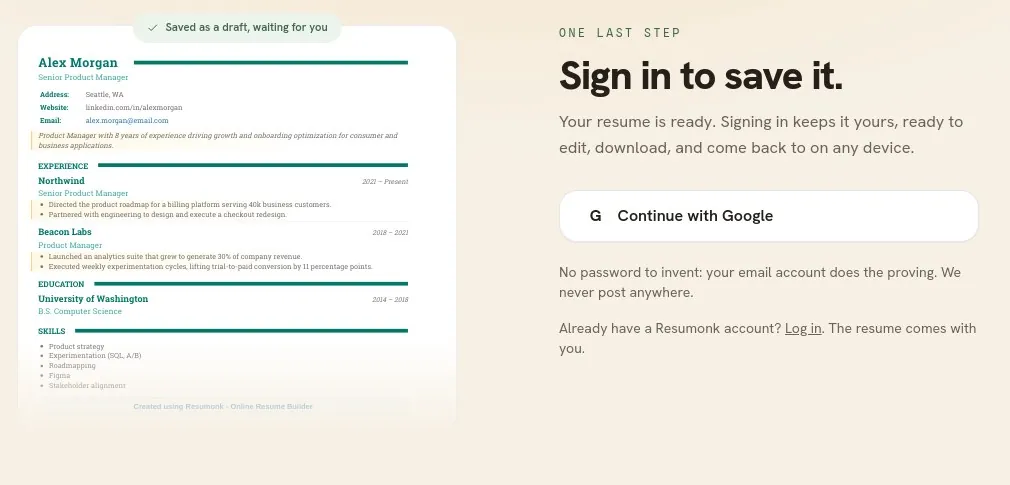
After an upload or an import, Resumonk shows you a preview of your first draft, with the rewritten lines highlighted. You can download the PDF straight away (it carries a small Resumonk footer). To keep the resume and edit it, click “Save & keep editing” and sign in with Google or LinkedIn. If you already have a Resumonk account, use the “Log in” link on that step instead, and the resume comes with you.
Edit the resume
- After you sign in, the editor opens with your resume in it. Later, open it with “Edit” on the Your resumes page.
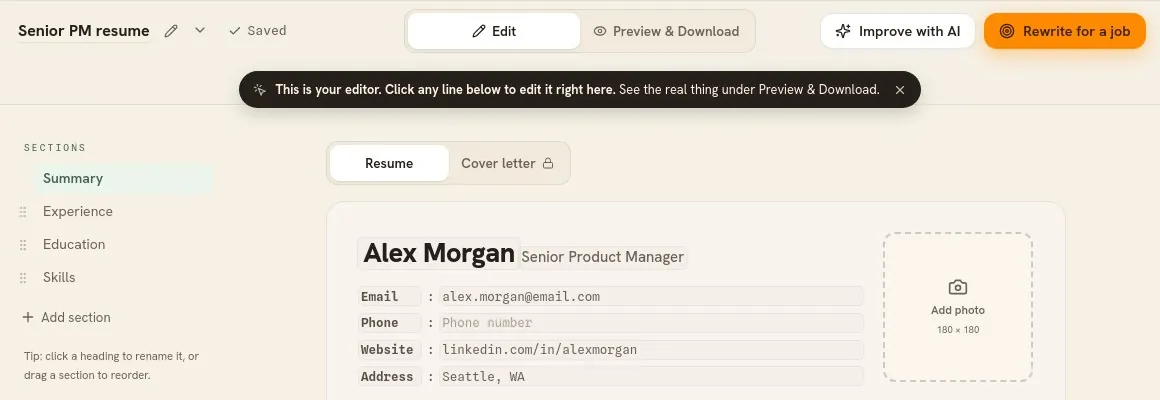
- Edit the imported information: click any line to change it, and add sections from the list on the left.
- Enhance your resume with AI: Take advantage of our AI features to optimize every section of your resume, creating a more personalized and impactful presentation:
- Improve with AI: click it at the top of the editor to improve the whole resume, or use the sparkles button on a single entry to improve only that entry. A bar then tells you how many lines changed, “See what changed” shows the words you had before, and “Undo” puts them back.

- Rewrite for a job: click it at the top of the editor, paste a job post or a link to it, and Resumonk writes a separate job version of your resume for that role. The resume you started from stays exactly as it was. The free plan includes one Improve with AI pass and one job version, and the Professional and Executive plans include both.

Preview and Download
- Review your full resume for any content, flow, or design fixes. Confirm there are no spelling or grammar mistakes.
- Make formatting changes to give your resume a polished, professional look.
- Click “Preview & Download” at the top of the editor to customize your resume design (your choices save as you make them):
- Choose a template that meets your requirements. Six of the 21 templates are free, and you can preview the others on your own resume before you upgrade.
- Edit PDF settings – Select the line spacing (font size), color, font, and page settings that go well with your unique personality.

- Click “Download” and choose PDF or DOCX. On the free plan, the PDF carries a small Resumonk footer and uses the template’s own font and color. A paid plan removes the footer, keeps your font and color, and adds the DOCX download (for the 14 templates without a photo).

Create a cover letter (optional)
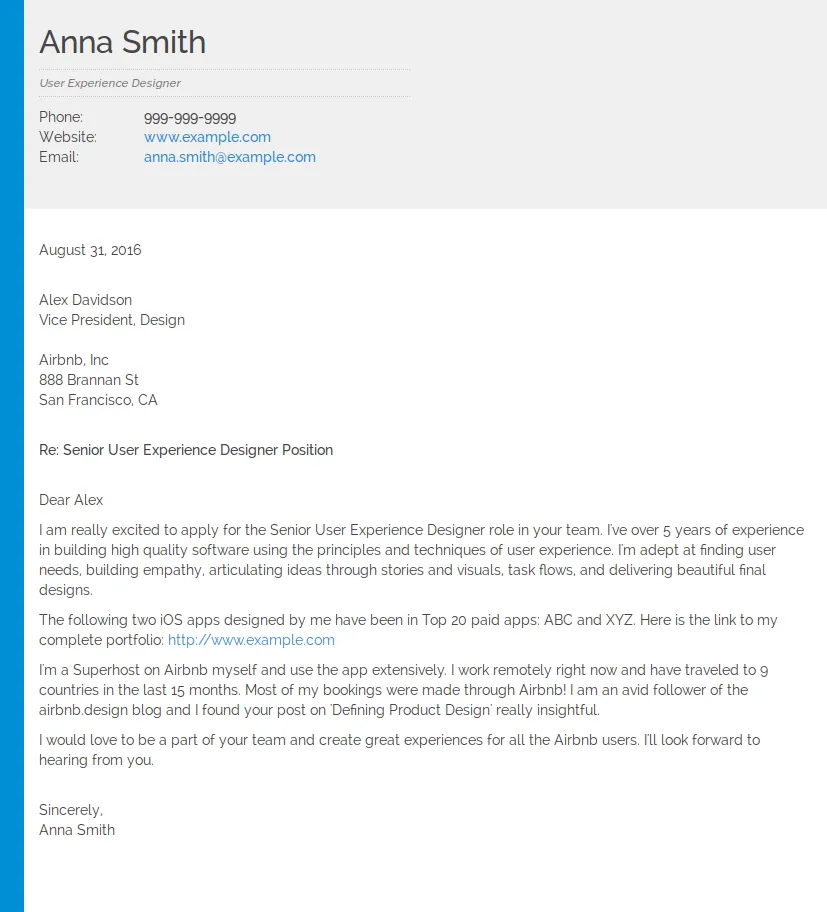
On a paid plan, you can create a complementary cover letter with the same design as your resume: open the “Cover letter” tab above the page in the editor. This personalized cover letter lets you provide additional context for your job applications and highlight specific qualifications that align with your desired roles.

Here is a sample cover letter created using the above feature:
Navigating the dashboard
Once your resume is saved to your account, you can open and edit it any time from your dashboard, the Your resumes page.

- New resume: start another resume. The free plan keeps one resume, and paid plans keep as many as you like.
- Your resumes: displays a list of all the resumes you’ve created.
- Actions: perform various actions on each resume:
- Preview: review how your resume appears to potential employers.
- Download: save a copy of the resume in the desired format (PDF, DOCX).
- Duplicate: copy an existing resume to change for a different kind of role, without starting from scratch. Duplicating comes with a paid plan.
- Analytics: see how many people opened your public resume page and downloaded its PDF. Public pages and analytics come with a paid plan.
- Edit: update information, change templates, or revise resume content as needed.
- Delete: remove an existing resume permanently.
Bonus Tip: On a paid plan, make your resume public and give it a custom URL (e.g., resumonk.com/your-name) for sharing. It adds a professional flair that can set you apart.
The Resumonk AI Resume Builder automates the difficult aspects of resume writing so you can focus on showcasing your experiences. With easy previewing, editing, and downloading, crafting a polished resume is simple.
We hope this step-by-step guide helped you learn how to create professional resumes quickly using Resumonk’s AI features. Check out our website for tips, examples, and resources to refine your resume further. Best of luck with your job search!
24 Timeless Tips for Creating a Resume That Will Win You a Job Interview

1. Quantify Your Achievements
When showcasing your accomplishments, don’t just tell, show. Adding specific metrics and numbers to your achievements can make a difference. Imagine the impact of reading “Increased quarterly sales by 27% ($500,000) through the implementation of a new CRM system” instead of just “Increased sales.” Resumes with measurable results are 40% more likely to get you an interview. Numbers don’t lie—they tell a compelling story that words alone can’t capture.
2. One Size Doesn’t Fit All
Sending out the same resume to every job you apply for? Big mistake. 63% of recruiters prefer resumes personalized to the specific job position. Customize your resume for each application by incorporating relevant keywords and highlighting experiences that match the job description. This increases your chances of getting noticed and demonstrates your genuine interest in the position.
3. Less Is More
Regarding resume length, aim for the sweet spot of 475-600 words. Resumes within this range are twice as likely to result in an interview as those that are too long or too short. Be selective about the information you include, focusing on the most relevant and impactful details. Remember, you want to leave recruiters wishing to learn more about you.
4. First Impressions Matter
A well-formatted resume can make all the difference. 83% of recruiters say they’re more likely to hire a candidate with a clear, professional-looking resume. Use a clean, easy-to-read layout with consistent formatting, clear headings, and appropriate white space. A visually appealing resume makes a positive first impression and encourages recruiters to spend more time reviewing your qualifications.
5. The Heart of Your Resume
Your work experience is the heart of your resume, and hiring managers spend 67% of their screening time examining this section. List your work history chronologically, emphasizing your most recent and relevant positions. Ensure each position includes a brief description of your responsibilities, followed by quantifiable achievements showcasing your impact.
6. Your Digital Resume
Having a strong LinkedIn profile is crucial for today’s job seekers. Resumes with a link to a comprehensive LinkedIn profile have a 71% higher chance of getting a job interview. Ensure your LinkedIn profile is up-to-date, consistent with your resume, and includes additional details about your professional background, such as recommendations and endorsements. Don’t forget to customize your LinkedIn URL for a polished look.
7. What Sets You Apart
41% of recruiters look for skills on a resume first, making it essential to showcase your relevant skills prominently. Highlight hard and soft skills directly relevant to the job you’re applying for. Be sure to tailor your skills section to the specific job description, focusing on the most demanding skills for the position.
8. Bring Your Achievements to Life
Starting each bullet point with strong action verbs can make your achievements more impactful and engaging. Words like “led,” “managed,” and “implemented” are more effective than passive language or weak verbs. Action verbs convey a sense of accomplishment and help paint a clearer picture of your contributions.
9. Show, Don’t Tell
60% of recruiters say that job seekers' biggest mistake on their resumes is using too many buzzwords. Instead of relying on vague terms like “team player” or “results-driven,” provide specific examples demonstrating these qualities. Showcasing your achievements and concrete examples of your skills is far more persuasive than simply listing buzzwords.
10. No Room for Errors
60% of hiring managers say they’ve found a typo on a resume. Thoroughly proofread your resume multiple times and consider having someone else review it to catch any errors. A typo can create a negative impression and make you appear careless or inattentive to detail. Make sure your resume is flawless before submitting it.
11. Keep It Classy
85% of resumes include an email address. It’s essential to ensure your email address is professional, ideally using some variation of your name rather than a casual or humorous address. A professional email address reflects your seriousness about the job application and makes it easy for recruiters to contact you.
12. Show Your Commitment
Listing relevant certifications, training programs, or professional development courses can give you an edge in the job application. This demonstrates your commitment to ongoing learning and skill development, which is especially important in today’s rapidly changing job market. Include the certification or course name, the issuing organization, and the completion date for each entry.
13. Make Your Impact Clear
Instead of simply listing your job duties, focus on your accomplishments and your impact in previous roles. Use the “accomplished [X] as measured by [Y], by doing [Z]” formula to structure your bullet points effectively. This helps convey the value you brought to your previous employers and makes your resume more compelling.
14. Less Is More
While hiring managers say they are more likely to interview a candidate with a visually appealing resume, avoid overly complex designs or graphics that may distract from your content or confuse ATS systems. Stick to a clean, easy-to-read layout with consistent formatting and ample white space. A simple design ensures that your resume remains professional and easy to read.
15. Start Strong
Start your resume with a concise resume summary (2-3 sentences) highlighting your most relevant qualifications and career objectives. This gives recruiters a quick overview of your fit for the position and encourages them to read further. Tailor your summary to the specific job you’re applying for, focusing on the key qualifications and skills the employer seeks.
16. Speak Their Language
Incorporate terminology and acronyms specific to your industry to demonstrate your familiarity with the field and to align with the language used in job descriptions. This shows that you understand the industry and helps your resume resonate with recruiters who are likely familiar with these terms.
17. Don’t Just List Them
While hard skills are crucial, don’t neglect soft skills. Instead of simply listing them, provide brief examples of how you’ve demonstrated these skills in previous roles. For example, instead of stating “strong communication skills,” you could write “collaborated with cross-functional teams to develop and implement a new marketing strategy, resulting in a 15% increase in customer engagement.”
18. Show Your Passion
If you have limited work experience or are changing careers, including relevant volunteer work or personal projects can help demonstrate your skills and passion for the field. Describe your role, the skills you used, and any measurable outcomes or accomplishments. This can help paint a fuller picture of your capabilities and interests.
19. Make It Easy for Recruiters
When saving and sending your resume, use a clear naming convention that includes your name and the word “resume” (e.g., “John_Smith_Resume.pdf”). This makes it easier for recruiters to find and identify your document, especially if they receive multiple applications.
20. Focus on What Matters
Keep your education section brief unless you’re a recent graduate, including only relevant degrees, certifications, and honors. For most professionals, work experience should take precedence, as it provides a more comprehensive picture of your qualifications and capabilities.
21. Keep It Professional
Omit personal details such as age, marital status, or religious affiliations unless they’re directly relevant to the job. This information can lead to unconscious bias and is generally unnecessary for job applications. Focus on presenting your professional qualifications and experiences.
22. Make Your Resume Visually Appealing
Incorporate numbers and percentages throughout your resume to break up dense text and draw the reader’s eye to key achievements. This makes your accomplishments more concrete and memorable, helping you stand out from other candidates.
23. One or Two Pages?
While one page is often recommended for entry-level positions, more experienced professionals can use two pages if necessary to showcase relevant experience. However, ensure every word counts and contributes to your overall narrative. Don’t include irrelevant information just to fill up space.
24. Quickly Showcase Your Qualifications
Create a dedicated skills section highlighting your most relevant technical and soft skills. This will allow recruiters to assess your qualifications quickly and can help your resume pass through ATS filters. Be sure to tailor this section to the specific job description, focusing on the skills that are most in demand for the position.
Get Your Resume Ready with Our AI Resume Builder
Resumonk is a job-search assistant that starts with your resume: it rewrites the resume you upload, or your LinkedIn profile, into a polished resume.
Our platform lets you improve any part of your resume with AI and offers 21 templates, 6 of them free, with matching cover letters on a paid plan. Key features include:
- LinkedIn profile importing
- Existing resume uploads
- Multiple resume management (paid plans)
- A 24/7 job search agent and a rewrite of your resume for each job (paid plans)
Resumonk makes the often tedious resume-building process simpler for job seekers, students, and professionals. Whether you start from scratch or update an existing resume, the editor and its AI tools help you get your application materials ready with less effort.
Build your resume with Resumonk today. Starting is free.
Keep reading
.png)
This article was originally published on our blog on Oct 29 2024 and authored by Team Resumonk. It was edited and republished in its present form by Team Resumonk on Sep 15 2025.