Utilizing AI Resume Builders for Job Applications: Dos and Don'ts

Use an AI resume builder for a fast first draft and better wording, then check every line yourself before you apply. Keep only what is true, cut generic phrases and change the resume for each job, since the tool cannot know your work.
Below are the dos and don'ts, an edited example bullet, and what to check before you trust a builder.
In short
- An AI resume builder drafts or rewrites resume text from the details you give it.
- Every number, title and date in an AI-written resume must be checked against what really happened.
- AI tools tend to use stiff, generic phrases, so read each bullet aloud and simplify it.
- A resume works best when it is changed for each job, using the words of the job post where they are true.
- Give a resume tool only the details a resume needs, and read how it stores your data.
What is an AI-generated resume?
An AI-generated resume is a resume whose wording was drafted or rewritten by an artificial intelligence tool, from details you supply. Many AI resume builders can write a summary, turn notes into bullets or rewrite a whole resume.
Using one is fine, as long as the resume stays yours. Employers judge what the resume says, and in an interview you will be asked about every line.
How does an AI resume builder work?
An AI resume builder takes what you give it and writes resume text from it. Most follow the same steps:
- You give it your details: an old resume, a LinkedIn profile, or answers to its questions.
- It drafts a summary and bullets, or rewrites the ones you have.
- If you paste a job post, it suggests skills and words from that post.
- You edit the result and download the resume, usually as a PDF.
The tool only knows what you tell it. If your notes are thin, it fills the gaps with general phrases, and sometimes with numbers you never gave it.
What should you do when using an AI resume builder?
When you use an AI resume builder, treat its output as a draft you finish yourself. These are the dos:
- Do make the output your own. Change each part so it reflects your real experience and skills, in words you would use.
- Do check every fact. Compare each number, job title and date with what happened. Remove anything you cannot explain in an interview.
- Do keep what is relevant. Check that the skills and results it puts first are the ones the job asks for.
- Do proofread. AI tools still make mistakes and write clumsy sentences. Read the whole resume before you send it.
- Do give it fresh details. When you finish a project or change jobs, add it, so the next draft starts from the truth.
Example: simplifying an AI-written bullet
A rewrite can be close to right and still read stiffly. Here are three bullets as an AI tool rewrote them:
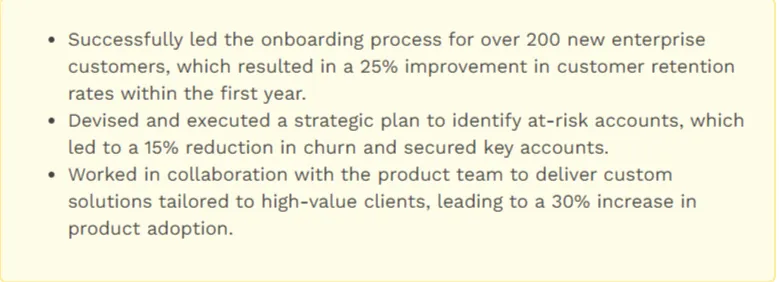
The second bullet in the picture is wordier than it needs to be. Simpler versions keep the same facts:
- Simpler: Developed and implemented a strategy to identify at-risk accounts, achieving a 15% reduction in customer churn and securing key accounts.
- Plainer still: Built a plan to spot at-risk accounts early, which cut customer churn by 15%.
Keep a number like 15% only if it is your real figure. If a tool adds a number you never gave it, replace it with yours or delete it.
How do you check what an AI tool changed?
Checking what an AI tool changed means reading the new text next to the old. Look for lost facts, new claims and changed meaning.
In Resumonk, Improve with AI rewrites the wording, and "See what changed" marks every changed line, with Undo to go back.
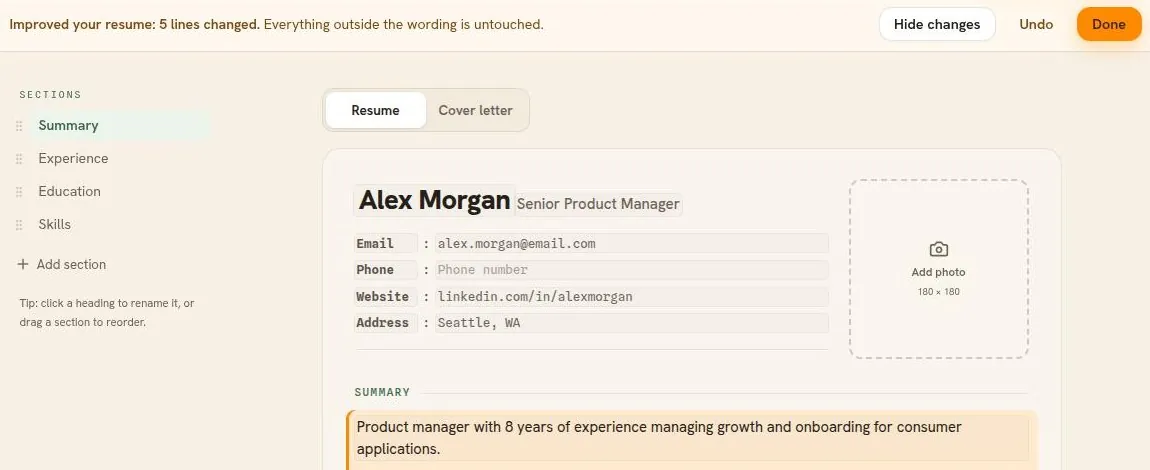
A rewrite may be longer or more formal than you need. Shorten it, or put back your own line where it said things better.
Check every line a tool rewritesRead each changed line in the editor before you download, and put back anything that is not true.
Build your resume
What should you avoid with an AI resume builder?
With an AI resume builder, avoid sending anything you have not read and changed. These are the don'ts:
- Don't skip the layout. Check that headings, dates and spacing are clear and the same throughout. A clean template does much of this; Resumonk has resume templates to choose from.
- Don't lose your own voice. Replace stock phrases such as "results-driven professional" with what you did.
- Don't send one resume to every job. Change the summary, skills and top bullets for each application.
- Don't let the parts drift apart. Your resume and cover letter should tell the same story, with the same titles and dates.
- Don't forget the job post. Compare the resume with the job description, and add the skills it asks for that you really have.
- Don't share more data than needed. A resume needs no ID numbers, bank details or passwords, so never paste them into a tool.
Can an AI resume builder help without hurting your application?
An AI resume builder helps without hurting your application only when you check its text before sending it. The usual problems are easy to spot:
- Invented numbers or skills that you cannot back up in an interview.
- Buzzwords that grab no attention because every AI resume uses them, such as "spearheaded" or "proven track record".
- The same wording on every application, with nothing about the job in front of you.
- Bullets that describe duties instead of what you achieved.
Used with care, an AI resume builder helps rather than hurts. It saves time on the first draft, and you spend that time on the facts.
What should you know before trusting a resume builder?
A resume builder you can trust lets you create a professional resume and keep control of your data. Before you trust one, check these points.
- Can you edit every line? You should be able to change all the text the tool writes.
- What can you download for free? Some builders let you write for free and charge to download.
- Where is your data kept? Read the privacy policy, and check that you can delete your account.
- What does it promise? Be wary of any builder that promises interviews or jobs.
How do you use AI with a job description?
Using AI with a job description means giving the tool your resume and the job post together. Many builders, some of them free, can then rewrite a resume based on that job description.
Paste the full post, not only the title. Keyword optimization, in plain terms, means using the post's own words for skills you really have.
Then check the result. Every skill it adds must be one you have, and every result must be yours. Our guide to tailoring a resume to a job description covers the steps by hand.
Common questions about AI resume builders
Is it OK to use an AI-generated resume?
Using an AI-generated resume is OK when every fact in it is true and you have edited it to sound like you. The problem is not the tool; it is sending text you have not checked.
Can employers tell a resume was written by AI?
Employers often notice an AI-written resume by its generic phrases and its sameness with other applications. Plain, specific bullets about your own work avoid that.
Can AI review or critique your resume?
AI can review a resume and point out weak bullets, missing results, repeated words and typos. Treat its comments as suggestions, and judge each one yourself.
Can an AI rewriter fix resume bullet points?
An AI rewriter can fix resume bullet points so they are shorter, start with a verb or add a result. Give it your real figures first, or it may guess them.
What are the benefits of an automated resume generator?
An automated resume generator saves time on the first draft, offers wording when you are stuck and keeps the format consistent. The checking and the choices about each job stay with you.
Keep reading
job hunting.
Resumonk polishes your resume, discovers matching jobs and finds connections inside companies.
Get started free- Indeed
- Greenhouse
- + more
This article was originally published on our blog on Apr 23 2024 and authored by Manjeet Kaur. It was edited and republished in its present form by Team Resumonk on Sep 15 2025.