Rezi Alternatives - An Expert Evaluation

Finding the Right Resume Builder for Your Job Search
Rezi has become a go-to for many job seekers because of its content-focused AI tools, but there’s no one-size-fits-all resume builder - which is why many professionals search for a Rezi alternative.
Some candidates want cleaner templates and more visual control; others want simpler, transparent pricing, resume hosting, or multi-version management for dozens of applications.
Price sensitivity, template variety, AI writing quality, and the overall user experience are the most common drivers that push people to look beyond a single product. In this guide we map the leading alternatives, give honest, practical comparisons against Rezi’s core strengths, and show which platform is a better match depending on your role, industry, and job‑search workflow.
What makes a strong Rezi alternative?
It’s a combination of recruiter‑approved templates, helpful writing features (AI-assisted or high-quality prompts), an intuitive editor, and pricing that’s clear and defensible for the user.
We also value extras that matter day‑to‑day: LinkedIn import, easy resume cloning for multiple tailored applications, a matching cover letter generator, and any hosting or analytics that help you understand how your resume performs. Below we list top contenders, note where they shine, and explain when one is a better fit than another.
How we made this list vs Rezi
We evaluated platforms through the lens of practical job search outcomes: template quality, AI/writing assistance, export flexibility (PDF/DOCX), pricing transparency, and supporting career tools (job trackers, interview prep, portfolio/website builders).
We cross‑checked product pages and pricing, user reviews on Trustpilot/G2/Reddit, and help‑center documentation to verify how features actually work. For Resumonk specifically we took the plans and features from our own pricing page and help center, so the comparisons reflect the plans users can sign up for.
Top Alternatives to Rezi
Each platform below takes a slightly different approach to resume creation: some prioritize polished design and portfolio sites, others focus on rapid content generation or deep optimization. We link each product’s official site once (below) and supplement with user‑facing review resources where helpful so you can see what real users report after using the tool.
Resumonk vs Rezi
Resumonk is our own builder and positions itself as a job-search assistant that balances design and practical features: 21 professional templates, PDF exports on every plan and DOCX on paid plans, and AI writing help that keeps to your real experience.
Resumonk also offers LinkedIn import on every plan and, on paid plans, a 24/7 job search agent that finds jobs that match you, your resume rewritten for each job, warm introductions on Executive, a matching cover letter builder, and hosted unique resume URLs with view analytics. Resumonk’s pricing page explains the free plan and the Professional and Executive plans, and shows each price in your local currency.
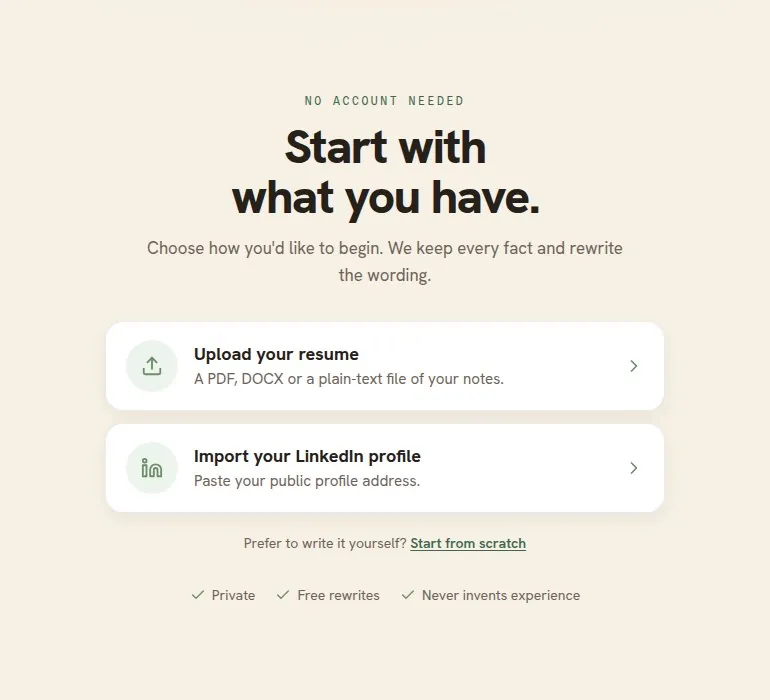
Pricing of Resumonk
- Free: 1 resume and 6 templates; free PDF downloads with a small Resumonk footer; LinkedIn import and resume upload; 1 free AI improve pass and 1 free AI rewrite for a job.
- Professional: unlimited resumes, cover letters and all 21 templates; clean PDF and DOCX downloads with no Resumonk footer; AI improvements for any part of your resume; 2 always-on job searches; your resume rewritten for each job; help preparing each application; a public resume page with a custom address and view analytics.
- Executive: everything in Professional, plus 5 always-on job searches and 10 warm introductions a month to people at your target companies you have a real connection to, each with a drafted first message.
Key Features of Resumonk
- AI writing: a full resume rewrite when you start, and "Improve with AI" for the whole resume or any single entry.
- 21 modern templates, export to PDF, and to DOCX on paid plans (photo templates are PDF only).
- LinkedIn import and resume upload support.
- Custom fonts (18 to choose from) and any color on paid plans.
- Your resume rewritten for each job, matching cover letters, and a 24/7 job search agent on paid plans.
- Unique hosted URL + performance analytics for public resumes.
Pros and Cons of Resumonk vs Rezi
- Pros (Resumonk): Free plan with no card needed, an AI rewrite that keeps to your real experience, a 24/7 job search agent with your resume rewritten for each job, PDF exports, and on paid plans DOCX, hosted resume analytics and strong customization (fonts/colors).
- Cons (vs Rezi): Rezi emphasizes job‑specific keyword targeting and an AI bullet writer that focuses specifically on job‑match scoring; Resumonk gives no resume score or keyword check, has an English-only interface, and keeps DOCX, cover letters and the job tools for paid plans.
Kickresume vs Rezi
Kickresume is a design- and career-tool hybrid that combines GPT‑4 powered AI writing with a personal website builder and a career map feature.
It’s a solid pick for job seekers who want creative or visually distinct resumes and an integrated site‑style portfolio tied to their resume. The product page lists multiple subscription options and highlights the AI writer, career map, and mobile apps.
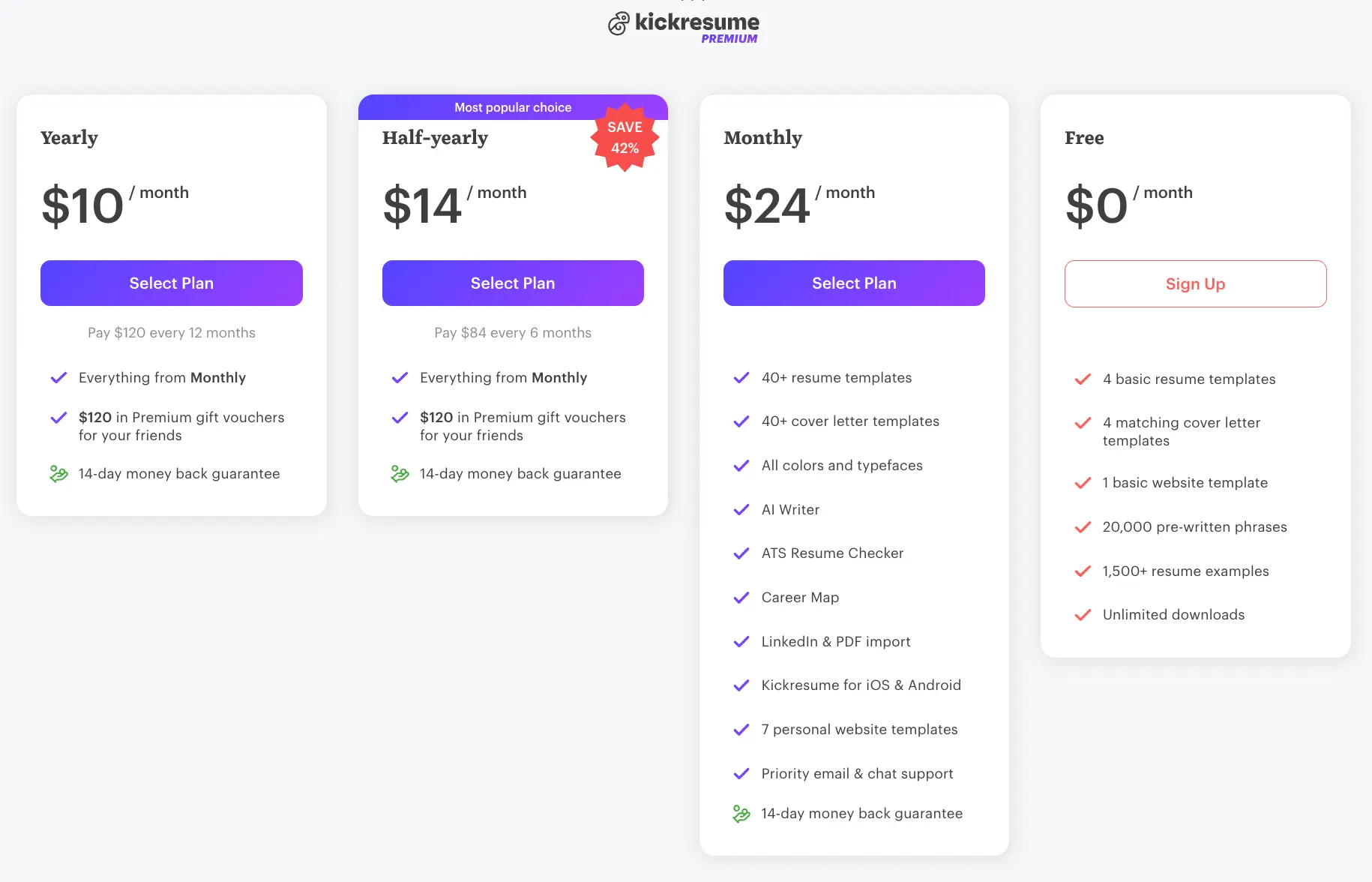
Pricing of Kickresume
- Free - limited templates and free downloads.
- Monthly - ~$24/month, full premium features.
- Half‑yearly - ~$14/month (billed every six months) - most popular.
- Yearly - deep discount for 12 months of premium features.
Key Features of Kickresume
- AI Writer (GPT‑4) for full resume and cover letter generation.
- 40+ premium resume and cover letter templates.
- LinkedIn & PDF import and mobile apps (iOS/Android).
- Career Map and interview preparation resources.
- Personal website/portfolio builder with templates.
Pros and Cons of Kickresume vs Rezi
- Pros (Kickresume): Strong visual templates and personal site builder; excellent for creative roles and personal brand building.
- Cons (vs Rezi): Rezi’s strength lies in tightly focused AI content optimization and keyword targeting for specific job postings; Kickresume prioritizes design + broader career tools.
Resume.io vs Rezi
Resume.io is an all‑rounder that combines an AI resume writer, job tracker, interview prep, and a resume score/checker. Their pricing page lists a 7‑day trial (after which subscriptions auto‑renew) plus quarterly and free plans; their builder emphasizes recruiter-tested templates and a job tracker with a Chrome extension to save listings.
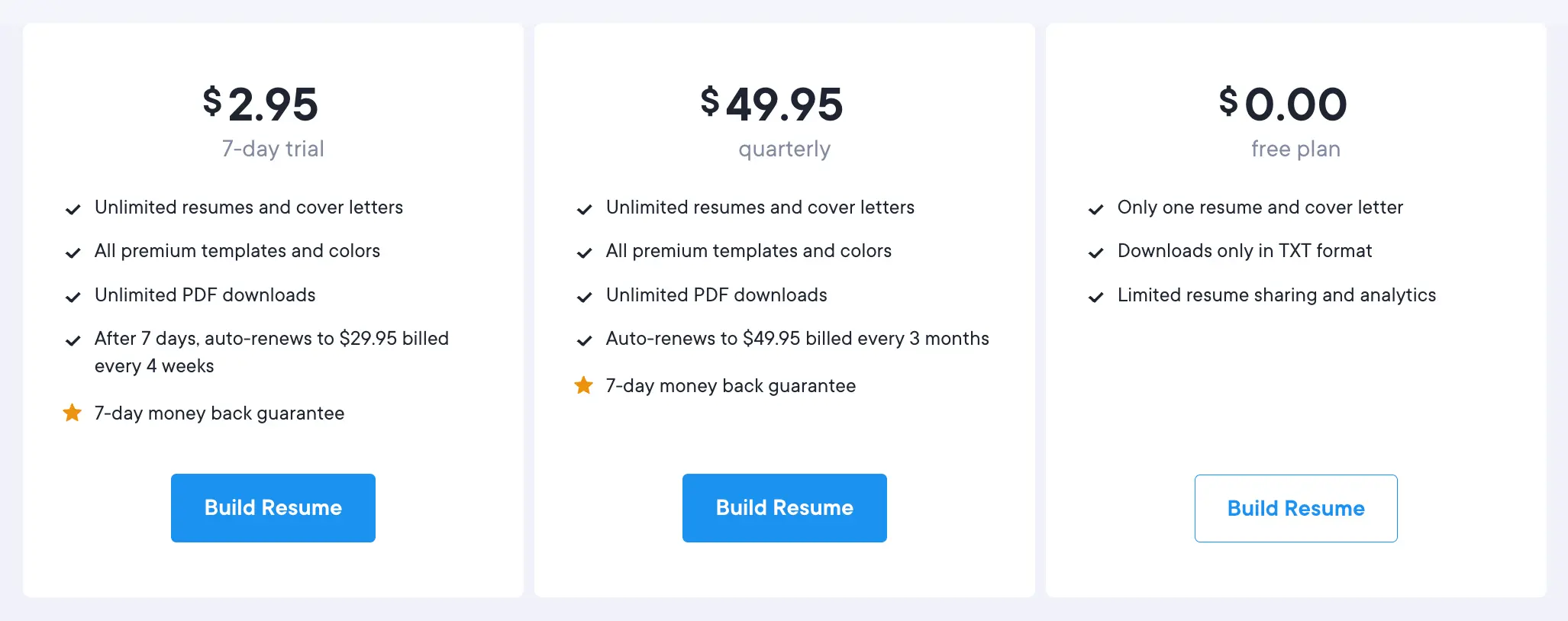
Pricing of Resume.io
- Free - limited (TXT only) downloads and one resume.
- 7‑day Trial - $2.95 trial then auto‑renews to ~$29.95 every 4 weeks.
- Quarterly - discounted multi‑month plan; monthly/annual options appear on the pricing page.
Key Features of Resume.io
- AI‑assisted resume builder and resume score/checker.
- Job Tracker, Interview Prep, Salary tools and a Recruiter Outreach option.
- Template library with customization and online resume links.
Pros and Cons of Resume.io vs Rezi
- Pros (Resume.io): All‑in‑one job search features (job tracker + extension), easy tailoring tools, recruiter‑tested templates.
- Cons (vs Rezi): Rezi’s focused AI bullet writer and skills explorer are particularly tuned to job‑description optimization; Resume.io balances content help with broader job‑search features.
Zety vs Rezi
Zety emphasizes guided, step‑by‑step building with 20+ modern templates and pre‑written examples for many roles; they also advertise a “Smart Apply” flow for readability and fast creation. Zety’s pricing includes a short‑trial option and an annual plan; users frequently praise the example text and guided prompts.

Pricing of Zety
- Free - basic editor with TXT downloads only.
- 14‑day Trial - small fee then auto‑renew to monthly; Annual - one‑time payment (~$71.40/year) for best value.
Key Features of Zety
- Step‑by‑step guided builder with pre‑written examples.
- 20+ templates with two‑column and photo options.
- Resume checking tools and matching cover letters.
Pros and Cons of Zety vs Rezi
- Pros (Zety): Excellent for inspiration and stepwise guidance; visual variety and downloadable templates.
- Cons (vs Rezi): Less emphasis on job‑specific keyword optimization and skills exploration than Rezi’s AI tools.
Novorésumé vs Rezi
Novorésumé focuses on modern visual customization, drag‑and‑drop layout control, and a real‑time preview experience. Their tiered pricing includes monthly, quarterly and annual premium plans with limits on page length and versioning in the free tier - Novorésumé markets itself toward users who need polished, design-forward resumes.
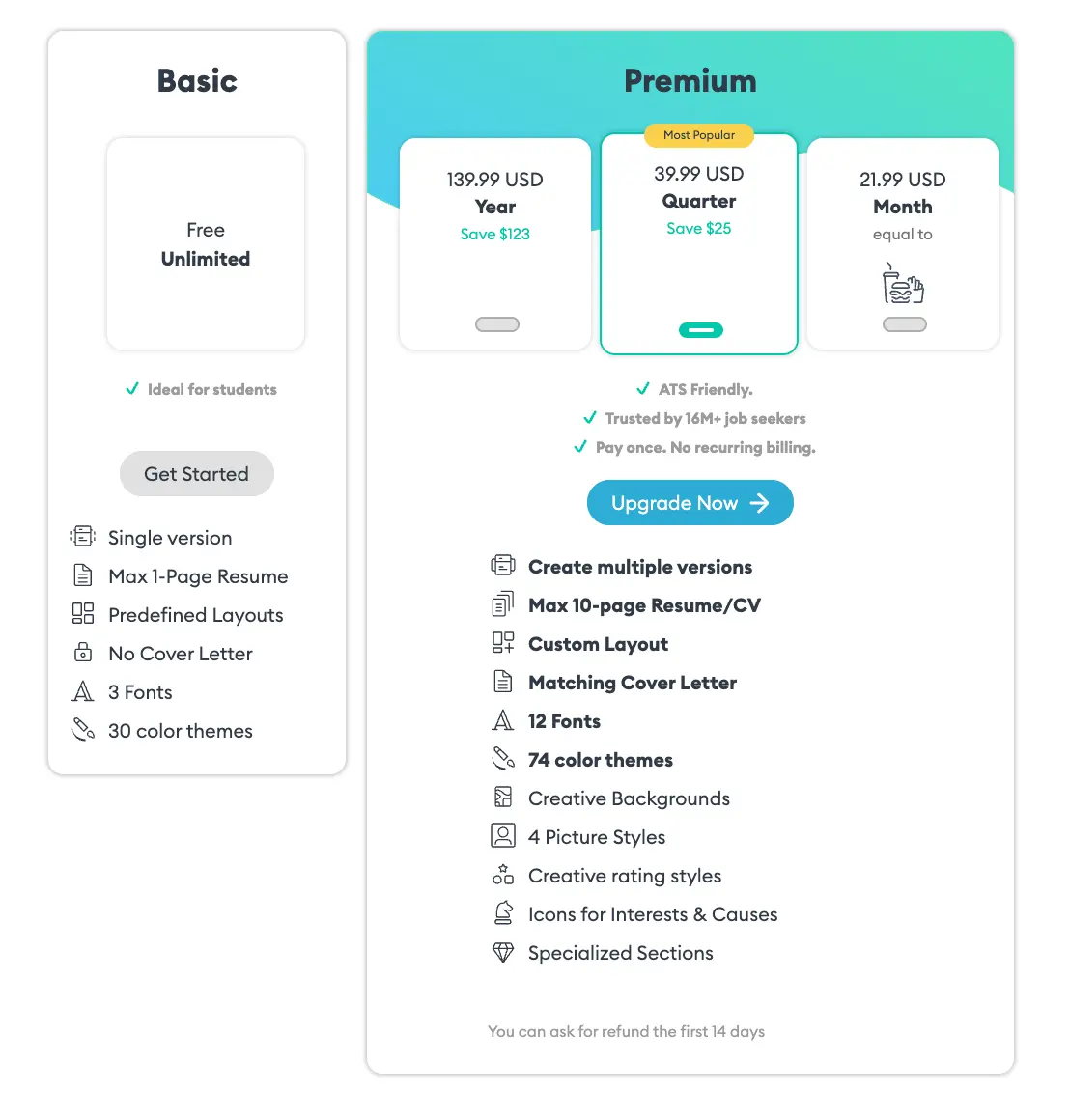
Pricing of Novorésumé
- Free Basic - single page, limited fonts and colors.
- Premium monthly/quarter/year prices (pricing page shows current offers); annual often presented as pay‑once non‑recurring for a period.
Key Features of Novorésumé
- Drag‑and‑drop editing with inline preview.
- Theme and color customizations, creative backgrounds and icons.
- Matching cover letters and limited page/resume versions for free accounts.
MyPerfectResume vs Rezi
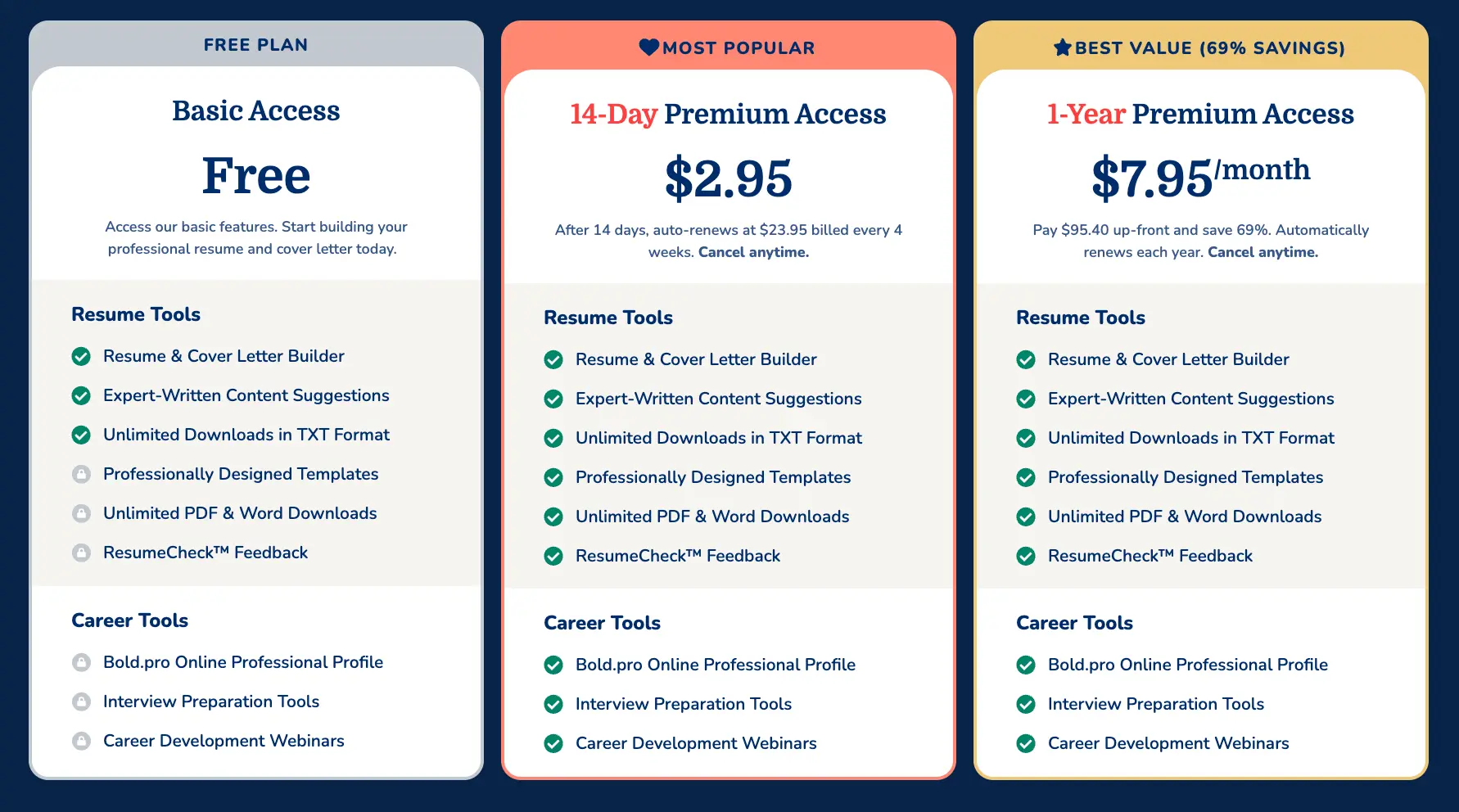
MyPerfectResume pitches a large template library (50+ templates and thousands of design combinations), guided prompts, resume check feedback, and an interview trainer. Their pricing commonly appears as a short low‑cost access period that auto‑renews into a higher periodic fee (the product site outlines the trial and recurring cost structure).
Pricing of MyPerfectResume
- Free - basic access and TXT downloads.
- 14‑Day Premium Access - low introductory fee (then auto‑renewing at a higher periodic rate); Annual Premium also offered.
Key Features of MyPerfectResume
- 50+ templates with many design variations and pre‑written content libraries.
- ResumeCheck feedback system and interview prep tools.
- Personalized resume URLs and customer support.
LiveCareer vs Rezi
LiveCareer is a long‑standing resume builder with a rich library of industry examples, cover letter tools, and career resources. The site advertises free TXT downloads but places most export and template features behind a paid plan; user discussions on forums highlight both ease of use and occasional billing complaints, so verify trial terms before subscribing.
Pricing of LiveCareer
- Free - TXT download and basic access.
- Paid subscription - access to premium templates and PDF/DOCX downloads (pricing details on the LiveCareer site).
Key Features of LiveCareer
- Professional templates and many example resumes across industries.
- Cover letter builder, editing tools, and career advice library.
ResumeGenius vs Rezi
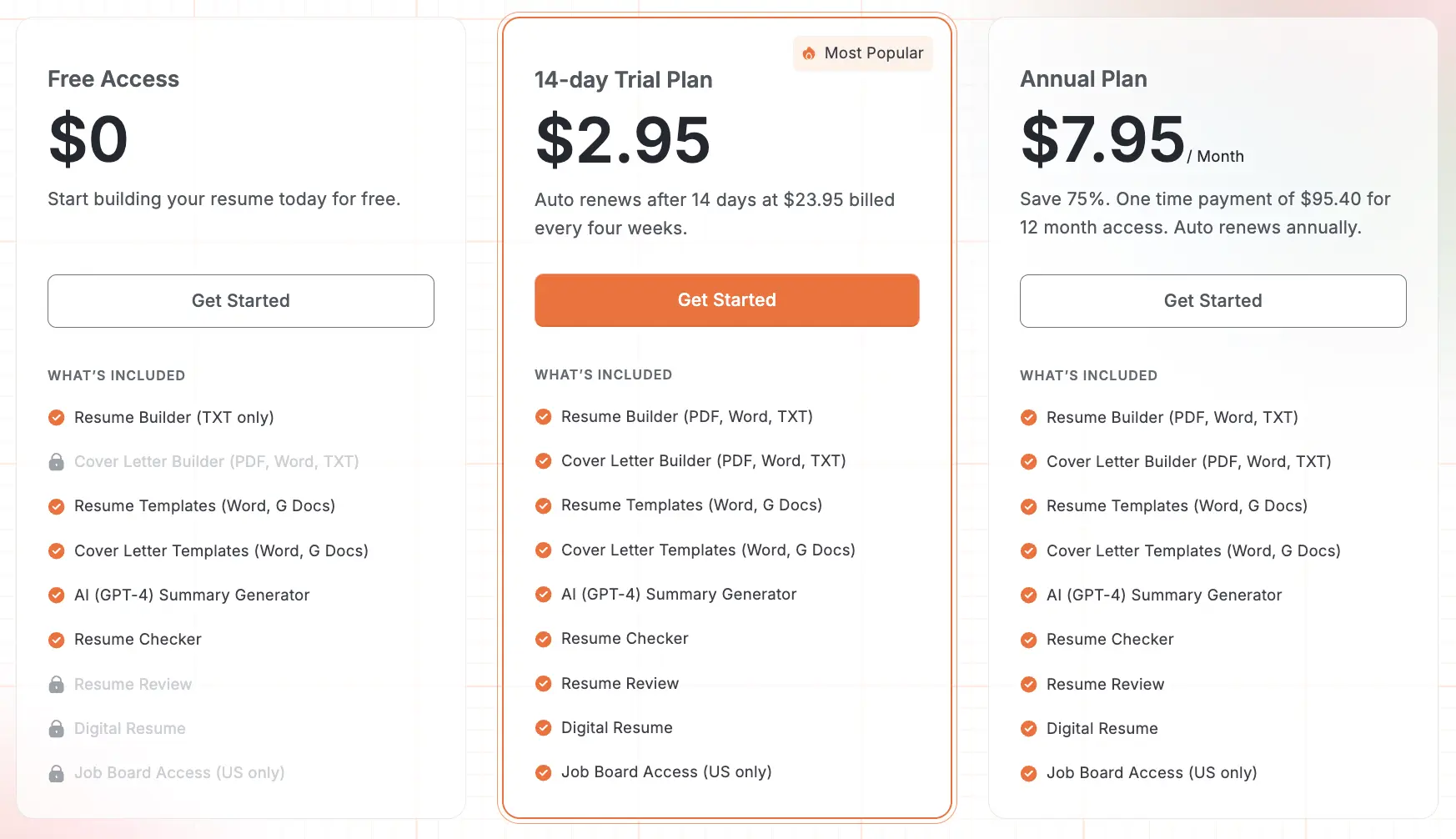
ResumeGenius focuses on speed and guided content: it offers a quick‑build method using pre‑written phrases and industry templates, plus an AI summary generator and resume checker. Pricing includes a free tier and short low‑cost trials that roll into subscription plans - the site lists a 14‑day trial and annual plans.
Pricing of ResumeGenius
- Free - limited downloads (TXT) and basic tools.
- 14‑day Trial - small fee then auto‑renews to a monthly subscription; annual option reduces per‑month cost.
Key Features of ResumeGenius
- Pre‑written bullet suggestions by role, AI summary generator (GPT‑4), and resume checker.
- Cover letter builder and templates for multiple formats.
Jobscan vs Rezi
Jobscan is a specialist optimization tool best used alongside a resume builder: it scans resumes against job descriptions and highlights keyword and skills gaps, then suggests edits. Jobscan’s pricing tiers range from limited free scans to premium monthly and quarterly plans with unlimited scans and extra job‑search tools - it’s a match for users who already have a base resume and want deep, actionable optimization.
Pricing of Jobscan
- Free - limited scans per month (small quota for casual users).
- Monthly - ~$49.95/month for unlimited scans and full toolset.
- Quarterly - discounted (~$29.99/month equivalent when billed every 3 months).
Key Features of Jobscan
- Keyword and job description matching, skills gap identification, and content recommendations.
- Job tracker, LinkedIn optimization, and ATS & recruiter findings in premium plans.
Teal vs Rezi
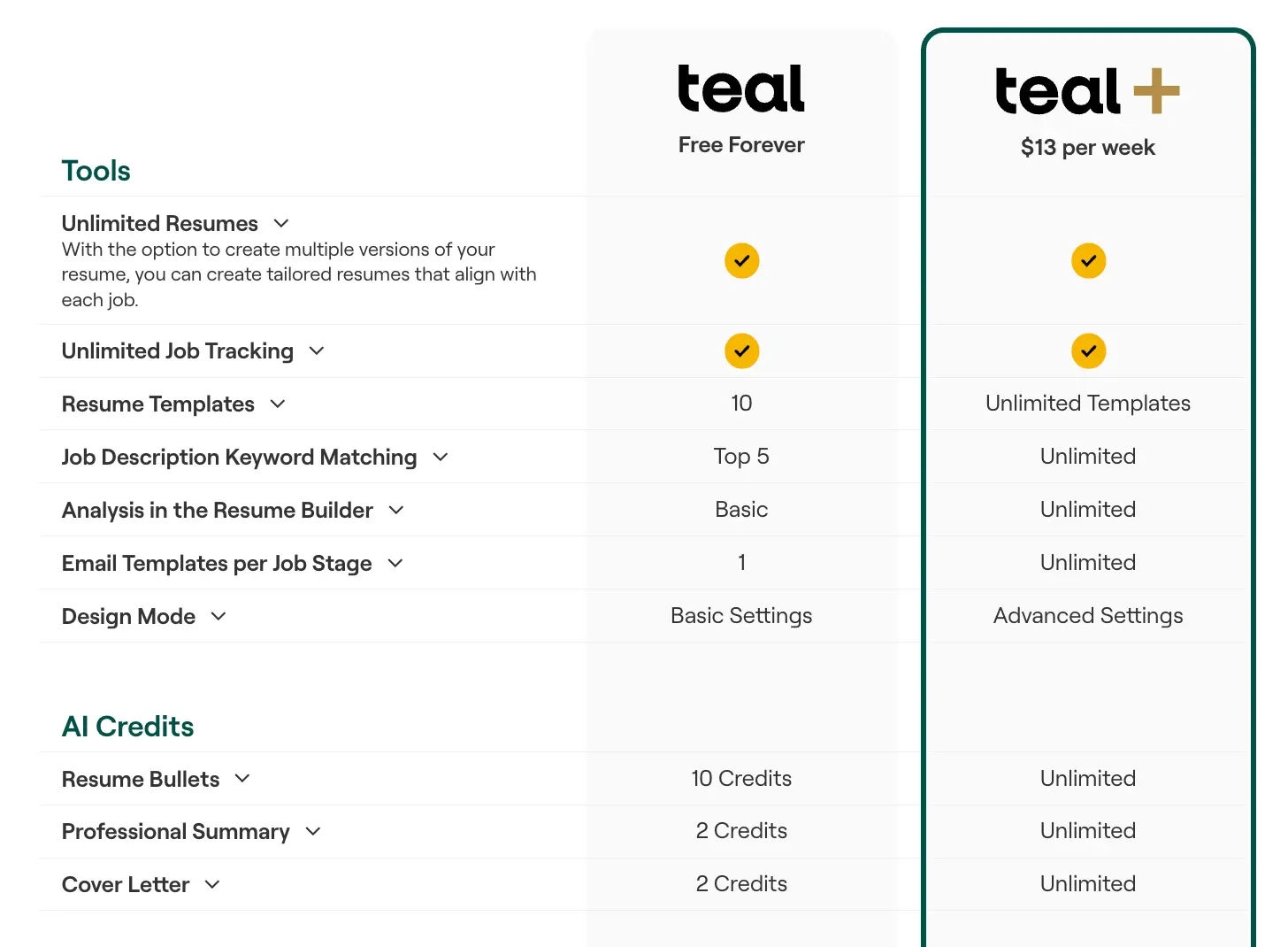
Teal aims to be an all‑in‑one job search platform combining resume building with application tracking, analytics, and browser extensions. Teal’s premium offering (Teal+) bundles unlimited templates, keyword matching, analysis mode, and resume versioning - it’s ideal for users who want to centralize applications, notes and analytics in one place.
Pricing of Teal
- Free tier - limited uses.
- Teal+ - weekly, monthly, and quarterly billing options (pricing shown on site; monthly plans typically around the $29/month mark depending on promotion).
Key Features of Teal
- Resume builder with AI assistance, job application tracker, Chrome extension for job saving, and career analytics.
- Resume version management and AI credits for tailored bullets/summaries.
Resumonk - The Ultimate Alternative to Rezi
Below we break down side‑by‑side how Resumonk stacks up against Rezi on templates, AI features, pricing and extras so you can decide which approach aligns with your job search strategy.
Resume Templates and Customization
Resumonk provides 21 modern templates (6 of them free) with export to PDF, and to DOCX on paid plans (with an exception for the seven photo templates); paid plans also open 18 fonts and any color to let users match personal branding or industry expectations.
Rezi’s template set tends to prioritize single‑column, recruiter‑friendly layouts designed to maximize content readability rather than heavy visual customization. For users who need both DOCX and a hosted, stylable resume, Resumonk’s combination of export flexibility and hosted URL analytics is a differentiator.
| Feature | Resumonk | Rezi |
|---|---|---|
| Number of templates | 21 templates (6 free, 15 on paid plans) | Fewer, highly optimized templates focused on clarity |
| File formats | PDF on every plan; DOCX on paid plans (not for photo templates) | PDF & DOCX exports (focus on plain, ATS‑friendly layout) |
| Font options | 18 fonts (paid plans) | Standard font set focused on legibility |
| Color customization | Any color (paid plans) | Restricted palettes, design conservatism |
| Design style | Modern/customizable | Professional/minimal optimized for recruiter scanning |
| Feature | Resumonk |
|---|---|
| Number of templates | 21 templates (6 free, 15 on paid plans) |
| File formats | PDF on every plan; DOCX on paid plans (not for photo templates) |
| Font options | 18 fonts (paid plans) |
| Color customization | Any color (paid plans) |
| Design style | Modern/customizable |
Summary: choose Resumonk if you want design control, hosted analytics and a 24/7 job search agent; choose Rezi when strict, content‑first, recruiter‑oriented templates and job‑matching are your priority.
AI Writing Features
Resumonk’s AI toolkit centers on editing and rewrite workflows: your whole resume is rewritten when you upload it or import your LinkedIn profile, "Improve with AI" improves a single entry or the whole resume in the editor, and "Rewrite for a job" makes a separate job version for a posting you paste.
Rezi concentrates on an AI bullet point generator, AI summary generator, keyword targeting and a Skills Explorer that recommends role‑relevant skills - its product messaging focuses on maximizing job‑match and resume score. If your workflow is to iterate and polish wording across multiple versions, Resumonk’s rewrite tools are practical, and they never invent employers, titles, metrics or skills; if you want heavy job‑description optimization and a bullet writer trained for job‑match signals, Rezi specializes there.
- Resumonk AI features: Full resume rewrite from an upload or your LinkedIn profile, Improve with AI for one entry or the whole resume, a job version of your resume for each job, and 1 free improve pass plus 1 free job rewrite on the free plan.
- Rezi AI features: AI bullet generation, keyword targeting from job descriptions, AI summary generator, Skills Explorer and real‑time content scoring.
Pricing and Value
Resumonk’s pricing is straightforward: a Free plan with 6 templates and a small Resumonk footer on its PDFs, and two monthly plans, Professional and Executive, with no trial and no annual lock-in (cancel anytime; the pricing page shows each price in your local currency).
Rezi’s public pricing shows a Free tier, a monthly Pro at $29/month and a one‑time lifetime option around $149 - Rezi markets unlimited AI access on paid tiers with a money‑back guarantee. Compare Resumonk’s free plan and monthly plans versus unlimited subscription access (Rezi) to match how often you’ll rely on AI.
| Plan Type | Resumonk | Rezi |
|---|---|---|
| Free Plan Features | 1 resume, 6 templates, PDF with a small Resumonk footer | Free account with limited downloads |
| Short-term | Professional or Executive, billed monthly (cancel anytime) | $29/month (Pro) |
| Mid/Long-term | The same monthly plans, with no annual lock-in | Various subscriptions or lifetime $149 one‑time purchase |
| Credit/Usage | AI included in both paid plans; the free plan has 1 improve pass and 1 job rewrite | Unlimited AI within subscription tiers |
| Plan Type | Resumonk |
|---|---|
| Free Plan Features | 1 resume, 6 templates, PDF with a small Resumonk footer |
| Short-term | Professional or Executive, billed monthly (cancel anytime) |
| Mid/Long-term | The same monthly plans, with no annual lock-in |
| Credit/Usage | AI included in both paid plans; the free plan has 1 improve pass and 1 job rewrite |
Additional Tools and Features
Resumonk’s paid plans add a 24/7 job search agent, your resume rewritten for each job, help preparing each application, warm introductions on Executive, a matching cover letter builder with consistent visual design, and unique URL hosting with analytics to track resume views.
Rezi offers a cover letter writer, resignation letter templates, an AI job search hub, and mock interview practice in its ecosystem. Rezi’s extras skew toward content and job‑search coaching, while Resumonk focuses on finding jobs that match you, a job version of your resume for each one, and people at your target companies you have a real connection to. This distinction matters: if you want to publish and track a single public resume, Resumonk’s hosting + analytics is valuable; if you want iterative optimization and interview practice bundled in, Rezi has that orientation.
- Resumonk extras (paid plans): 24/7 job search agent, job versions of your resume, warm introductions (Executive), matching cover letters, hosted URL & analytics, LinkedIn import and resume upload.
- Rezi extras: Cover letter generator, resignation letter writer, AI job search, mock interviews, document dashboard.
Choosing the Right Resume Builder for Your Needs
The right tool depends on your priorities: budget, design needs, how often you’ll tailor resumes, and whether you want integrated job‑search tracking or deep optimization. Below is a practical, short decision framework to help you pick quickly.
When to Choose Each Platform
Use this decision checklist to match features to typical job‑search behaviours and goals:
- Choose Resumonk when: You want a free start with no card, an AI rewrite that keeps to your real experience, a 24/7 job search agent with a job version of your resume for each application, visual customization (fonts/colors), and unique URL hosting with analytics.
- Choose template‑focused platforms (Kickresume, Zety, Novorésumé) when: Design variety, portfolio/website features, and visually distinctive resumes are top priorities.
- Choose content‑focused platforms (Rezi, Jobscan) when: Job‑specific optimization and keyword matching are critical to your success. These tools excel at tailoring content to roles.
- Choose comprehensive platforms (Teal, Resume.io) when: You want an all‑in‑one workflow: resume building, job tracking, interview prep and analytics in a single dashboard.
Key Factors to Consider
When comparing builders, weigh these essentials: pricing transparency and billing cadence; template count and export formats (PDF/DOCX); AI quality and whether it helps craft content or optimize for job descriptions; extras such as resume hosting, cloning, job tracking, and interview prep; and the editor experience (drag‑and‑drop vs structured forms). A quick decision matrix below maps user priorities to recommended platforms.
| User Priority | Best Matches |
|---|---|
| Budget‑conscious | Resumonk (free plan, no card needed), Resume.io (trial), ResumeGenius (trial options) |
| Design‑focused | Kickresume, Zety, Novorésumé |
| Optimization‑focused | Rezi, Jobscan |
| Comprehensive job management | Teal, Resume.io |
Making Your Final Decision
We recommend trying free plans or trials first to evaluate the editor and feature set - check how easy it is to export to the formats you need and whether the AI suggestions actually improve your wording.
Also consider long‑term value: if you’ll be applying to many roles, features like resume cloning, hosted links with analytics, or a job tracker can save hours across a search.
Finally, pick the tool that supports your immediate goal (apply now vs. build long‑term career brand) and fits comfortably within your budget and workflow.
Key Takeaways for Finding Your Rezi Alternative
There are many credible alternatives to Rezi - each with distinct strengths.
Resumonk focuses on the job search itself: an AI rewrite that keeps to your real experience, a 24/7 job search agent, a job version of your resume for each application, and document hosting with analytics; Kickresume and Zety emphasize design and personal brand/website creation; Resume.io and Teal deliver broader job‑search toolkits; while Rezi and Jobscan lead when your priority is job‑specific optimization and keyword matching. The best choice depends on whether your immediate need is design, deep optimization, multi‑application management, or a single, recruiter‑focused resume.
Before you commit, test free tiers and short trials to see how each editor feels in real use.
Look for the export formats you need, confirm the billing cadence and refund policy, and choose the platform that will make your job search faster, clearer, and more repeatable across multiple applications. If you want a balanced mix of design control, AI rewriting that keeps to your real experience, and a job search agent on the paid plans, we suggest trying Resumonk on its free plan as part of your evaluation, and then picking the tool that best aligns to the way you actually apply for jobs.
Keep reading
.png)