Resume Genius Alternatives - A Complete Guide

Finding the Right Resume Builder for Your Career
If you searched for a "resumegenius alternative," you’re not alone - many job seekers start with a popular builder like Resume Genius but then look around for tools that better match their budget, workflow, or feature needs.
Some people want upfront, transparent pricing; others prioritize fast LinkedIn import and flexible editing; still others want advanced AI rewriting features that can tailor single bullet points without forcing a full guided wizard. We’ve put together this hands-on guide so you can compare Resume Genius to the most relevant alternatives and choose the one that fits your stage, budget, and resume workflow.
In the sections below we cover: a succinct baseline of what Resume Genius offers, a curated list of strong alternatives (including how they price and where they differ), head‑to‑head comparisons (Resumonk first, then Zety, Resume.io, Kickresume, Novorésumé, MyPerfectResume and Rezi), a compact comparison table for quick scanning, and a practical checklist for choosing.
We evaluated official pricing pages, product pages and current user reviews on marketplaces and discussion forums to reflect up-to-date experience signals and real-world caveats. Where useful, we link directly to product pages and to review resources so you can verify details and test platforms during their trial windows.
How we made this list vs Resume Genius
We selected alternatives based on three practical criteria: (1) feature parity with Resume Genius (builders, coverage for cover letters, AI content helpers), (2) distinct differentiators (LinkedIn import, multiple resume management, hosting, or advanced AI edit controls), and (3) transparent pricing or trial options that let users try with low risk.
We prioritized official product pages for accurate pricing and product claims and paired those with recent reviews and community feedback (review sites and discussion forums) to surface common user experience themes like billing clarity, import reliability, and AI usefulness. Our angle is practical - we write resumes for working professionals - so we weigh speed, content quality and long-term value for job seekers in the US/UK/CA/AU markets.
What Resume Genius Offers
Core Features and Capabilities
Resume Genius uses a guided, step-by-step builder: you answer prompts and the tool assembles sections, suggests job‑specific phrases and offers a cover letter builder.
The product also includes an AI summary generator and resume checking tools that aim to speed the content creation process for job seekers who prefer a structured workflow.
This approach works well for people who want a low-friction path from empty page to downloadable document without having to make many design choices up front. For the vendor’s current feature list and pricing overview, see Resume Genius’s official pricing and product page.
Key features commonly highlighted on Resume Genius include:
- Step-by-step resume builder with pre-written suggestions for many job titles (pre-filled phrasing)
- AI summary generation (GPT‑4 powered summaries reported on the product page)
- Matching cover letter builder that follows the resume design
- Multiple download formats (PDF, Word, TXT) available to paying users
- Resume checking and review services integrated into the product
Pricing Structure
Resume Genius’s pricing model centers on a low-cost trial followed by recurring access.
The official pricing page lists a 14‑day trial for a small fee that automatically renews into a recurring monthly access if not cancelled, and an annual plan option billed up front.
That trial + auto‑renew approach is commonly flagged in user discussions, so it’s important to track renewal timing if you choose the trial. For details on current trial and annual prices, review Resume Genius’s pricing page.
User Experience Highlights
Users who like Resume Genius most often point to the guided onboarding and pre-written job phrases that reduce writer’s block.
The sequential wizard is especially helpful for first-time résumé authors because it surfaces typical bullet phrasing and organizes content entry into manageable steps.
At the same time, the step-by-step flow can feel restrictive to people who prefer to edit a finished layout directly (for example, toggling fonts or color palettes on the fly). Community feedback threads also underscore the importance of watching automatic billing settings during free/trial periods.
Best Resume Genius Alternatives
Below we list leading alternatives, starting with our own product first. For each, we give a concise introduction, clear pricing bullets, key features, and practical pros & cons compared directly to Resume Genius.
Resumonk vs Resume Genius
Resumonk is positioned as a job-search assistant: it rewrites the resume or LinkedIn profile you already have into a polished resume, and on a paid plan its 24/7 job search agent finds jobs that match.
Where Resume Genius uses a sequential wizard, Resumonk emphasizes a flexible editor, LinkedIn import, multiple-resume management and AI rewrites that keep to your real experience, including a version of your resume for each job.
Resumonk’s approach is useful for people who want to maintain several versions of a resume (duplicate one, or have it rewritten for each job) and for those who want to start free, without a card. Official plan details show a free tier plus two monthly plans, Professional and Executive, and the pricing page lists what each includes, with prices in your local currency.
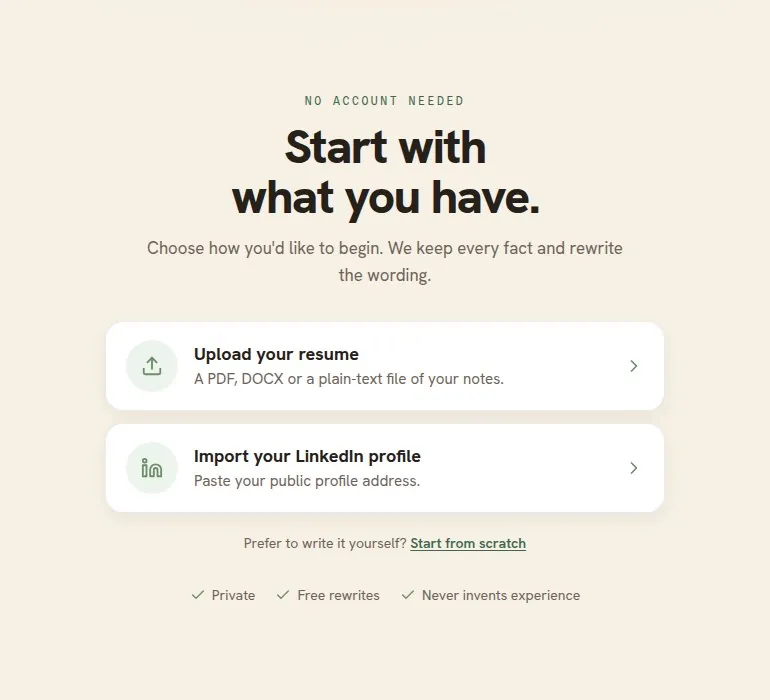
Pricing of Resumonk
- Free: 1 resume and 6 templates, a free PDF download with a small Resumonk footer, one AI improve pass and one rewrite for a job; LinkedIn import and resume upload included
- Professional: unlimited resumes, cover letters and all 21 templates; clean PDF and DOCX downloads with no Resumonk footer; improve any part of your resume with AI; 2 always-on job searches (the 24/7 job search agent); rewrite your resume for each job; help preparing each application; view analytics for your public resume page
- Executive: everything in Professional, plus 5 always-on job searches and 10 warm introductions a month (people at your target companies you have a real connection to), each with a drafted first message
- Both paid plans are monthly, and the pricing page shows their prices in your local currency
Key Features of Resumonk
- Import LinkedIn profile and upload existing resumes (PDF/DOCX)
- AI rewrites, from a single entry to the full resume, that keep to your real experience
- 21 templates, 7 of them with a place for a photo
- PDF & DOCX export, unlimited color palette and extra fonts
- Resume hosting with custom URL and analytics for public resumes
- Your resume rewritten for each job (each job version sits under the original), plus a 24/7 job search agent on paid plans
Pros and Cons of Resumonk vs Resume Genius
- Pros: A free plan you can start without a card; flexible editor, with a rewrite of your resume for each job; LinkedIn import and resume hosting/analytics for sharing; a 24/7 job search agent on paid plans.
- Cons: Smaller template library (21) than some competitors; English-only interface; DOCX, cover letters and the job tools need a paid plan.
Zety vs Resume Genius
Zety is a long‑standing resume builder that balances guided creation with a strong library of pre-written content and career resources.
You can start building for free, and official pricing shows a short paid access period (trial) followed by automatic renewal to a monthly plan, or an annual plan billed up front for a lower effective monthly cost.
Zety’s strength is its large library of industry‑tailored suggestions, plus a visible set of career guides and resume-checking tools on the site. See Zety’s pricing and trial details on their site for up-to-date options.
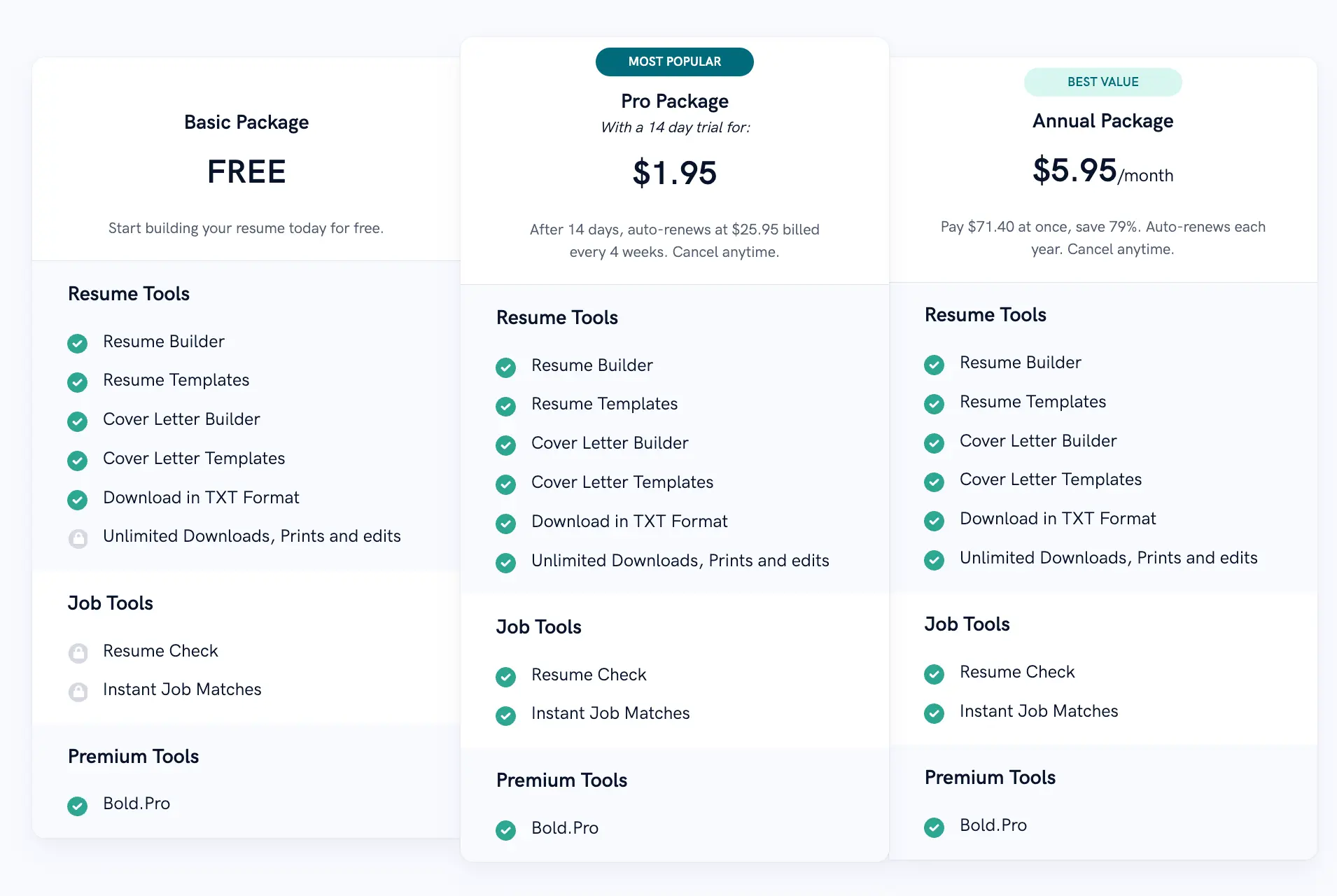
Pricing of Zety
- Free - build & create, TXT downloads free
- 14‑day paid access/trial - nominal fee (regional pricing; often shown as $1.95–£2.95) then auto‑renews to monthly
- Annual - billed up front (example: $71.40/year, equivalent to about $5.95/month)
Key Features of Zety
- Large library of pre‑written bullet points and templates
- Cover letter builder that pairs with your resume
- Resume checking and scoring tools
- Extensive career advice and guides
- Unlimited edits during paid access period
Pros and Cons of Zety vs Resume Genius
- Pros: Strong content library and career resources; affordable annual pricing if you commit for a year.
- Cons: Trial auto‑renews to a subscription unless cancelled; some users report aggressive billing flows in forum discussions (so track cancellations if you only want short access).
Resume.io vs Resume Genius
Resume.io mixes a guided builder with an AI assistant and built‑in reviewer tools.
The platform offers a short trial period (7 days) and monthly/semester/year billing options.
Resume.io is convenient for users who want a combination of template quality, quick LinkedIn import and extra career tools like interview prep.
Community discussion includes both positive usage notes and occasional billing complaints, so we recommend testing the trial and checking recent reviews before purchasing. Official pricing and trial terms are listed on Resume.io’s site.

Pricing of Resume.io
- Free - limited single resume and TXT download
- 7‑day trial - small fee (then auto‑renews to monthly billing if not cancelled)
- 6‑month or 1‑year one‑time payments available (non‑recurring options) - often better value per month
Key Features of Resume.io
- AI assistant and resume review features
- Multiple templates and direct LinkedIn import
- Job tracker and interview prep resources
- Unlimited downloads during paid access
Pros and Cons of Resume.io vs Resume Genius
- Pros: Flexible billing (including non‑recurring semester/year options) and richer career toolset for ongoing search management.
- Cons: Trial auto‑renews to monthly unless cancelled; some users report billing friction in community forums.
Kickresume vs Resume Genius
Kickresume blends design-forward templates with an AI writing toolbox and additional career tools such as a personal website builder and interview prep aids.
Kickresume’s pricing varies by billing cadence (monthly, half‑yearly, yearly) and the site lists tiered savings for longer commitments.
It’s a compelling pick for users who want creative templates and extra tools beyond resume + cover letter. For current plan structures and features, check Kickresume’s pricing page.
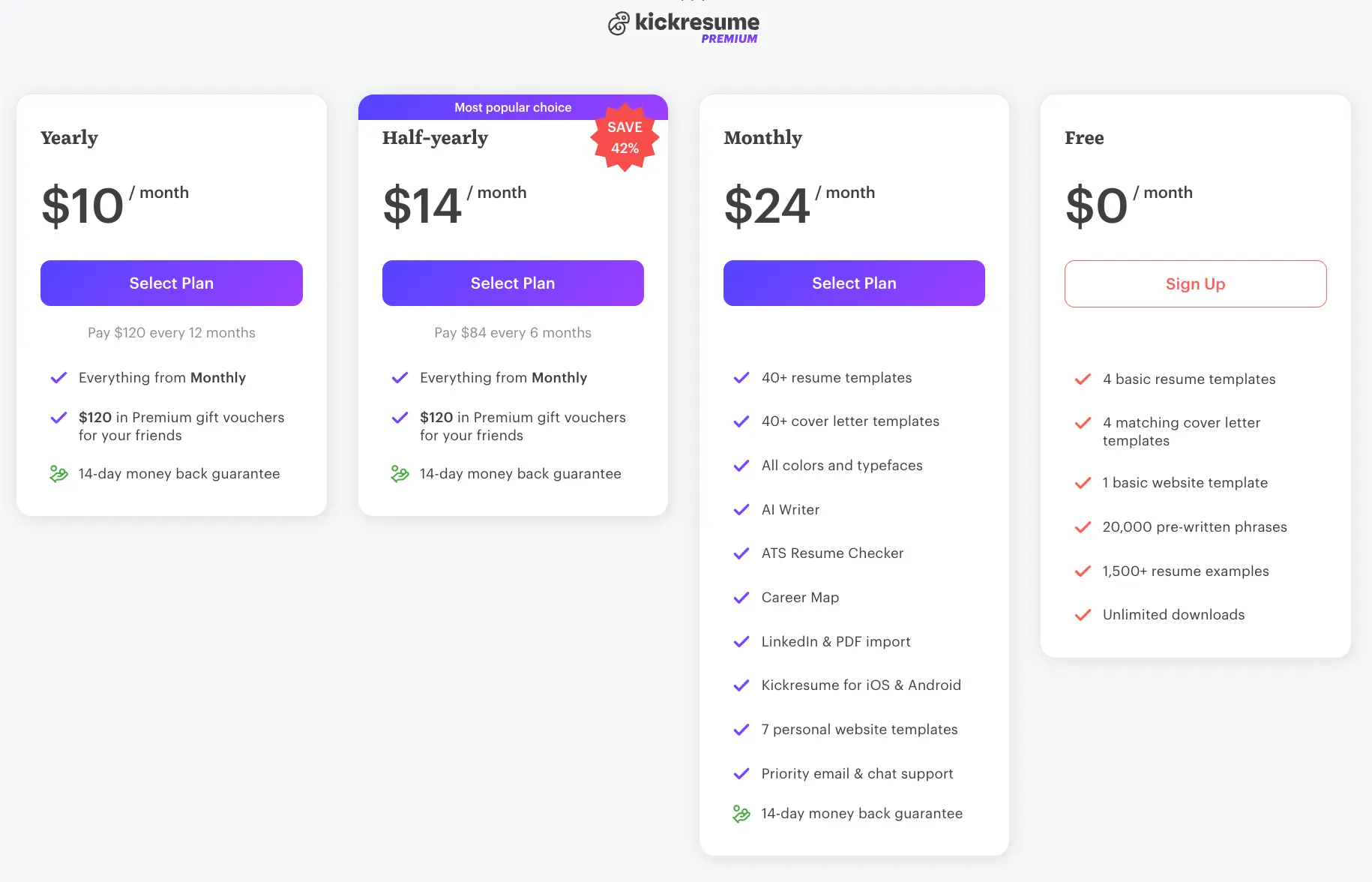
Pricing of Kickresume
- Free - limited templates and basic features
- Monthly - around $24/month (regionally variable)
- Half‑yearly/Quarterly/Annual options - discounted effective monthly cost (examples shown on site include €14/month for half‑yearly or $84 every 6 months depending on region)
Key Features of Kickresume
- AI Writer for resumes and cover letters
- LinkedIn import and resume/PDF import
- Personal website/portfolio builder
- Large template set and customization options
- Human proofreading service add‑ons
Pros and Cons of Kickresume vs Resume Genius
- Pros: Strong design/portfolio features and a robust AI toolbox; good for creative professionals who want a personal site alongside their resume.
- Cons: Advanced features behind paywall; free tier is limited so most users need a paid plan for production downloads.
Novorésumé vs Resume Genius
Novorésumé offers a drag-and-drop editing experience, a "My Content" master library for reusing accomplishments, and a transparent non‑recurring premium purchase model (you buy a time-limited premium period rather than an auto‑renew subscription in many regions).
Novorésumé is particularly attractive for users who want design control and a reusable content store for multiple resume versions. Official pages emphasize a free one‑page option and paid premium periods for multi‑page and multi‑version needs.
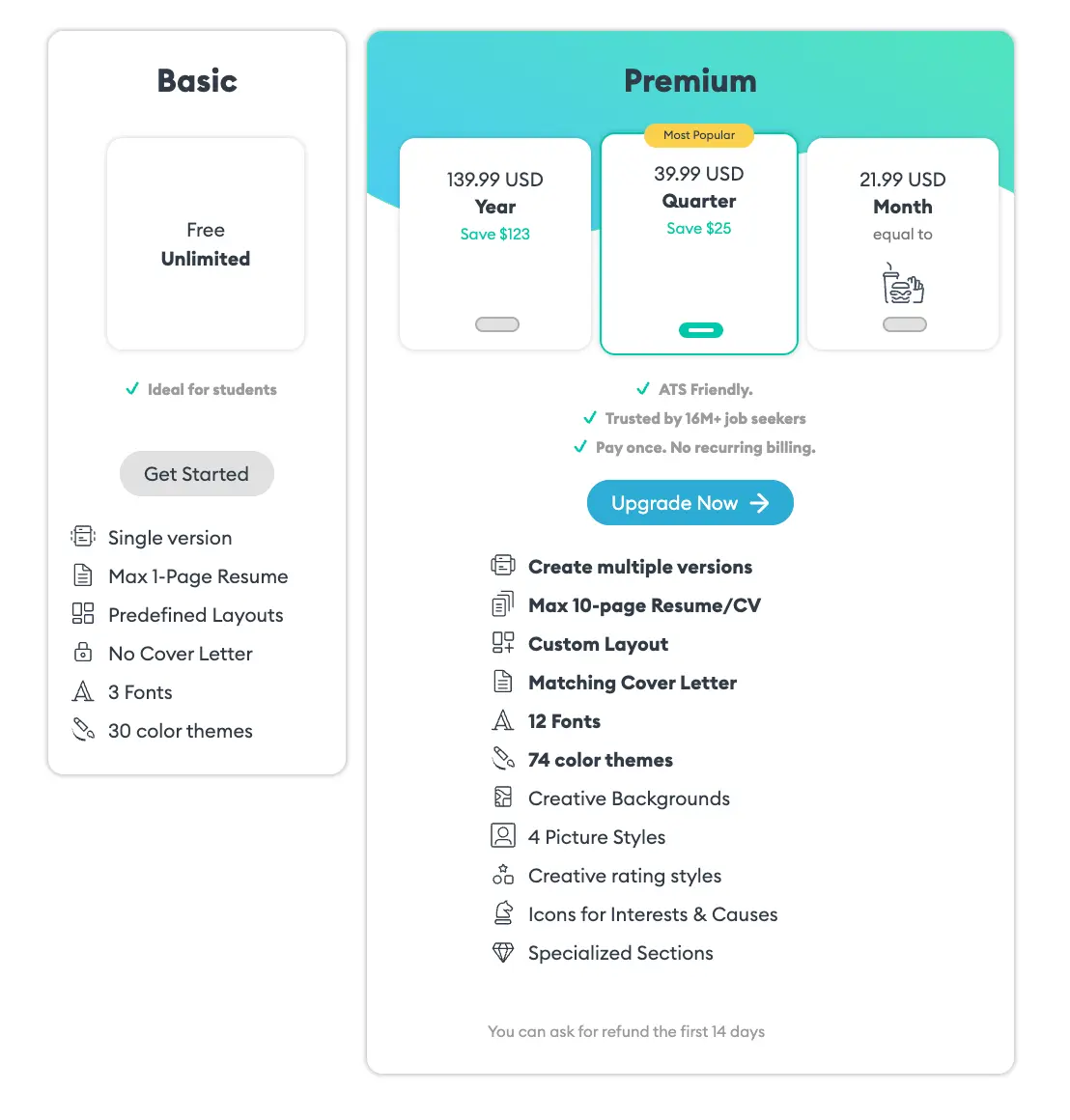
Pricing of Novorésumé
- Free - one‑page resume, limited fonts and colors
- Monthly - approx. $19.99/mo
- Quarterly - approx. $39.99/quarter
- Yearly - approx. $99.99/year (often sold as a one‑time, non‑recurring premium purchase)
Key Features of Novorésumé
- Drag-and-drop editor with immediate template selection
- "My Content" master resume for reusable achievements
- AI chat assistant (beta/varies by rollout)
- Free one‑page resume with premium upgrades for multi‑page and advanced features
Pros and Cons of Novorésumé vs Resume Genius
- Pros: Excellent for reusable content management and direct template editing; clear non‑recurring premium purchase options in many markets.
- Cons: Free plan is intentionally limited to one page; some premium features require the paid period to download.
MyPerfectResume vs Resume Genius
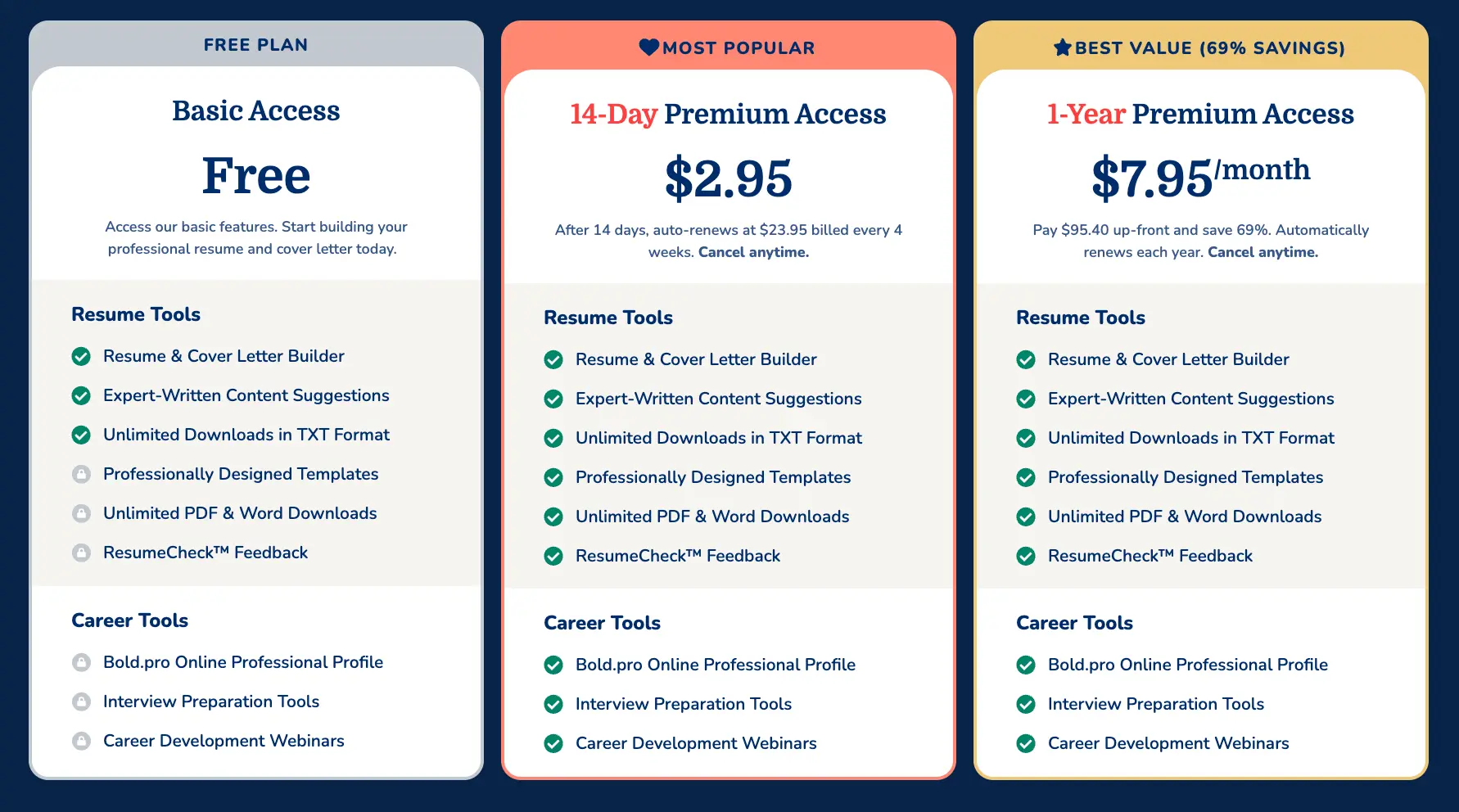
MyPerfectResume offers a very similar guided, step‑by‑step building experience to Resume Genius along with pre‑written content suggestions and review tools.
Their published pricing shows a short paid access option that auto‑renews into a monthly subscription if not cancelled and a full-year upfront option. Users who want guided hand-holding often prefer this model, though the billing flows are something to watch during trials.
Pricing of MyPerfectResume
- Free - basic builder access (limited downloads)
- 14‑Day Premium Access - nominal fee (then auto‑renews to monthly if not cancelled)
- 1‑Year Premium Access - billed up front (example figures shown on the official site)
Key Features of MyPerfectResume
- Guided resume builder with expert-written suggestions
- Cover letter builder and resume check tools
- Unlimited TXT downloads in free tier, premium unlocks PDF/Word
- Career resources and interview prep tools
Pros and Cons of MyPerfectResume vs Resume Genius
- Pros: Very beginner-friendly with structured guidance and similar pricing models; helpful content suggestions.
- Cons: Pricing and trial auto‑renewal mechanics mirror Resume Genius - if you want only one download and no recurring billing, check cancellation timing carefully.
Rezi vs Resume Genius
Rezi is the most AI-forward option on the list, offering advanced sentence completion, targeted text generation and a keyword-focused set of tools.
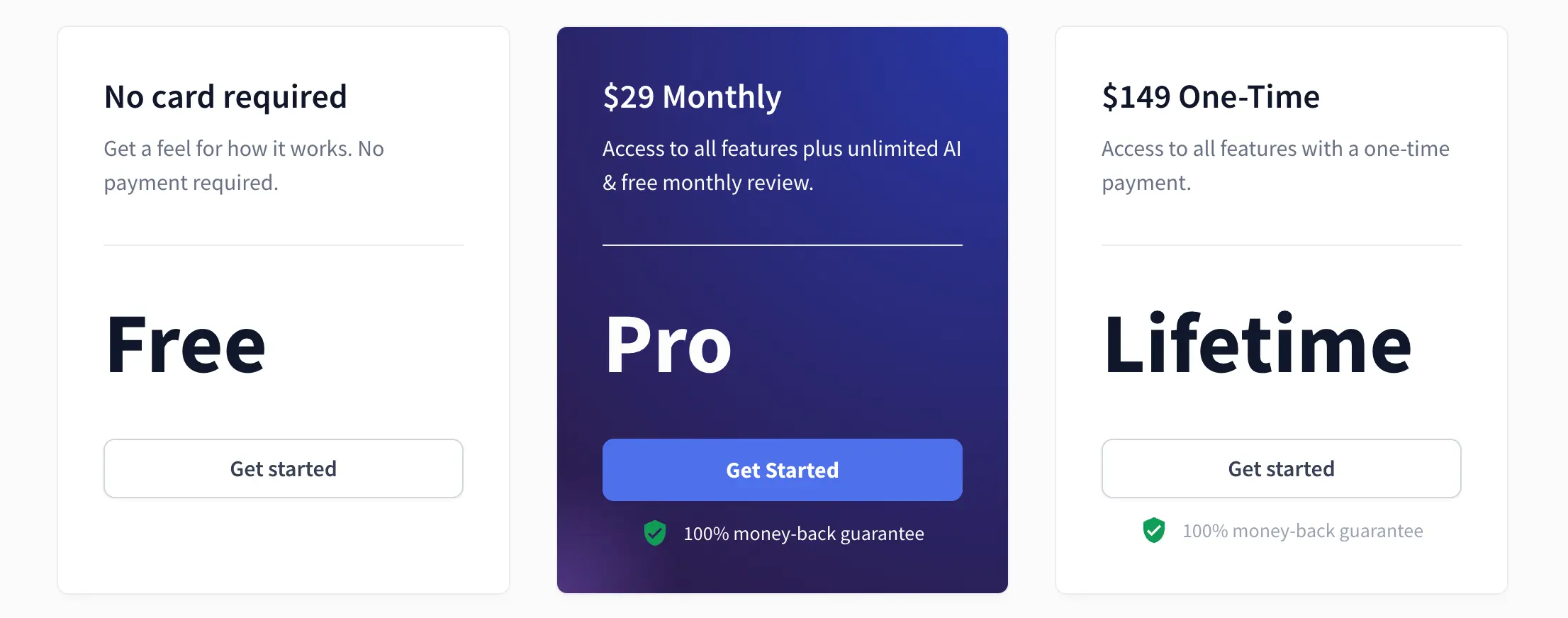
Rezi provides a free tier plus Pro monthly pricing and a one-time lifetime purchase in some periods; the vendor emphasizes extensive AI capabilities for people looking to deeply customize wording and target job descriptions. For users who are comfortable experimenting with AI prompts and want powerful inline generation, Rezi is a fine choice - just compare subscription vs lifetime trade-offs on their pricing page.
Pricing of Rezi
- Free - limited access (1 resume, limited PDF downloads)
- Pro - approx. $29/month (unlimited resumes and AI features)
- Lifetime - one‑time payment (varies; offers commonly shown on the official pricing page)
Key Features of Rezi
- Advanced AI resume writer and in‑line generation
- Keyword targeting and content analysis tools
- Resume review options and recurring AI-powered suggestions
- PDF and DOCX exports, Google Drive integration
Pros and Cons of Rezi vs Resume Genius
- Pros: Most powerful AI toolkit for sentence-level generation and keyword targeting; lifetime purchase option can be attractive for heavy users.
- Cons: More features means a steeper learning curve for users who prefer simple guided wizards; templates are more utilitarian than design-forward competitors.
Resumonk Compared to Resume Genius
Resume Building Experience
Resume Genius uses a guided, sequential builder: you answer prompts in order and the system composes each section.
This is excellent for people who prefer structure and examples.
Resumonk takes a different route: you import a LinkedIn profile or upload an existing resume, Resumonk rewrites it into a polished first draft, and you then edit any line directly in a flexible editor.
The import/upload-first workflow speeds getting started for people who already have content and want to iterate quickly rather than re-entering everything through a wizard.
Resumonk’s Duplicate button and its rewrite for each job also help applicants create a version for each role faster. For Resumonk’s import and editor capabilities see their product page.
On a practical level, that means:
- Resume Genius is often faster for brand-new resume creators who need guided prompts.
- Resumonk is faster for people who already have a LinkedIn profile or an existing file to adapt: it rewrites what you bring, then you polish it in the editor.
AI Features and Content Help
Resume Genius lists an AI summary generator among its features.
Resumonk’s model focuses on flexible AI edits across any entry: "Improve with AI" works on a single entry or the full resume, and "Rewrite for a job" writes a separate version of your resume for one posting.
The Resumonk approach makes AI changes explicit: it rewrites your wording but never invents employers, titles, metrics or skills, and it shows you what changed, with an Undo. The free plan includes one improve pass and one rewrite for a job, and the paid plans include both.
Template Selection and Customization
Resume Genius publishes a set of professionally designed templates (a catalog of templates for its paid offering).
Resumonk provides 21 templates (7 with a place for a photo), 18 fonts and any color you like on paid plans, plus reorderable sections and, on paid plans, matching cover letters: the emphasis is on granular control for layout and styling. If you need tight design control (fonts/colors/section order) Resumonk offers more customisation out of the box; if you prefer ready-made templates with a minimal selection process, Resume Genius’s guided template picking works well.
- Resumonk customization features: PDF & DOCX export, photo templates, 18 custom fonts, unlimited colors, section reordering, matching cover letters, resume hosting & analytics.
Pricing Transparency and Value
Resume Genius popularized a trial-then-subscribe flow where a small trial fee converts into a recurring billing cadence unless cancelled.
Resumonk takes a free-first approach: a free plan that needs no card, then two monthly plans, Professional and Executive, that you can cancel anytime, with prices shown in your local currency on the pricing page.
For users who update resumes periodically (say, every job change or promotion), Resumonk’s free plan has no time limit, and its paid plans are monthly, so you can cancel anytime once a search is over. See both vendors’ pricing pages for the current numbers and trial rules.
Unique Features
Resumonk’s standouts include resume hosting at an address you choose, with view analytics (paid plans), LinkedIn import, a 24/7 job search agent on paid plans, and warm introductions on Executive (people at your target companies you have a real connection to). Resume Genius highlights job board access and an extensive career advice blog as complementary resources - both valuable, it just depends which product fit you want (sharing & analytics vs guided career content).
Feature Comparison Table
Below is a concise, at-a-glance comparison so you can scan major differentiators quickly.
| Platform | AI Features | Template Count (approx.) | Key Differentiator(s) | Starting Price (example) |
|---|---|---|---|---|
| Resume Genius | AI summary generator | 25+ | Guided wizard, pre-written job phrases, career resources | Trial then $23.95/4 weeks or $95.40/yr. |
| Resumonk | AI rewrites of any entry or the whole resume, plus a version for each job | 21 | LinkedIn import, resume hosting, 24/7 job search agent | Free; Professional and Executive are monthly, priced in your local currency on the pricing page. |
| Zety | AI summaries, pre-written bullets | 20+ | Large content library + career guides | 14‑day trial nominal fee; annual $71.40/yr typical. |
| Resume.io | AI assistant & review | 30–50+ | Job tracker & longer billing options (6mo/1yr) | 7‑day trial then ~$24.95/mo; semester/year plans available. |
| Kickresume | AI writer & proofreading add‑on | 40+ | Website builder + design focus | Free; tiers from monthly to half‑yearly/annual (examples on site). |
| Novorésumé | AI chat (beta) & content optimizer | 16–20+ | Master content library & drag/drop editing | Free one‑page; premium $19.99/mo or $99.99/yr (varies by region). |
| MyPerfectResume | Pre-written bullets & suggestions | 30+ | Guided builder similar to Resume Genius | 14‑day access nominal fee; $95.40/yr example. |
| Rezi | Advanced AI writer & keyword targeting | Minimal / utilitarian templates | Deep AI controls; lifetime purchase option | Free; Pro ~$29/mo; Lifetime one‑time (example $149). |
| Resume Genius | |
|---|---|
| AI Features | AI summary generator |
| Template Count | 25+ |
| Key Differentiator(s) | Guided wizard, pre-written job phrases, career resources |
| Starting Price | Trial then $23.95/4 weeks or $95.40/yr. |
Factors to Consider When Choosing a Resume Builder
Your Resume Writing Experience Level
Beginners typically benefit from step‑by‑step builders (Resume Genius, Zety, MyPerfectResume) because those platforms do a lot of the structural thinking for you and offer plentiful pre‑written phrases.
More experienced users, or people who already have a LinkedIn profile or Word/PDF resume to adapt, will likely prefer flexible editors (Resumonk, Novorésumé, Rezi) that let you import, edit and style quickly. Consider whether you want guided prompts or direct visual editing when you pick a tool.
Beginner-friendly features to look for: pre-written content, step-by-step guidance, on-page spelling/grammar hints, and real examples by industry.
Budget and Pricing Preferences
Pricing models fall into a few practical buckets: short paid trials that auto‑renew to a subscription (Resume Genius, Zety, Resume.io models), upfront paid periods that may or may not auto‑renew, and one‑time lifetime purchases (occasionally offered by AI-first vendors).
If you only need a one-time download, short trials can be affordable - but watch auto-renewal timing closely.
If you plan on managing many resumes over time, an annual or lifetime purchase may provide better long-term value. We recommend calculating likely annual spend for your use-case (occasional updates vs continual tailoring) before deciding.
Required Features and Capabilities
- AI assistance level (per-entry edits vs full-document generation)
- LinkedIn import and resume upload
- Multiple format support (PDF/DOCX)
- Cover letter builder and matching designs
- Multiple resume version management and hosting/analytics
Tech professionals who want tight control over language may prioritize advanced AI (Rezi, Resumonk per-entry AI). Career changers who need different resumes for different roles should prioritize multi‑resume management and duplicating resumes (Resumonk, Novorésumé).
Pricing Comparison Breakdown
Monthly Subscription Costs
Below is a quick reference of typical monthly-equivalent starting points (note: many vendors bill every four weeks or use regional pricing; always verify before purchasing):
| Platform | Typical Monthly (example) |
|---|---|
| Resume Genius | Trial then ~$23.95 every 4 weeks (check site). |
| Resumonk | Free plan, then monthly Professional and Executive plans; the pricing page shows each price in your local currency. |
| Zety | Annual: ~$5.95/mo equivalent; short paid trial then monthly renewal otherwise. |
| Resume.io | Trial then $24.95/mo (or 6mo/1yr non-recurring plans). |
| Kickresume | Examples: $24/mo monthly, discounted half‑yearly rates visible on site. |
| Novorésumé | $19.99/mo (monthly) or one‑time annual purchase approx. $99.99. |
| MyPerfectResume | Trial then monthly equivalent options; official pages show 14‑day trial flows and annual examples. |
| Rezi | Pro $29/mo; Lifetime one‑time purchase often offered. |
Annual Plan Value
Annual plans and one‑time purchases often reduce effective monthly cost substantially.
For example, Zety’s annual plan is a low monthly equivalent when paid up front, and Novorésumé often sells premium access as a non‑recurring purchase.
Resumonk’s paid plans are monthly rather than annual, and you can cancel anytime. Always confirm whether a purchase auto‑renews or is a one‑time access purchase on the vendor’s checkout page.
Trial Periods and Free Access
- Resume Genius - 14‑day paid access/trial (auto‑renews if not cancelled).
- Zety - 14‑day trial / paid access, then auto‑renew to monthly unless cancelled.
- Resume.io - 7‑day trial with auto‑renew to monthly.
- Novorésumé - functional free one‑page plan; premium available as time-limited purchase.
- Kickresume - free tier with premium features behind paywall; trial behavior shown on pricing page.
- MyPerfectResume - 14‑day paid access/trial flows available.
- Rezi - free tier with limited downloads; Pro trial behavior on site.
Hidden Costs and Transparency
Several community threads and consumer reports highlight recurring concerns about trial auto-renewals and refunds - not necessarily widespread product defects, but billing friction that matters to users who choose short trials.
We recommend (1) checking the vendor’s trial/cancellation terms before you enter payment details, (2) using a calendar reminder to cancel if you only want the trial, and (3) preferring vendors with clear upfront pricing if you dislike surprise renewals. Sites we referenced have current billing policies on their help/pricing pages.
Making Your Final Decision
Testing Before Committing
We recommend trying 2–3 platforms that match your needs (one budget-friendly, one AI-focused, one flexible editor) and using the trial or free tier to build one focused resume.
Checklist for testing: ease of use, template appeal, import reliability, how the AI edits read in your voice, and billing clarity. If you use a paid trial, set a calendar reminder to cancel before auto‑renewal if you don't want ongoing billing.
Evaluating Your Resume Results
When comparing outputs, judge on professional look, clear structure, strong achievement-focused bullets, and format consistency across PDF and DOCX exports. Ask a trusted mentor or peer to compare two resumes made on different builders - real-world feedback on clarity and impact will beat automated checkers every time.
Long-Term Value Consideration
Think beyond the immediate job hunt: will you need multiple versions over the year?
Do you want a hosted URL or analytics to track views?
If so, features like multi-resume management, hosting with a public URL and view analytics (Resumonk) or lifetime access (Rezi during special promotions) may deliver more long-term value. Balance the cost of a subscription against how many times you’ll realistically edit or tailor your resume.
Key Takeaways
Resume Genius is a solid, beginner-friendly option with a structured wizard and pre-written content, but alternatives offer trade-offs that matter depending on your priorities: Resumonk for a free start without a card, LinkedIn import, AI rewrites that keep to your real experience and a 24/7 job search agent; Zety for an affordable annual plan; Resume.io for a broad toolset and flexible billing; Kickresume for design and career tools; Novorésumé for drag‑and‑drop editing and master content; and Rezi for advanced AI generation or a lifetime purchase option. We encourage testing during the trial windows (or using free tiers) to confirm which platform’s output and workflow best match your voice and application goals.
Main decision factors: budget, desired AI assistance level, LinkedIn import need, preference for a guided wizard vs flexible editing, requirement for extra career tools, design customization needs, and pricing transparency.
Final recommendation: match your choice to your career stage and how often you’ll tailor your resume.
If you only need a single update, short paid trials or single‑period purchases are cost‑efficient; if you plan frequent tailoring and deep AI help, consider platforms with richer AI tooling or lifetime options. Try two platforms in quick succession and compare the outputs - the better fit will usually be obvious after you create the same resume twice.
Keep reading
.png)