Resume Formats Guide - How to Format a Resume
The three main types of resume formats are reverse chronological, functional and hybrid, which is also called a combination resume. Reverse chronological lists your newest job first and suits most people, while functional and hybrid resumes put your skills higher up.
Below is how each format is laid out, who it suits, and how to format the page itself.
In short
- A reverse chronological resume lists jobs from the newest to the oldest and is the format most employers expect.
- A functional resume groups your skills under headings and keeps the work history to a short list of jobs and dates.
- A hybrid resume opens with a skills summary and then gives a full reverse chronological work history.
- A well formatted resume uses one plain font at 10 to 12 points and margins of about one inch.
- Most resumes run in this order: contact details, summary, experience, education, then skills.
What are the three types of resume formats?
The different types of resume formats differ in what comes first: your jobs, your skills, or a mix of both.
- Reverse chronological: work history first, newest job at the top. Best for a steady career in one field.
- Functional, or skills-based: skills first, grouped by type, with jobs listed briefly near the end. Used by some career changers and people with long gaps.
- Hybrid, or combination: a summary of skills and results at the top, then a full work history. Good for experienced people and career changers.
Other names you may see, such as "traditional", "chronological" or "skills-based", are the same three formats under other labels.
What is a reverse chronological resume?
A reverse chronological resume lists your most recent job first, then each earlier job in turn. Your education and skills follow the work history.
This is the most common resume format, and it suits almost anyone. The layout is tidy, and adding a new job or dropping an old one is easy.
The format has one weakness: the dates are easy to see. A gap between jobs shows at a glance. If that is your case, read how to handle gaps in your employment history before you choose a format.
Here is a reverse chronological resume made with the Concrete template in Resumonk:
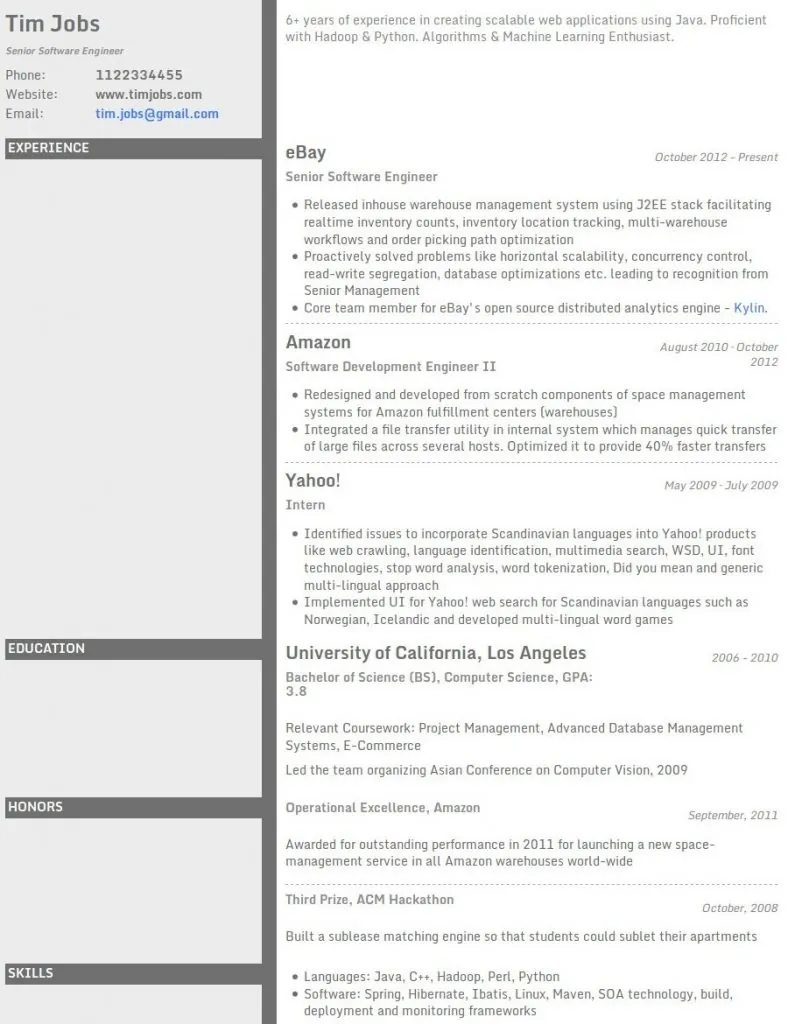
A reverse chronological resume is laid out in this order:
- Name and contact details.
- A short summary of two or three lines.
- Work experience, newest job first, with three to five bullet points each.
- Education.
- Skills, and any extra sections such as certifications or awards.
What is a functional or skills-based resume?
A functional resume puts your skills at the top, grouped under headings such as Leadership, Customer Service or Technical Skills. Under each heading, bullet points give proof of that skill.
The work history still appears, but only as a short list of employers, job titles and dates near the end. You can find a full walk-through in our guide to writing a functional resume.
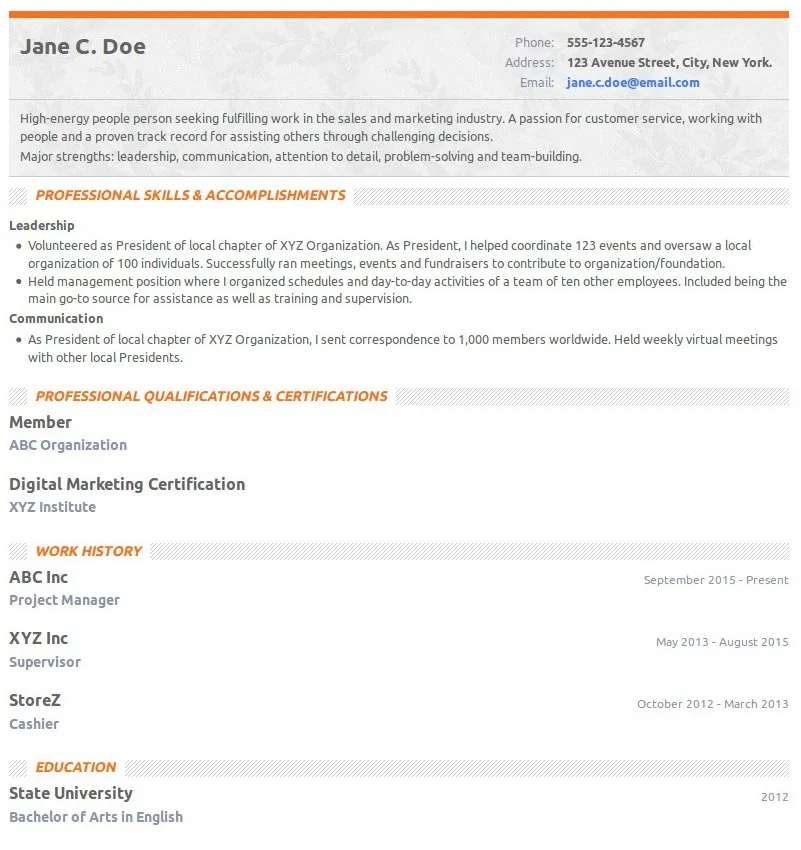
A functional resume has a real drawback. It shows what you can do, but not where or when you did it. Some employers read that as hiding something, and some will not consider a functional resume at all.
Use it only when a reverse chronological resume would work against you, for example after many years out of work.
What is a hybrid or combination resume?
A hybrid resume, or combination resume, starts with a summary of your skills and results. Your full work history follows, newest job first.
The top of a hybrid resume usually holds two parts:
- A professional profile: two or three lines on who you are and the skills you built at work.
- A summary of qualifications: three to five bullet points on what you achieved with those skills.
The hybrid format suits people with a long work history who want their strongest skills seen first. It also helps career changers, because the skills that carry over sit at the top while the dates stay visible.
Whichever format you use, tailor your resume to each job: put the skills and results the post asks for first.
Which resume format is best for you?
The best resume format for most people is reverse chronological, because it is the one employers expect. Choose another only for a clear reason:
- Steady work in one field: reverse chronological.
- Changing careers: hybrid, so your transferable skills come first.
- A long gap or a scattered work history: hybrid first; functional only if the gaps would still dominate.
- A student or recent graduate: reverse chronological, with education placed above experience.
- Senior roles with many years of work: hybrid or reverse chronological, with older jobs cut short.
If you know which format an employer prefers, use that one.
In Resumonk, sections can be moved and renamed, so the same content fits any of the three formats. The look comes from the template you pick in the Preview & Download view; the functional example above uses Slim.
Pick a format and start writingChoose one of 21 templates in Resumonk, some of them free, and fill in your sections.
Build your resume
How do you format a resume?
Resume formatting is about the page itself: margins, font, headings and spacing. A resume is formatted well when it reads easily and every section looks the same. Follow these steps:
- Set the margins to about one inch on each side. Go down to half an inch only if you must.
- Pick one plain font that every computer has, such as Calibri, Arial or Georgia.
- Use 10 to 12 points for the text and a little larger for your name and section headings. Do not shrink the text to fit more in.
- Give each section a clear heading, such as Experience, Education and Skills.
- Use bullet points for what you did in each job, not long paragraphs.
- Keep dates, job titles and spacing the same in every entry.
- Save it as a PDF unless the employer asks for a Word file.
Leave room in the header for your email address, phone number and, if it matters for the role, one profile link. For more on spacing and design, see how a professional resume layout should look.
What order do the sections of a resume go in?
The organization of a resume runs from the most useful part to the least useful part for the reader. The usual order is:
- Contact details: name, phone, email, city.
- Summary: two to three lines.
- Experience.
- Education.
- Skills.
- Optional sections: certifications, awards, projects, languages or volunteer work.
Two changes are common. A student or recent graduate puts Education before Experience. A functional resume puts Skills straight after the summary.
How do you format dates on a resume?
Dates on a resume are best written as the month and the year, in the same style in every entry. For example:
Jan 2022 - PresentMarch 2019 - December 20212016 - 2019(years only, for older jobs)
Pick either short month names or full ones, and keep to that choice. Number dates such as 01/2022 are harder to read.
Write "Present" for the job you hold now. For a degree, give the month and year you graduated, or "Expected May 2027" if you are still studying.
Put the dates in the same place in every entry, usually on the right of the job title line.
Resume format example, filled out
This filled-out resume example uses the reverse chronological format. The person and the companies are made up:
- Contact details: Priya Raman, Austin, TX, [email protected], (512) 555-0143
- Summary: Accountant with six years in audit and month-end close. Cut close time from ten days to six at a food maker.
- Experience: Senior Accountant, Hillcrest Foods, Austin, TX,
Mar 2021 - Present - Led the month-end close for three plants and cut it from ten days to six.
- Built a reconciliation checklist now used by a team of five.
- Experience: Staff Accountant, Delmar Partners, Dallas, TX,
Jun 2018 - Feb 2021 - Prepared audit files for 25 small business clients each year.
- Education: BBA in Accounting, Lakeview State University, May 2018
- Skills: Excel, NetSuite, QuickBooks, account reconciliation, audit preparation
In a hybrid version of the same resume, three bullet points of results would sit under the summary, before the first job.
Should your cover letter match your resume format?
A cover letter should use the same font, header and margins as your resume, so the two look like a set. Unlike the resume, the letter is written in short paragraphs rather than bullet points.
Use the letter to say why you want this job and which results matter most for it. You can also say where you want your career to go. Then check it against these common cover letter mistakes.
Common questions about resume formats
What is a traditional resume format?
A traditional resume format is the reverse chronological one, with work history first and the newest job at the top. It is the format most employers expect.
Which resume format focuses on work experience and education?
The chronological resume format focuses on work experience and education. A functional resume focuses on skills instead.
What is the most up-to-date resume format?
The most up-to-date resume format is still reverse chronological. What has changed is the layout: one or two pages, plain headings, bullet points, and a PDF file.
What file format should a resume be in?
A resume is usually sent as a PDF, which keeps its layout on every screen. Send a Word file when the employer asks for one.
What is the CAR format on a resume?
The CAR format is a way to write resume bullet points: the Challenge you faced, the Action you took and the Result. For example, "Cut month-end close from ten days to six by building a shared checklist."
Can a resume format hide an employment gap?
No resume format hides an employment gap fully. A hybrid resume moves attention to your skills, but the dates are still there. A short, honest line about the gap works better.
Keep reading
- How to Name a Resume File (with Tips from Experts)
- Should You Put a Photo on Your CV?
- How to Write a Functional or Skills-Based Resume (With an Example)
- A Complete Guide On How To Write A One-Page Resume (With Templates)
- How Long is a Resume Supposed To Be? 10 Tips For the Right Length
- When can a resume be 2 pages long?
- How To Shorten Resume Without Losing Valuable Information (With Templates)
- How Should a Professional Resume Look In Terms Of Structure & Format?
Next step: pick a resume template.
job hunting.
Resumonk polishes your resume, discovers matching jobs and finds connections inside companies.
Get started free- Indeed
- Greenhouse
- + more
This article was originally published on our blog on Jul 30 2023 and authored by Sarah Landrum. It was edited and republished in its present form by Team Resumonk on Sep 15 2025.