How to find connections for a job application
An application read by someone who knows you does better than one that arrives cold. For a role you are pursuing, Resumonk shows you people at that company you have a real connection to.
-
Open a match from your Jobs page.
-
Click Find warm intros.
-
Read who comes back. Each person has a How you connect line saying what you actually have in common.
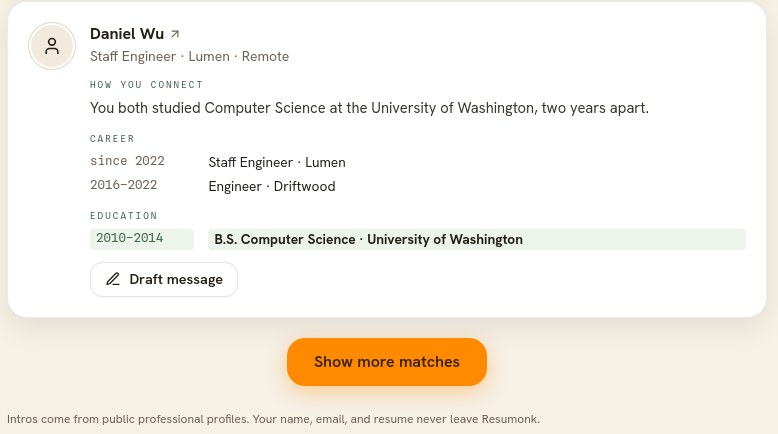
The connection is named, so you can judge for yourself whether it is worth using. Your name, email, and resume never leave Resumonk. -
Click Draft message and Resumonk writes an opener. Copy it, put it in your own words, then send it yourself.
How to use it well
- Read the connection first. Some are closer than others, and the line on each person tells you which.
- Edit the draft where you send it. It is a starting point, and a message in your own voice lands better.
- Ask for a conversation, not a job. People help more readily when the ask is small.
- Resumonk never contacts anyone for you. You send the message yourself, wherever you normally would.
Good to know
- Warm intros are part of the Executive plan, which includes 10 a month. The page shows how many you have left, and tells you the reset date once you have used them all.
- The people come from your own resume, so a fuller resume finds more of them. If a role returns nobody, that is an honest answer rather than a filled-out list.
- The details shown are professional background, the kind of thing on a public profile.