How to embed a public resume
You can put your resume inside one of your own web pages, so visitors read it without leaving your site. It stays live: when you edit the resume, the version on your page changes too.
-
Open your resumes and make sure the resume is public. If it says Private, click Make public beside the badge and confirm. Publishing is included on every paid plan.
-
Open the card's ⋯ menu and choose Embed.
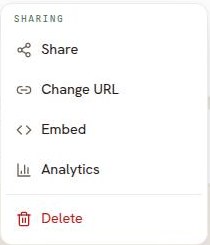
Embed sits in the Sharing group, under Change URL. -
A box opens holding the code, already written for your resume. Click Copy the code.
-
Paste the code into your own page, wherever you want the resume to appear. Most website builders have a block for this, usually called Embed, Custom HTML or Code.
Good to know
- Any public resume can be embedded, on every plan.
- A job version can be embedded too. Its row's ⋯ menu holds both Make public and Embed.
- The code sets the height to 1100 pixels, which suits most one-page resumes. Change that number in the code if your resume is longer or your page is smaller.
- Make the resume private again and the embedded copy stops showing it, so you control this from Resumonk rather than from your website.
- Changing the resume's public address breaks any code you have already pasted. Copy the new code and paste it again.
- Views through an embed count towards your resume analytics, the same as views of the page itself.
- Anyone who can see your page can see the resume, so only embed what you are happy to publish.