Resume.io Alternatives - A Comprehensive Comparison

Understanding your resume builder options
Finding the right resume builder is less about which tool is “best” on paper and more about which tool fits your workflow, budget, and the way you like to tell your story.
As a resume team, we write resumes for a wide range of candidates and see the same decision points arise: do you want guided prompts or a freeform editor, AI help or manual control, a subscription or a one-time purchase? This section lays the groundwork so you can compare Resume.io and its competitors from a clear, user-first perspective.
How we made this list - evaluation criteria vs Resume.io
We evaluated alternatives to Resume.io through four lenses that matter most to active job seekers:
- pricing transparency and billing practices,
- design and customization options,
- import/export and portability, and
- AI/content assistance (how the tool helps you actually write).
For each platform we checked official pricing and features, then sampled user feedback from product review aggregators and social communities to surface recurring strengths and pain points.
Where possible we link to the vendor’s pages so you can verify plans, and to independent reviews so you see how real users perceive value and support. Our goal is practical: help you shortlist tools that match how you actually apply for roles.
What Resume.io offers job seekers
Resume.io is a widely used resume and cover‑letter builder that combines a step‑by‑step editor, content suggestions and a built‑in cover‑letter creator.
It supports multiple languages across local sites, provides pre‑written phrases and a summary generator, and presents guided templates for users who appreciate structure while they write.
Resume.io also sits alongside career services in the Career.io portfolio (including TopResume), which gives it a broader service ecosystem beyond the builder itself. For details on languages, features and the trial model, see Resume.io’s help pages and updates.
Common reasons people explore alternatives
People look beyond a single builder for many benign reasons: they need a different template aesthetic, want clearer billing (or a one‑time purchase), prefer a more powerful AI writer, need LinkedIn import/fast uploads, or simply want to compare editing experiences. Searching for an alternative is usually about “finding the right fit” rather than fixing something broken - different tools favor different workflows, so narrowing priorities first will save time.
How to choose the right resume builder for your needs
Before you commit, prioritize the features that will matter across a job search: clear pricing and cancellation terms, export formats (PDF vs DOCX), whether you can import from LinkedIn or upload an existing resume, the depth of template customization (fonts, colors, layout control), AI writing assistance model (credit system, unlimited, or guided suggestions), and how easy it is to create multiple tailored versions. Test at least one end‑to‑end flow (build → download → reopen) so you confirm the output quality and whether file types suit recruiters or your application portal.
With that framework in place, we now walk through high‑value alternatives and then provide head‑to‑head comparisons with Resume.io so you can choose with confidence.
Top Resume.io alternatives for job seekers
Resumonk vs Resume.io
We often recommend Resumonk for job seekers who want a balance of clean templates, strong export options, and an AI rewrite that keeps to their real experience.
Resumonk starts free, with no card needed: upload your resume or paste your LinkedIn profile link, and Resumonk rewrites it into a polished first draft. On a paid plan, a 24/7 job search agent finds jobs that match and Resumonk rewrites your resume for each job, which is useful if you apply to several roles at once.
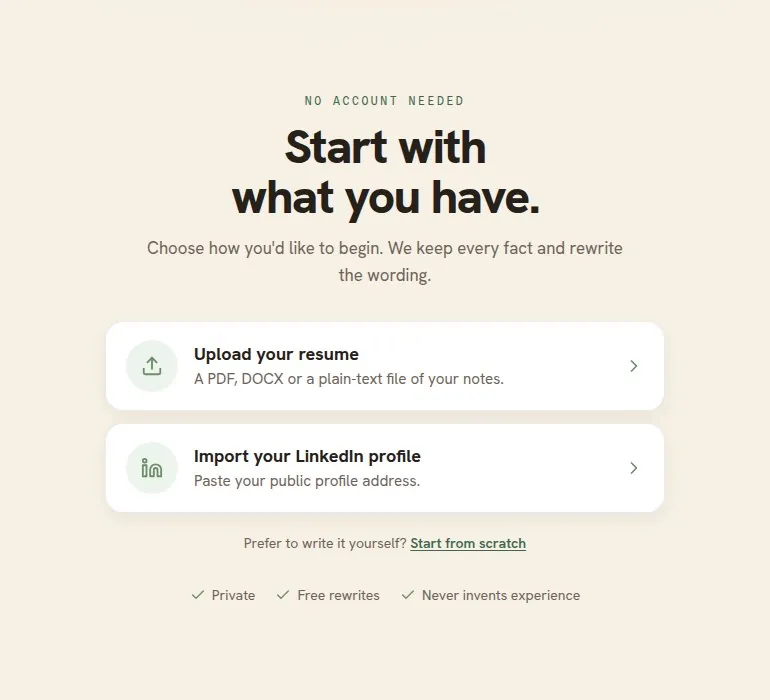
Pricing of Resumonk
- Free: 1 resume and 6 templates, a free PDF download with a small Resumonk footer, one AI improve pass and one rewrite for a job. LinkedIn import and resume upload are included.
- Professional: unlimited resumes, cover letters and all 21 templates; clean PDF and DOCX downloads with no Resumonk footer; improve any part of your resume with AI; 2 always-on job searches (the 24/7 job search agent); rewrite your resume for each job; help preparing each application; view analytics for your public resume page.
- Executive: everything in Professional, plus 5 always-on job searches and 10 warm introductions a month (people at your target companies you have a real connection to), each with a drafted first message.
- Both paid plans are monthly, and the pricing page shows their prices in your local currency.
Key features of Resumonk
- 21 templates, 6 of them free and 7 with a place for a photo.
- AI rewrites for the whole resume or a single entry, keeping to your real experience.
- LinkedIn import and resume upload (PDF/DOCX support).
- A rewrite of your resume for each job, plus a 24/7 job search agent on paid plans.
- Matching cover letter designs, DOCX + PDF downloads.
- Custom public URL and analytics for hosted resumes.
- 18 font options and an unlimited color palette for styling.
Pros and cons of Resumonk vs Resume.io
- Pros (Resumonk): A free plan you can start without a card; an AI rewrite that keeps to your real experience; a 24/7 job search agent and a rewrite of your resume for each job on paid plans; robust exports (PDF/DOCX) and, on paid plans, custom URL hosting with analytics.
- Cons (Resumonk): Smaller template library (21) compared with Resume.io’s larger set; the interface is in English only; DOCX, cover letters and the job tools need a paid plan.
LiveCareer vs Resume.io
LiveCareer is an established builder often chosen by people who want a highly guided, step‑by‑step experience across multiple templates and downloadable formats.
LiveCareer is part of a family of career products and presents a straightforward path for users who prefer structure and prewritten content suggestions. It’s a good match for users who appreciate a highly prescriptive builder experience.
Pricing of LiveCareer
- Free - basic builder and limited templates.
- 14‑day access trial - low initial fee (regional pricing) then automatic renewal at the full periodic rate (e.g., £1.95 then £19.85 every four weeks in some regions).
- Annual plan - deeper discount when paid yearly.
Note: LiveCareer’s short access plan typically auto‑renews if not cancelled, so confirm billing terms before entering payment details.
Key features of LiveCareer
- 15+ template bundles with matched cover letters.
- Step‑by‑step content guidance and prewritten suggestions.
- Multiple download formats (Word, PDF, HTML).
- Cloud storage and article resources for resume writing.
Pros and cons of LiveCareer vs Resume.io
- Pros (LiveCareer): Structured prompts and a longer history in the space; good for users who want hand‑holding during writing.
- Cons (LiveCareer): Some users report confusing trial/renewal experiences - check cancellation steps.
Zety vs Resume.io
Zety is a popular, beginner‑friendly option that leans heavily into automated content suggestions and a guided editing experience. Users who like detailed writing prompts and a resume score/summary tool often choose Zety to overcome “writer’s block.” Its pricing includes trial and annual plans that aim to lock in savings for longer commitments.
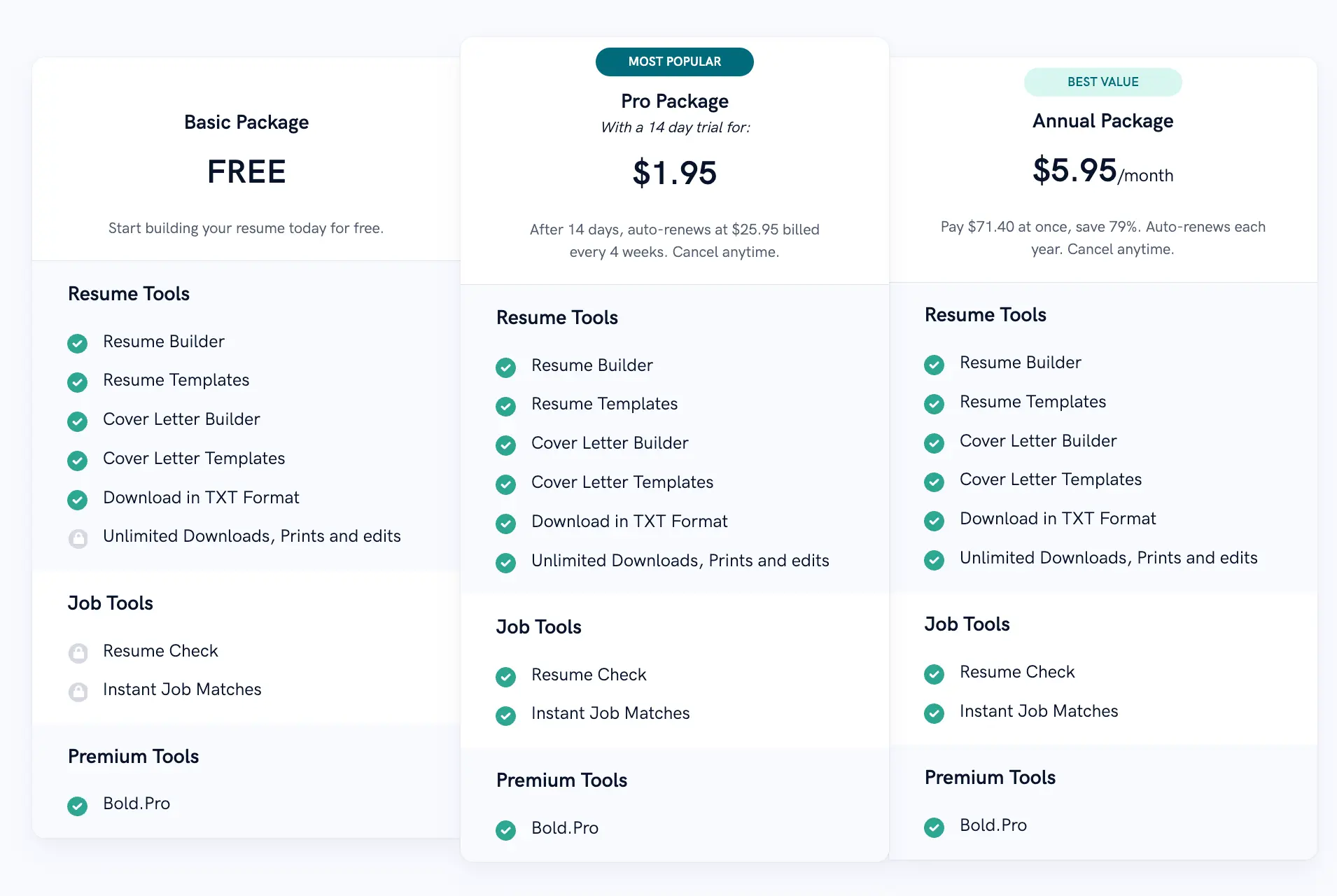
Pricing of Zety
- Free - build and download limited formats (TXT typically).
- Pro trial - small fee for a limited period, then auto‑renewal at the standard recurring price (regional variations apply).
- Annual - discounted when paid yearly (e.g., equivalent to ~$5.95/month in some regions).
Key features of Zety
- 36+ base templates and template matching for cover letters.
- Automated content suggestions tailored to job titles.
- Resume score and summary generation tools.
- Job search integration and resume checkers.
Pros and cons of Zety vs Resume.io
- Pros (Zety): Extensive auto‑suggestions, scoring, and strong editorial guidance for early‑career writers.
- Cons (Zety): Pricing is subscription‑based with trial auto‑renewal mechanics; confirm trial terms up front.
Novorésumé vs Resume.io
Novorésumé is design‑forward and aimed at users who want tight visual control without a steep learning curve.
It offers a “master content” approach to keep a running record of accomplishments and supports multiple tailored versions and matching cover letters - handy when you manage applications across roles. The company positions itself with a clear free tier plus premium options that unlock advanced layout control and multiple‑version management.
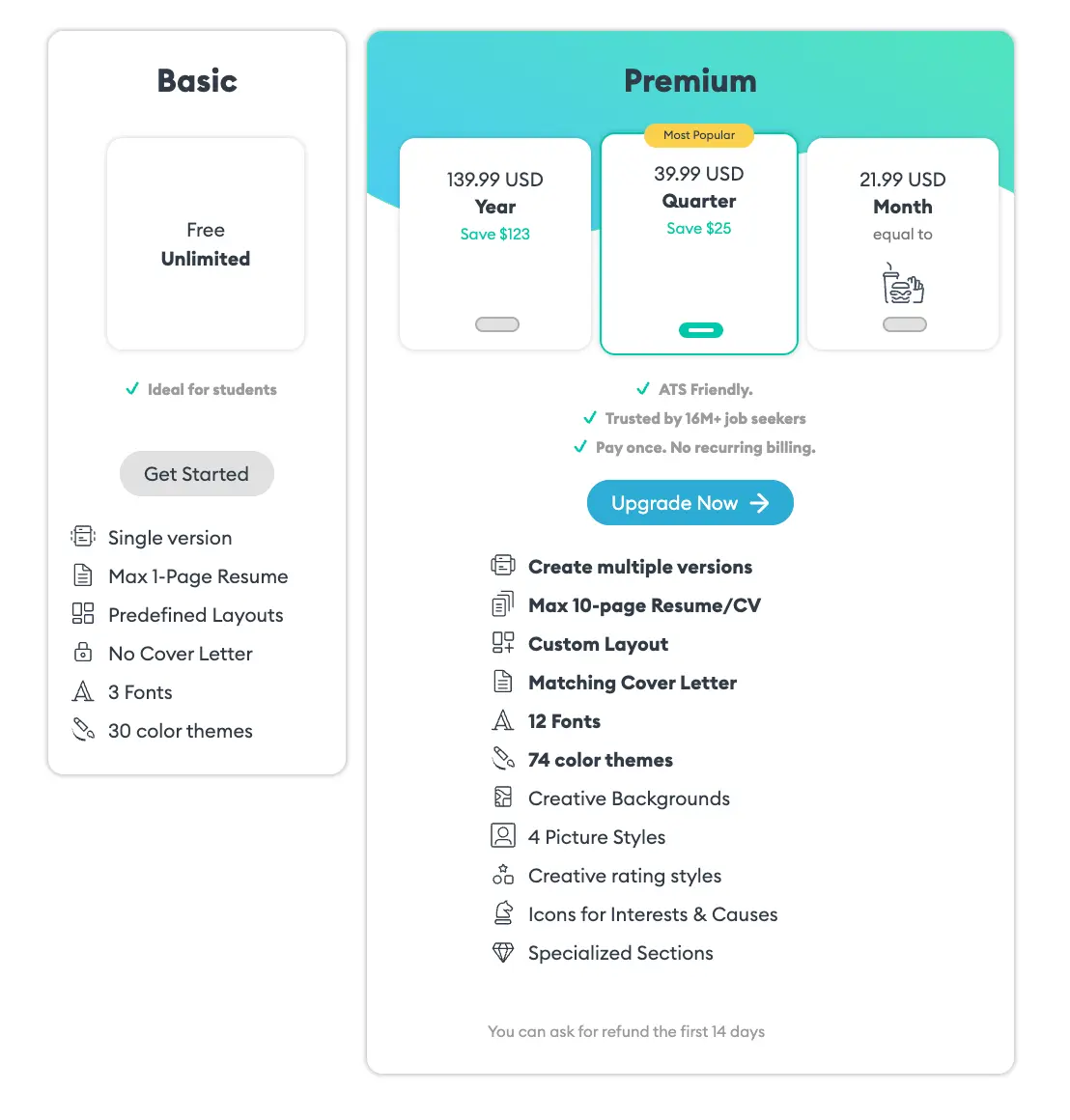
Pricing of Novorésumé
- Basic - free (single page, limited customisation).
- Premium monthly - pricing around $19.99/month (regional variation).
- Premium quarterly / annual - discounted multi‑period pricing with one‑time payments; the vendor states no automatic subscription for some billing models.
Key features of Novorésumé
- Drag‑and‑drop inline editing with live preview.
- Master content repository for career accomplishments.
- Matching cover letters and job application tracker.
- 16+ templates with extensive color and font theme options.
Pros and cons of Novorésumé vs Resume.io
- Pros (Novorésumé): Strong design controls and master content for repeated reuse; non‑subscription purchase options in some cases.
- Cons (Novorésumé): Smaller template count but deeper customization per template.
MyPerfectResume vs Resume.io
MyPerfectResume (a Bold product family member) emphasizes template recommendations by experience level and offers a quick PDF import to jumpstart editing. Its structure is familiar to users of other Bold resume products - good if you want templated recommendations based on career stage and a straightforward import flow.
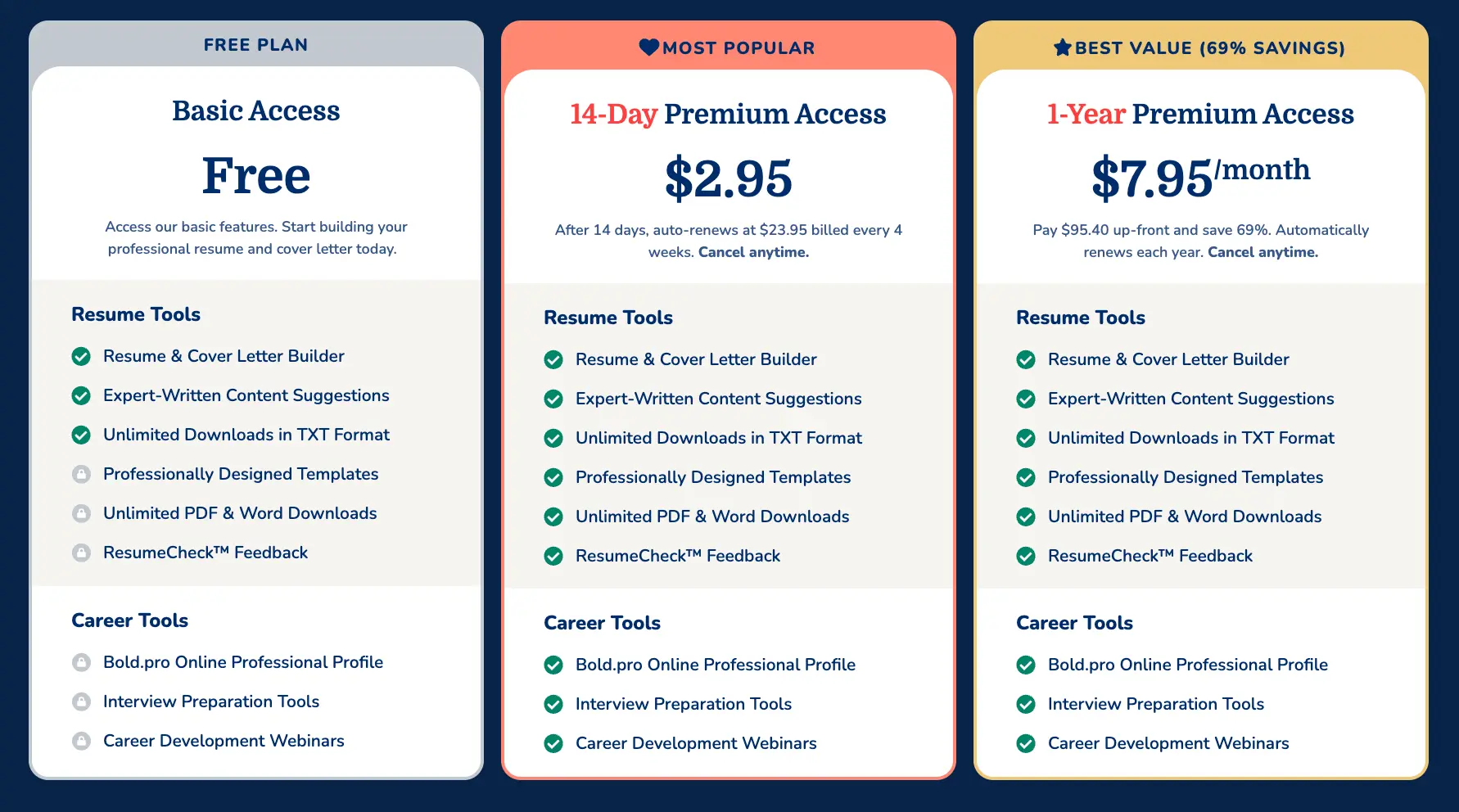
Pricing of MyPerfectResume
- Free basic access - limited downloads and TXT export.
- 14‑Day Premium Access - low introductory price then auto‑renewal into a periodic paid plan (regional pricing applies).
- Annual premium option - discounted when paid as a year.
Key features of MyPerfectResume
- 31+ premium templates organized by style and experience level.
- PDF import to pull content from existing resumes.
- Expert‑written suggestions and resume checks.
Pros and cons of MyPerfectResume vs Resume.io
- Pros (MyPerfectResume): Clear template categorization and PDF import for quick migration.
- Cons (MyPerfectResume): Trial auto‑renewal models - watch billing terms closely.
ResumeGenius vs Resume.io
ResumeGenius is guidance‑oriented and features step‑by‑step prompts, a library of prewritten content, and human resume review services.
It’s commonly chosen by those who want structured help and multiple download formats (Word and PDF) for later edits. Their pricing frequently includes a brief trial and longer annual options.
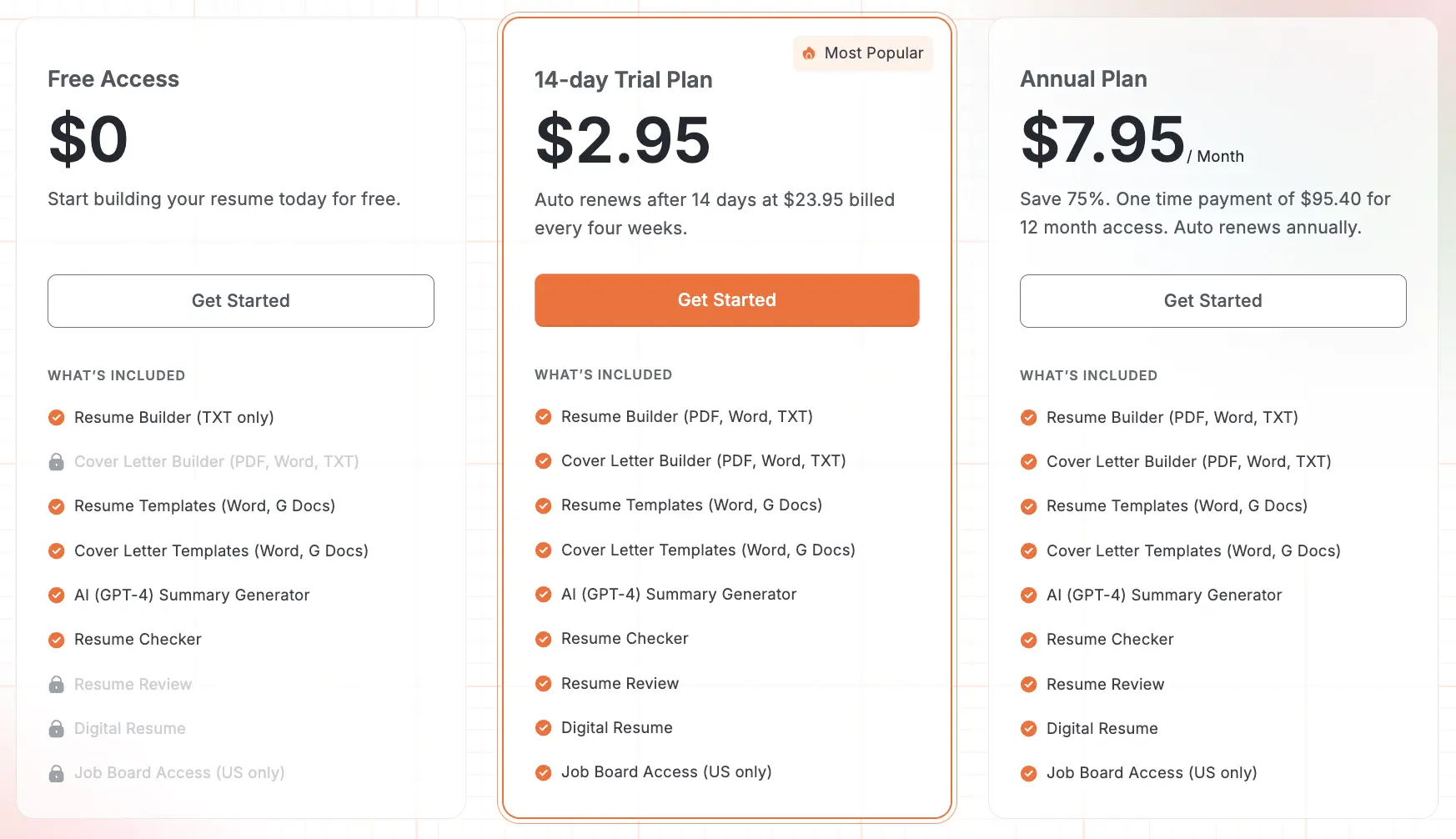
Pricing of ResumeGenius
- Free - limited TXT download.
- 14‑day trial - $2.95 then auto‑renews at recurring price unless cancelled (regional variations exist).
- Annual - discounted yearly option available.
Key features of ResumeGenius
- 17 professional templates and one‑on‑one consultant help (paid).
- Step‑by‑step builder and prewritten bullets to speed content entry.
- Multiple format downloads (Word & PDF).
Pros and cons of ResumeGenius vs Resume.io
- Pros (ResumeGenius): Emphasis on guided content and availability of consultant services for hands‑on help.
- Cons (ResumeGenius): Trial auto‑renewal mechanics; verify billing and cancellation policies.
Rezi vs Resume.io
Rezi markets itself as an AI‑first resume platform with real‑time content analysis and a lifetime purchase option - appealing if you prefer a pay‑once route for long‑term access to AI tools. Rezi’s interface focuses on direct content optimization and keyword targeting during writing.
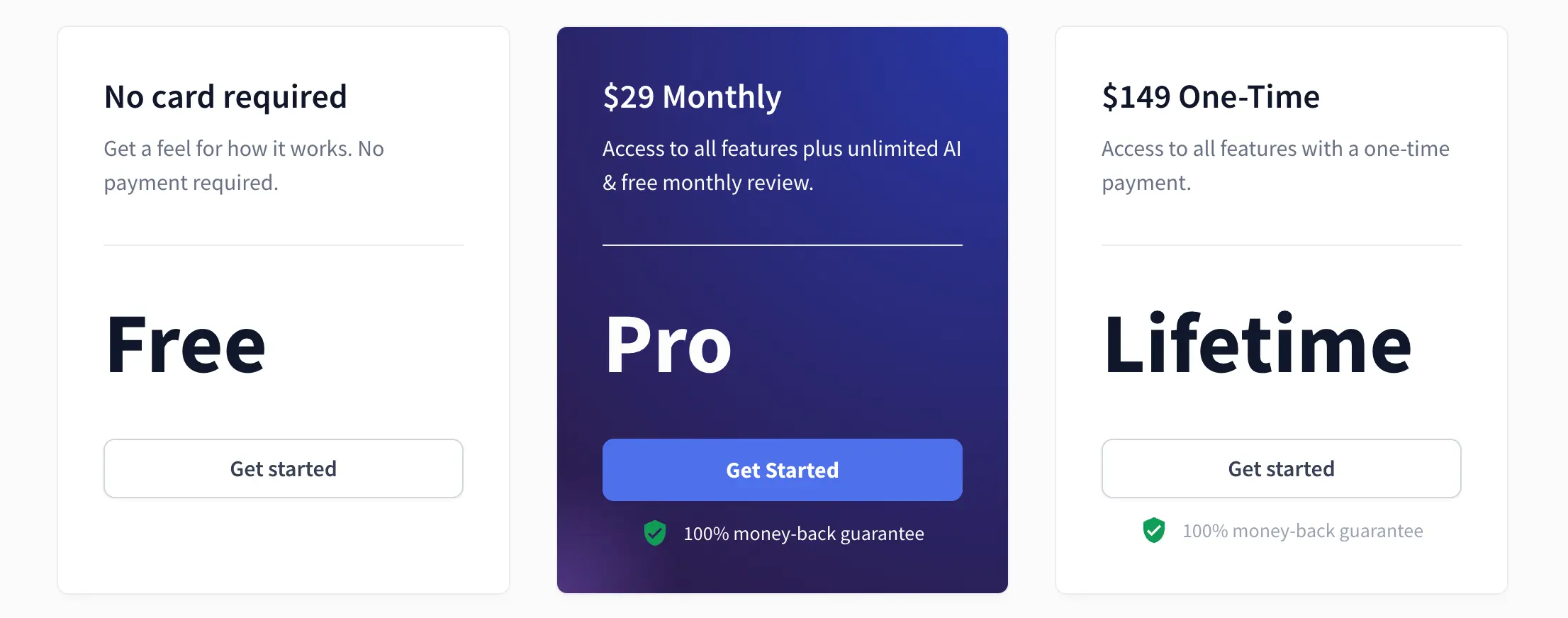
Pricing of Rezi
- Free - limited access with download caps and a single resume.
- Pro - $29/month (or regional equivalent) for unlimited features.
- Lifetime - $149 one‑time payment for full access (no recurring charge).
Key features of Rezi
- Real‑time analysis, keyword targeting and Rezi Score feedback.
- AI resume writer & editor with unlimited downloads on paid plans.
- Option for a one‑time lifetime purchase to avoid subscription fees.
Pros and cons of Rezi vs Resume.io
- Pros (Rezi): Lifetime plan option and heavy focus on AI‑driven content feedback.
- Cons (Rezi): Free tier has stricter limits; some users prefer broader template aesthetics.
Kickresume vs Resume.io
Kickresume is feature rich: 40+ templates, an AI assistant, LinkedIn and PDF import, a personal website builder, and career planning tools. Users who want a one‑stop career toolkit (resume, cover letter, website) often find Kickresume useful, and its pricing tiers include free and multiple premium subscription options.
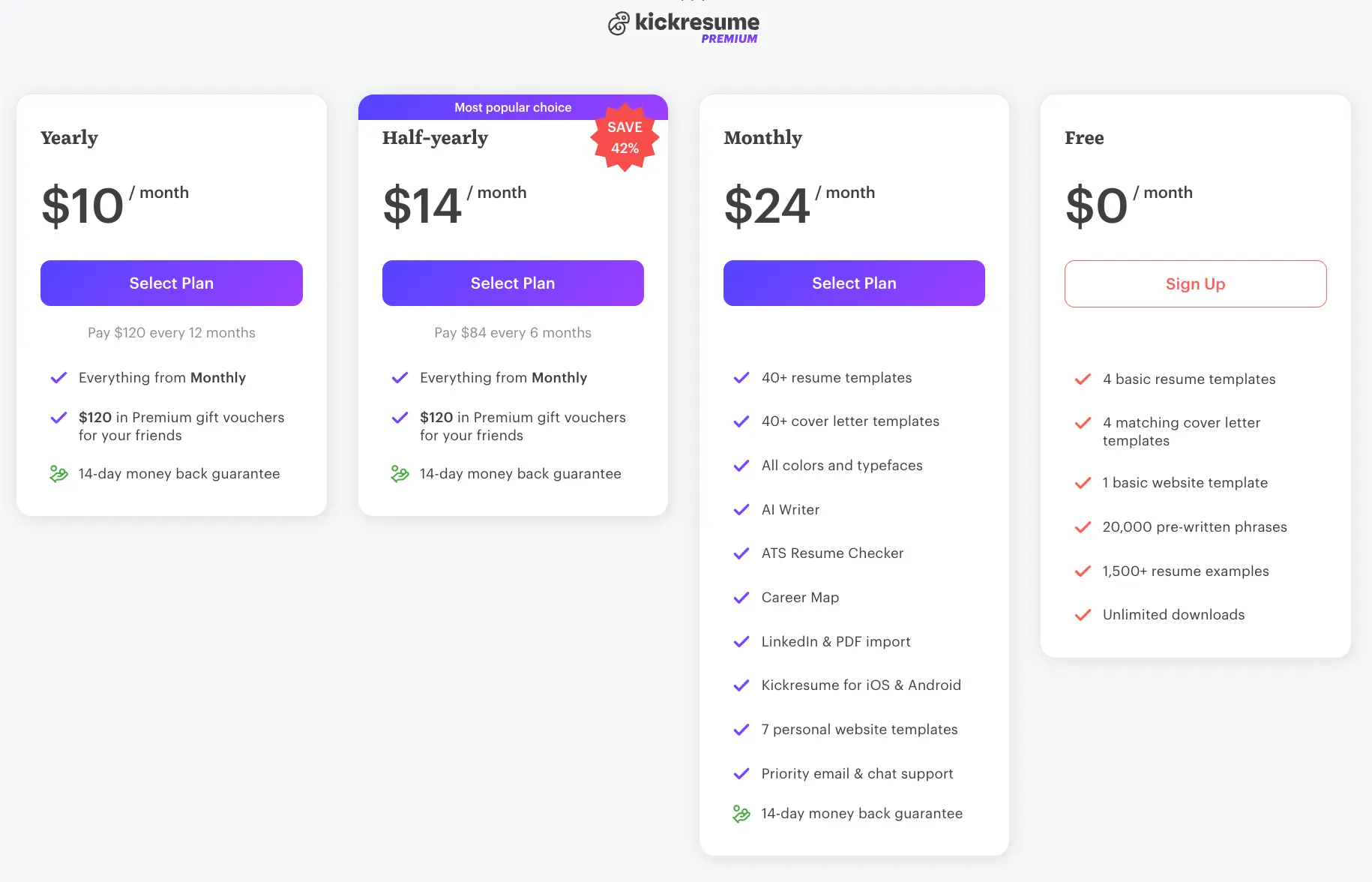
Pricing of Kickresume
- Free - 4 basic templates and unlimited downloads.
- Monthly - around $24/month (or local equivalents depending on promotions).
- Half‑yearly / yearly - discounted recurring options (student access programs also exist).
Key features of Kickresume
- 40+ resume & cover letter templates, AI Writer and LinkedIn import.
- Personal website builder and mobile apps.
- Proofreading as an add‑on and career planning tools.
Pros and cons of Kickresume vs Resume.io
- Pros (Kickresume): Wide template library, website builder, and robust AI toolbox.
- Cons (Kickresume): Subscription tiers vary widely by billing cycle; double‑check the best price cadence for your needs.
Next, we compare Resumonk vs Resume.io in more detail so you can evaluate the practical differences around pricing, templates, import/export and AI workflows.
Why Resumonk is the Perfect Alternative to Resume.io
Pricing transparency and value
| Feature | Resumonk | Resume.io |
|---|---|---|
| Free plan | Yes (branded PDF, limited templates) | Yes (limited free builder; download restrictions) |
| Paid plan pricing | Professional and Executive, billed monthly; the pricing page shows prices in your local currency | 7‑day trial (small fee), then recurring subscription (pricing varies by region; example: $19.95 every 4 weeks in some markets) |
| Trial period | No trial. The free plan has no time limit. | 7‑day trial (varies by offer) |
| Automatic renewal | Paid plans renew monthly. Cancel anytime. | Trial auto‑enrolls into subscription if not cancelled within trial window; recurring billing every 4 weeks or other subscription lengths |
| Pricing page visibility | The pricing page lists what each plan includes, side by side | Pricing and billing explained in help/billing pages but may vary by local brand |
| Hidden fees | The free plan needs no card, so nothing is charged unless you choose a paid plan | Trial auto‑renewal has led to user confusion in some reports - review billing FAQ before purchase |
| Feature | Resumonk |
|---|---|
| Free plan | Yes (branded PDF, limited templates) |
| Paid plan pricing | Professional and Executive, billed monthly; the pricing page shows prices in your local currency |
| Trial period | No trial. The free plan has no time limit. |
| Automatic renewal | Paid plans renew monthly. Cancel anytime. |
| Pricing page visibility | The pricing page lists what each plan includes, side by side |
| Hidden fees | The free plan needs no card, so nothing is charged unless you choose a paid plan |
Resumonk publishes three plans with clear breakdowns: Free, Professional and Executive. The free plan needs no card and has no time limit; the two paid plans are monthly, with prices shown in your local currency on the pricing page, and you can cancel anytime.
Resume.io uses a trial model that often transitions into recurring payments if the trial isn’t cancelled - users should read the billing FAQ and trial terms carefully before entering payment details. The practical difference: with Resumonk you can build a resume and download the PDF before you pay or enter a card, while Resume.io’s model suits users who intend ongoing subscription access.
Template selection and customization
Resumonk provides 21 professionally styled templates (7 have a place for a photo) and deeper on‑page styling choices on paid plans (18 fonts and any color you like), plus PDF downloads on every plan and DOCX on paid plans.
Resume.io typically lists 30+ templates across local brands with simpler customization controls (color and font size adjustments are common). In practice, Resumonk is stronger when you want finer visual control for branding while Resume.io offers a larger template catalog and multi‑language templates for international audiences.
Resumonk customization features:
- 21 templates, 7 with a place for a photo; 18 fonts; any color you like;
- PDF and DOCX downloads;
- Duplicate a resume to keep one per kind of role (paid plans);
- Matching cover letter maker
Import and export capabilities
Both platforms allow modern exports, but Resumonk also supports direct LinkedIn profile import, resume upload (PDF, DOCX or plain text) and, on paid plans, a public resume page at an address you choose, with view analytics.
Resume.io provides a step‑by‑step editor with multi‑language support and downloads, but its import options are more limited compared with Resumonk’s explicit LinkedIn and upload pathways. For users juggling several versions or migrating an existing résumé, Resumonk’s import/upload flexibility is practical.
AI writing features
Resumonk’s AI rewrites the content you already have and keeps to your real experience (a single entry, the full resume, or a version for each job), while Resume.io offers in‑builder AI content suggestions, prewritten phrases, and a summary generator.
The practical difference is approach: Resumonk rewrites what you already have, shows you what changed and lets you undo it; Resume.io integrates suggestions into the editor as continuous help during creation. Your preference will hinge on whether you want your existing content rewritten in one pass (Resumonk) or integrated built‑in suggestions while you build (Resume.io).
Overall, if billing clarity and export flexibility are priority #1, Resumonk is worth testing. If template breadth and multi‑language local brands matter most, Resume.io remains a strong choice.
Making your decision
For budget‑conscious job seekers
Look for transparent pricing or one‑time purchases: Resumonk’s free plan (no card needed), Rezi’s lifetime option and Novorésumé’s free basic plan are good starting points. Free tiers are useful for building a simple resume and testing interface comfort, but always check the trial’s auto‑renewal rules before entering payment details to avoid surprise charges.
For users seeking design flexibility
If visual customization matters, consider Novorésumé for deep per‑template control or Resumonk and Kickresume for font and color flexibility plus downloadable DOCX/PDF. These tools let you create visually distinct documents that still read professionally.
For career changers and entry‑level professionals
Choose platforms with strong content assistance: Zety for scoring and suggestions, ResumeGenius for education‑focused prompts and consultant services, LiveCareer for highly guided steps, and Resume.io for structured multi‑language guidance. These platforms reduce overwhelm and help you present transferable skills clearly.
For users managing multiple applications
Pick tools that support separate versions or master content: Resumonk’s job versions (it rewrites your resume for each job and leaves the original as it was), Novorésumé’s master content repository, or any platform that explicitly supports multiple resume versions. This streamlines tailoring resumes for different job descriptions and saves time across an active job search.
Key considerations when switching resume builders
Data portability
Confirm you can import or upload your existing resume (PDF/DOCX) or pull from LinkedIn - Resumonk, Kickresume and MyPerfectResume explicitly advertise such import capabilities. Keep copies of your resume in multiple formats (PDF and DOCX) so you can move between tools without losing content.
Trial periods and testing
Always test with a simple “v1” resume before committing to paid plans: create a short version, attempt a download, and re‑open the exported file to check formatting.
Pay attention to what the free plan actually allows (exports, downloads, template access) and set calendar reminders for trial expirations so you aren’t unintentionally charged. Read cancellation steps in the vendor’s billing FAQ.
Long‑term value
Look beyond immediate features: consider whether you’ll need multiple versions, how often you’ll update the resume, the quality of customer support, and frequency of template updates. A slightly higher upfront cost may be worth it if the tool reduces editing time or provides useful career resources over the year.
Essential takeaways
Action steps
- Identify your top 3 priorities (pricing, templates, AI features, import/export).
- Shortlist 2–3 platforms that match those priorities.
- Test free versions or short trials without entering payment info if possible.
- Create a short test resume to evaluate editing & download quality.
- Check export formats and re‑open downloaded files to confirm formatting.
- Review cancellation and auto‑renewal policies before subscribing.
- Set a calendar reminder to cancel trials if you decide not to continue.
Final recommendation
No single provider is perfect for everyone.
Resume.io remains a strong, widely used option for users who value template breadth and multi‑language/local site coverage, but alternatives like Resumonk, Rezi and Kickresume each bring different strengths: a free plan and a 24/7 job search agent, lifetime pricing, more design control, or broader career tools.
Our recommendation: clarify the three features you cannot compromise on (for example: DOCX export, no surprise renewals, or LinkedIn import), then trial the two platforms that match those must‑haves. With a short test resume and a careful read of billing terms you’ll quickly discover which tool fits your workflow - and we’re confident you’ll find one that supports the next step in your career.
Keep reading
.png)