Novoresume Alternatives - A Thorough Analysis

Finding the Right Resume Builder for Your Career Goals
Job hunting today often starts with a search for tools that make a resume look and feel like the professional you are - but not every builder fits every situation.
We frequently hear readers weighing alternatives to Novorésumé because of differences in pricing models, the need for more design flexibility, or a desire for AI features that better match their workflow. Whether you're conserving budget, chasing a creative layout, or looking for a builder that supports rapid multi-version tailoring, the right alternative comes down to which features solve your personal pain points.
When we evaluate alternatives, we focus on practical signals that matter in an active job search: template quality and variety, ease of getting your existing info in (LinkedIn or file import), the quality and control of AI writing or rewriting tools, export options (PDF/DOCX), and clear, predictable pricing that fits short-term or long-term needs. Below we walk through the best options to consider, why each might be a fit, and how they compare head-to-head to Novorésumé so you can decide with confidence.
How we made this list
We compiled this list by combining product pages, recent pricing and feature documentation, and independent user feedback from review sites and forums to reflect how these platforms perform in real searches and real workflows.
We prioritized builders that offer: straightforward import/export, clear pricing (including trials), meaningful AI assistance (for rewriting / suggestions), and templates that can be customized without long design fiddling. Where available, we cross-checked official feature pages with user reviews on sites like Trustpilot, Sitejabber and community threads to surface recurring strengths and weaknesses.
We also supplement our opinion with user-review references from review platforms and community posts to surface authentic user experience. This helps you see both the marketed feature set and how real users experience billing, support, and product reliability.
Top Resume Builders to Consider
Resumonk vs Novoresume
We position Resumonk as a pragmatic alternative focused on clean design, straightforward customization, and AI help that keeps to your real experience, with a 24/7 job search agent on its paid plans.
Resumonk offers 21 templates (including 7 photo-CV styles), a LinkedIn import, and both PDF and DOCX export (DOCX on paid plans); on paid plans its customization includes an unlimited color palette and 18 font choices so you can quickly align design to industry or personal brand. You can start free without a card, and a paid plan adds a rewrite of your resume for each job, help preparing each application and, on Executive, warm introductions to people at your target companies.
- AI rewriting that keeps to your real experience
- Cover letter builder with matching designs
- PDF and DOCX export options
- Duplicate any resume for multiple versions
- Custom URL hosting with analytics tracking
- Photo CV templates included
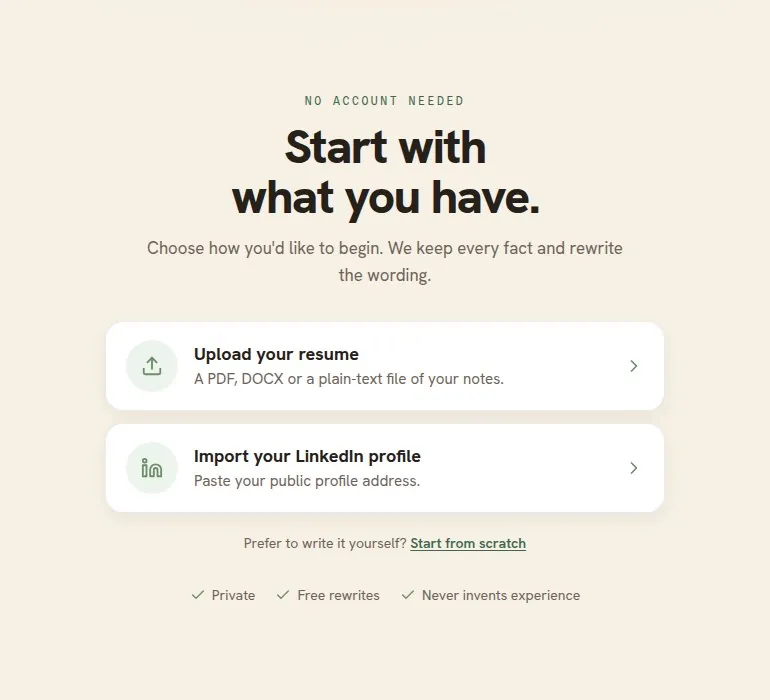
Resumonk has three plans. Free includes 1 resume, 6 templates, a PDF download with a small Resumonk footer, one AI improve pass and one rewrite for a job. Professional adds unlimited resumes and cover letters, all 21 templates, clean PDF and DOCX downloads, 2 always-on job searches and a rewrite of your resume for each job; Executive adds 5 always-on job searches and 10 warm introductions a month. Prices are shown in your local currency on the pricing page, and paid plans renew monthly.
Kickresume vs Novoresume
Kickresume positions itself as an AI-forward builder (including GPT-powered writers and an AI career coach) while also providing a broad sample library and a personal website builder.
It’s a strong pick for students and early-career users because of its free Premium access for verified students and a focus on polished, recruiter-friendly visuals. Kickresume's mobile apps make it convenient to retrieve and edit documents on the go.
- GPT-4 / AI Writer for full-section or full-resume generation
- 2,200+ resume & cover letter samples and phrase libraries
- AI resume tailoring for supplied job descriptions
- LinkedIn and PDF import, plus iOS & Android apps
- Priority support and personal website templates for Premium users
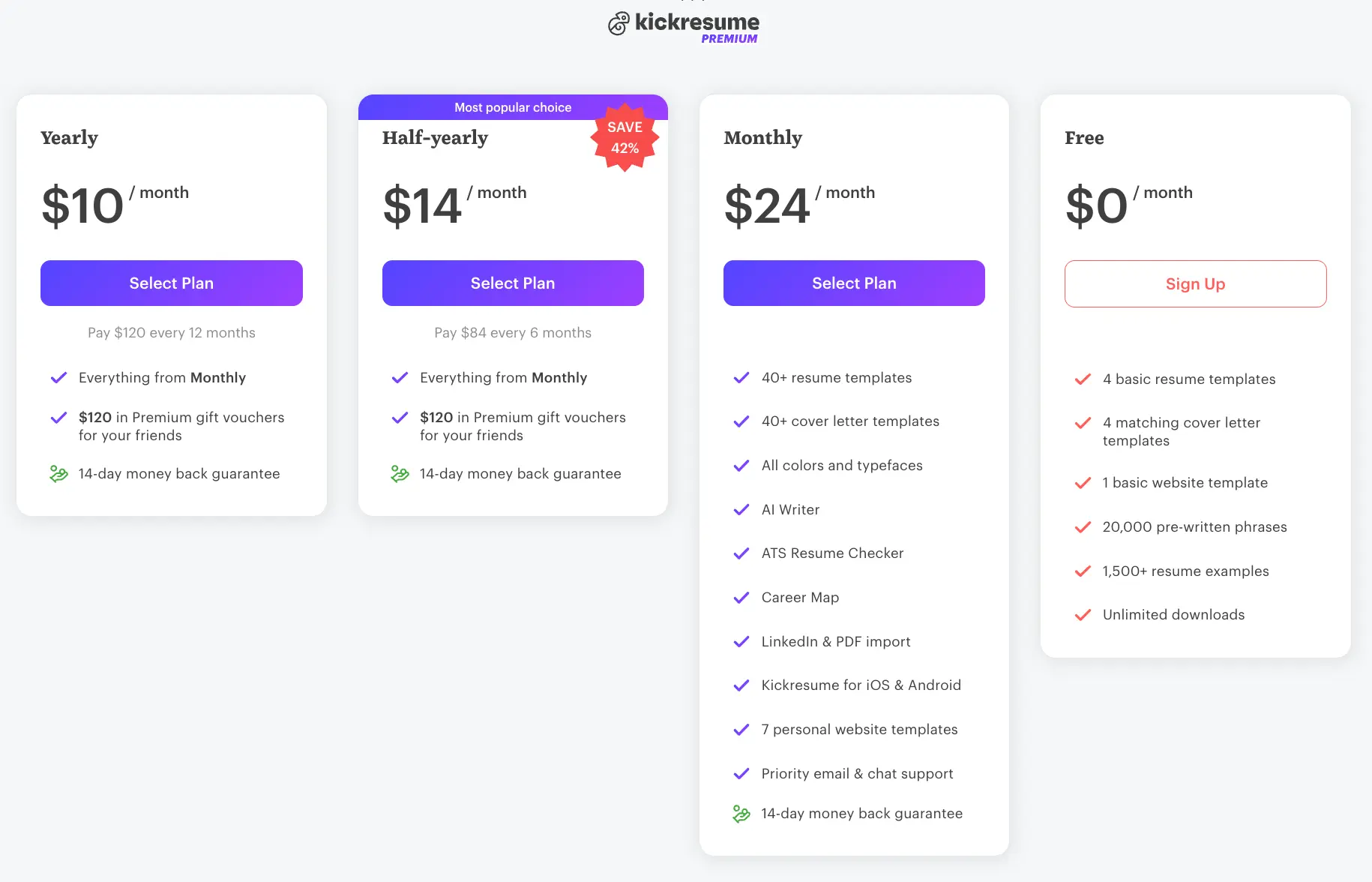
Pricing is tiered: monthly, half-year and annual options are available, with frequent student promotions; Kickresume’s structure tends to favor users who plan to use the product actively for several months (or who qualify for student access).
Zety vs Novoresume
Zety is a step-by-step builder that offers strong guidance for first-time resume creators and many role-specific content examples.
Its emphasis is on helping users craft content through tips and pre-written suggestions, paired with 60+ industry-specific templates and an integrated job board that can help coordinate applications. Zety suits users who want hands-on content help while still keeping design choices simple and professional.
- Built-in resume scoring and quality-check tools
- Industry-specific template categories (60+ templates)
- Pre-written examples and suggestions for many roles
- Integrated job board and application match features
- Comprehensive resume-building guides and help copy

Zety often markets a low-cost trial (commonly a $2.70 or similar short trial) and an annual plan billed upfront; its free builder allows limited downloads so users can test templates before committing.
Resume.io vs Novoresume
Resume.io is a professional-first builder with an AI assistant that offers resume review, strengths analysis and an integrated job tracker. It’s a good fit for mid-career professionals who want a no-nonsense toolkit: polished templates, a review workflow, and the ability to create multiple, exportable versions quickly.
- AI-powered resume review and feedback
- Integrated job board access and a Job Tracker
- Career guidance tools, interview prep, and first-90-day planning
- Matching cover letters and preview before download
- Multiple export formats including unlimited PDF downloads on paid plans

Resume.io offers a trial period (7 days at a low trial rate) and varying billing cadences (weekly/monthly/quarterly), which range from short-term experimenting to quarterly/annual commitment.
MyPerfectResume vs Novoresume
MyPerfectResume is a guided builder that walks users through one section at a time - a format that appeals to students and entry-level candidates who need structure and clear writing prompts. The platform includes a content suggestion engine and a library of career resources that help transform outlines into polished, role-focused bullet points.
- Step-by-step guided resume creation
- Student-friendly, clean template designs
- Personalized content suggestions and ResumeCheck feedback
- AI cover letter generator and career guides
- 14-day premium trial option for paid plans
Pricing options include a short trial and an annual plan billed up front; this model is attractive if you want to test the product risk-free and then keep long-term access for ongoing updates.
Enhancv vs Novoresume
Enhancv leans into design-first resumes for creative and design careers - its templates and section options are tailored to visually showcase projects, side-work and portfolio highlights. If you need unique section types (projects, languages, creative sidebars) and strong visual control, Enhancv is worth evaluating.
- Visually distinctive templates designed for creative fields
- AI assistant for rewriting and translation
- Resume scoring and content analyzer
- Custom sections for non-traditional experience
- Multilingual support and many customization options
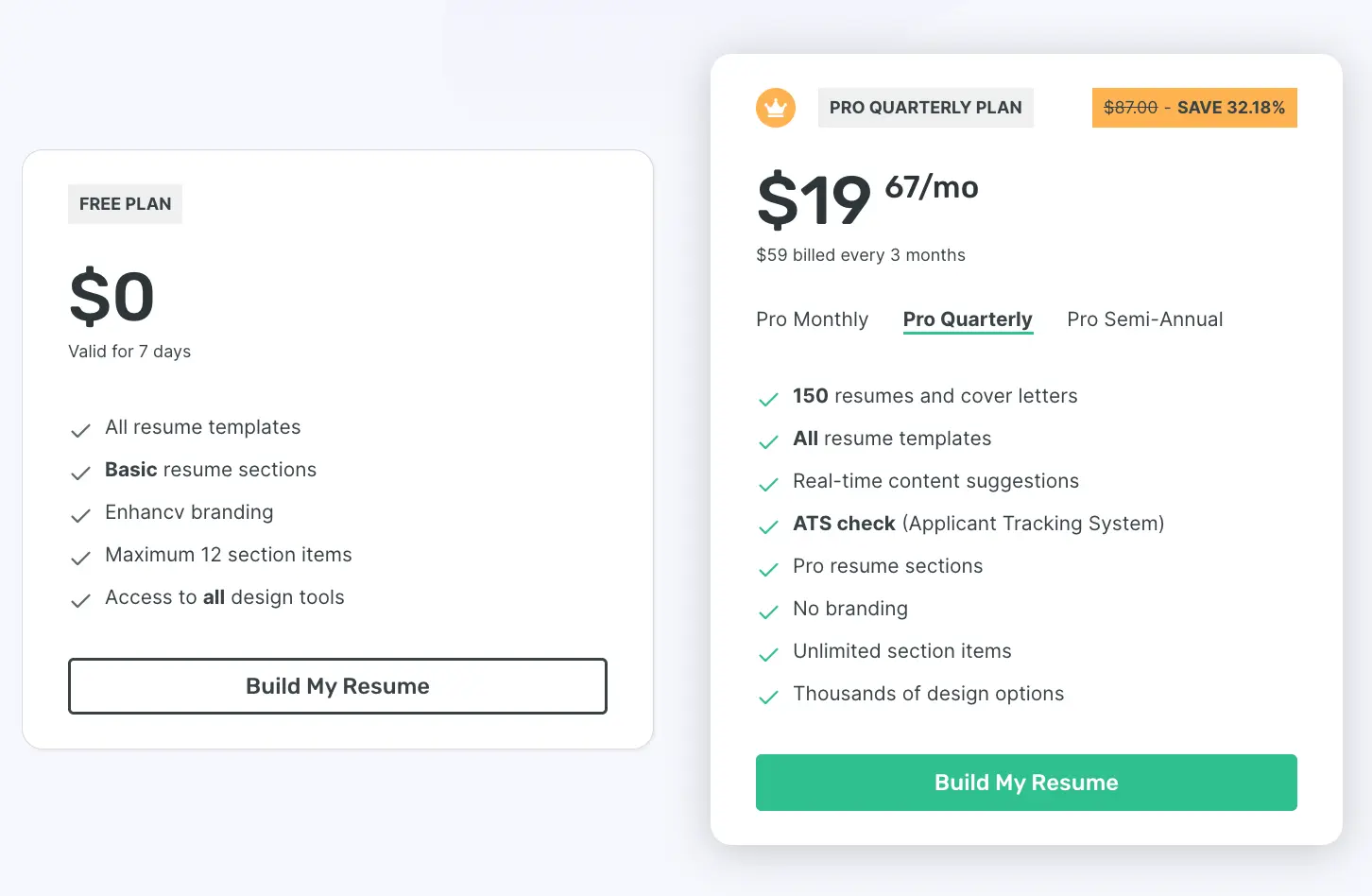
Enhancv offers several subscription cadences (monthly, quarterly, semi-annual) and short free trials so creative professionals can decide whether the visual tools justify an ongoing plan.
ResumeGenius vs Novoresume
ResumeGenius focuses on speed and a rich pre-written content library to get a usable resume completed quickly. Users who want fast drafts and lots of example phrasing will appreciate the guided flows and one-click suggestions that help fill role-specific bullets.
- Large pre-written content library for many industries
- Fast resume generation workflows
- Expert tips and in-builder guidance
- Cover letter templates and quick exports
- Multiple template style options
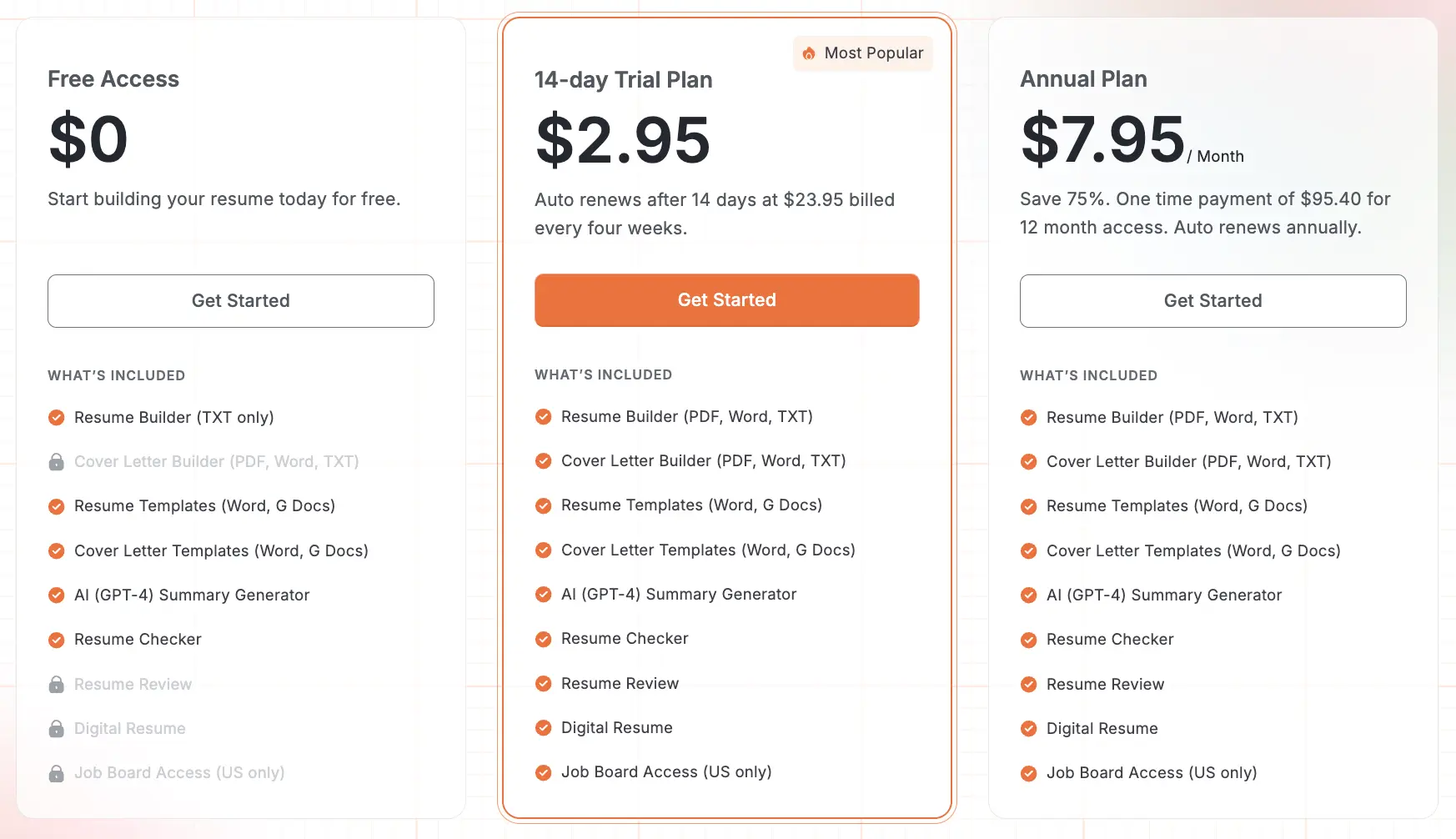
ResumeGenius typically offers a short, low-cost trial with automatic renewal into a subscription - good for users who want a quick, hands-on way to create and download a resume without a long commitment. We also reviewed user feedback on Trustpilot and Sitejabber to understand billing and cancellation experiences.
LiveCareer vs Novoresume
LiveCareer is a longstanding player with deep career resources and a large template library; its age shows in broad coverage for traditional job categories and a wealth of resume examples. If you want a mature resource ecosystem - articles, guides, and long-form career help - LiveCareer is a practical choice.
- Extensive template collection across industries
- Career advice articles and guides
- Resume & cover letter examples for many roles
- Professional guidance materials and sample sentences
LiveCareer’s pricing tiers reflect combinations of builder access, document downloads and extra services; its platform is better suited for users who value a full career resource set alongside the builder.
Rezi vs Novoresume
Rezi is an AI-first player that emphasizes formatting and targeted content optimization. Rezi’s tools are aimed at applicants who need precise structure and keyword-conscious content generation; its Pro and lifetime plans are useful if you expect to iterate often and want a dedicated AI workflow for content targeting.
- AI-powered content suggestions focused on structure and clarity
- Formatting and resume structure tools for consistent outputs
- Varied templates with customization options
- Export options for DOCX and Google Drive
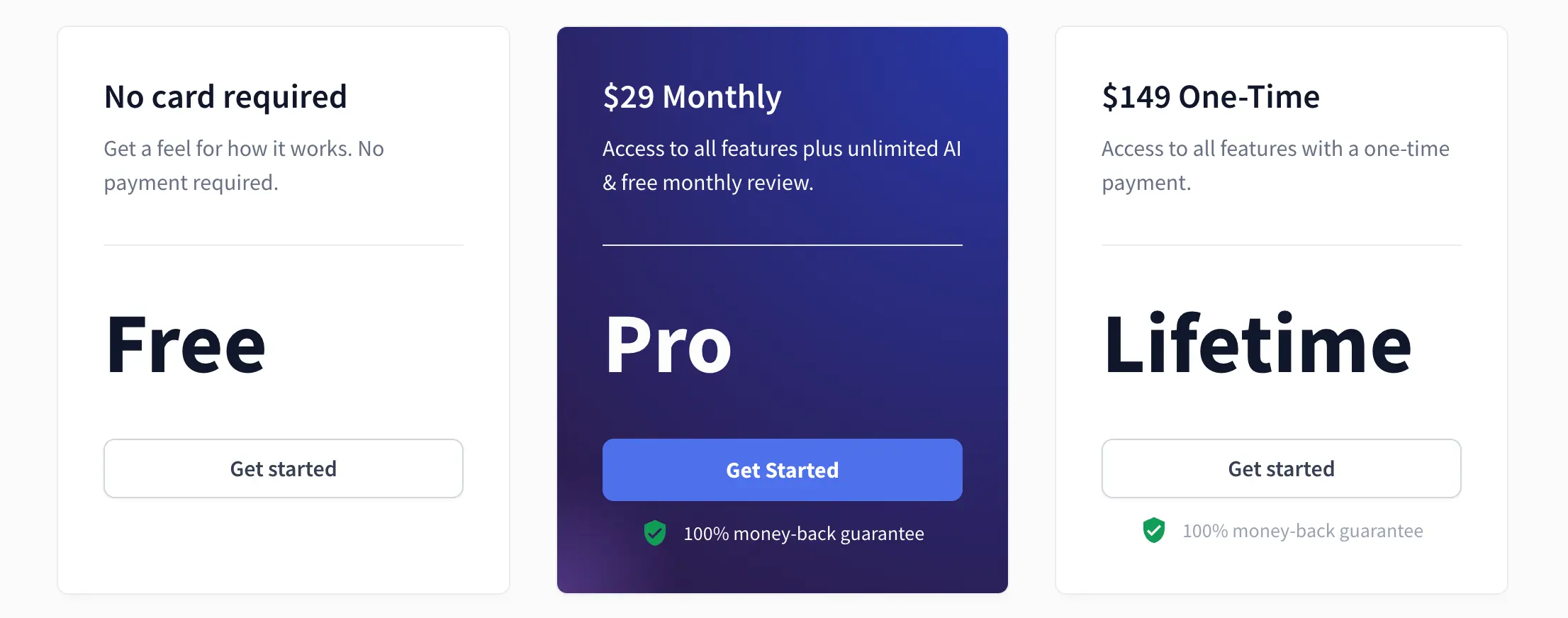
Rezi’s pricing includes a free tier, a Pro monthly plan, and sometimes a lifetime one-time option - a good fit for power users who want guaranteed refunds and the option to buy long-term access.
Resumonk - The Best Alternative to Novoresume
Template Selection and Design Flexibility
When comparing the two, Resumonk’s offering centers on a compact but practical template set (21 templates, 7 of them photo-CV styles) paired with deep surface customization on paid plans: an unlimited color palette and 18 font selections that let you tune visual tone quickly.
Novorésumé takes a different route: it offers multiple curated themes with a focus on polished, specialty sections and export-ready PDFs. For candidates who need quick, simple edits and the ability to produce many versions (Resumonk’s Duplicate button, or a job version for each posting), Resumonk’s customization depth is advantageous; Novorésumé’s strengths are in its curated layouts and specialty structural elements for targeted resumes.
| Feature | Resumonk | Novorésumé |
|---|---|---|
| Template Quantity | 21 templates (6 free) | Multiple curated themes (varied counts) |
| Photo Template Options | Yes (7 photo templates, 2 of them free) | Yes (picture styles and photo options) |
| Color Customization | Unlimited palette | Preset color themes (dozens) |
| Font Options | 18 fonts | ~12 fonts |
| Design Style Categories | Professional + photo CVs | Professional, creative, and specialized layouts |
| Feature | Resumonk |
|---|---|
| Template Quantity | 21 templates (6 free) |
| Photo Template Options | Yes (7 photo templates, 2 of them free) |
| Color Customization | Unlimited palette |
| Font Options | 18 fonts |
| Design Style Categories | Professional + photo CVs |
Both platforms produce recruiter-ready PDFs, but Resumonk leans toward flexibility for users who want to customize brand elements across multiple versions, while Novorésumé focuses on curated, ready-to-publish templates for users who prefer a guided visual standard.
AI Features and Content Assistance
Resumonk’s AI functionality is built around rewrites that keep to your real experience: Improve with AI rewrites a single entry or the whole resume, and a rewrite for a job makes a separate job version, leaving your original as it was.
Novorésumé offers a chat-style assistant and content generation tools integrated into its editor with different usage limits depending on the plan.
Practically, Resumonk’s approach favors users who want control over individual edits, since each pass shows what it changed and can be undone; Novorésumé’s assistant is designed for more conversational drafting within the editing session.
Both produce usable text, but the control model (a pass you can review and undo vs. more open chat access) determines which feels more natural for occasional vs. heavy AI users.
- Content rewriting capabilities: Resumonk (single-entry or whole-resume rewrites, plus a job version for each posting) vs Novorésumé (chat assistant and generation tools).
- Suggestion quality: both provide role-focused suggestions; Resumonk’s arrive as a rewrite you can review and undo, Novorésumé’s are iterative within the editor.
- Full resume rewrite: Resumonk includes it on paid plans, and the free plan includes one pass; Novorésumé relies on assistant interactions depending on plan.
- Access model: Resumonk = a free plan plus monthly paid plans; Novorésumé = plan-based feature access and one-time premium periods.
Which model wins depends on usage patterns: if you want to review and undo each AI change, Resumonk suits you; sustained AI drafting favors Novorésumé’s bundled access.
Import and Export Capabilities
Resumonk supports LinkedIn import and uploads in PDF, DOCX and plain text, letting users bring in existing content quickly and export into PDF (every plan) and DOCX (paid plans) for sharing.
Novorésumé emphasizes polished PDF exports (with advanced layout fidelity) and provides import options as well; both platforms make migration straightforward. Resumonk reads PDF, DOCX and plain text, so save an older DOC or ODT file in one of those formats first; it then rewrites the content into a polished draft that keeps every fact.
Pricing Structure and Value Proposition
Resumonk has a free plan with no time limit and two monthly paid plans, Professional and Executive, with AI rewriting included in both. The pricing page shows each price in your local currency, and you can cancel a paid plan anytime.
Novorésumé’s pricing is structured around fixed premium periods (monthly, quarterly, annual) with one-time payments for each period rather than automatic subscriptions in many regions; for example, public pricing lists a monthly option near $19.99 and annual tiers that reduce the per-month cost when paid upfront. The practical takeaway: if you want to start free and pay month to month only while you need the job tools, Resumonk’s plans fit; if you prefer unlimited editing sessions during a dedicated job-search window, Novorésumé’s time-based premium windows may be a simpler choice.
| Pricing Row | Resumonk | Novorésumé |
|---|---|---|
| Short-term cost | Professional, billed monthly (price in your currency on the pricing page) | Monthly ~ $19.99 (one-time period) |
| Mid-term cost | No multi-month plans. Stay on a monthly plan as long as you need it. | Quarterly / Premium period (one-time pricing) |
| Annual cost | No annual plan. Paid plans renew monthly. Cancel anytime. | Annual premium (discounted when paid upfront) |
| Free Plan Features | 1 resume, 6 templates, LinkedIn import, PDF download with a small Resumonk footer, 1 AI improve pass and 1 rewrite for a job | Basic free tier, 1-page resume with limited download options |
| Payment Model | No trial. The free plan has no time limit, and paid plans renew monthly. | Time-limited premium periods (one-time payments) |
| Pricing Row | Resumonk |
|---|---|
| Short-term cost | Professional, billed monthly (price in your currency on the pricing page) |
| Mid-term cost | No multi-month plans. Stay on a monthly plan as long as you need it. |
| Annual cost | No annual plan. Paid plans renew monthly. Cancel anytime. |
| Free Plan Features | 1 resume, 6 templates, LinkedIn import, PDF download with a small Resumonk footer, 1 AI improve pass and 1 rewrite for a job |
| Payment Model | No trial. The free plan has no time limit, and paid plans renew monthly. |
We recommend matched selection based on use: pick Resumonk if you want a free plan to start and a monthly plan with the job tools when you need them; pick Novorésumé if you’d rather buy a premium time-window with broader, bundled access.
Additional Tools and Features
Beyond templates and AI, Resumonk’s paid plans offer practical extras such as custom URL hosting with analytics (handy for sharing a stable resume link), duplicating a resume for quick multi-version management, and a cover letter builder that matches resume design. They also include a 24/7 job search agent, and the Executive plan adds warm introductions to people at your target companies you have a real connection to.
Novorésumé provides useful job-application tracking tools and master resume management features that centralize content across versions. For active applicants who need to track applications and notes, Novorésumé’s built-in trackers are convenient; for professionals who want to publish an attractive public resume and measure views, Resumonk’s custom URL + analytics is a notable differentiator.
In short: Resumonk focuses on version control, shareability, AI edits that keep to your real experience and a 24/7 job search agent; Novorésumé focuses on curated presentation and an application-centric workflow. Your choice should match whether you prioritize public sharing and analytics or integrated application tracking and curated templates.
Frequently Asked Questions About Novoresume Alternatives
Which Platform Offers the Best Free Plan?
Free plans vary by what they actually allow you to download.
Kickresume is notable for permitting free template downloads and offering student premium access, while Resumonk provides a usable free tier with branded PDFs and basic templates so you can create a presentable resume without immediate payment. Most free plans limit advanced exports (DOCX or unbranded PDFs) so expect to upgrade if you want fully polished, unbranded documents.
Can These Platforms Import Existing Resumes?
Yes - most alternatives accept PDF or DOCX uploads and LinkedIn imports.
Resumonk and Kickresume explicitly advertise LinkedIn import, and many builders let you upload a PDF and then edit the parsed content. Expect some manual cleanup after import: section mapping and line breaks often need adjustment, but the heavy-lift of getting legacy work history into a modern template is substantially reduced.
Which Alternative Provides the Best AI Features?
Different AI implementations serve different needs: Kickresume emphasizes GPT-based full-section generation and career coaching, Resumonk rewrites a single entry or a whole resume while keeping to your real experience, and Resume.io and ResumeGenius provide review-style AI feedback and strengths analysis. We avoid naming an absolute winner. Pick by use case: full-draft generation (Kickresume), rewrites that invent nothing plus a version for each job (Resumonk), or review and scoring (Resume.io / ResumeGenius).
Do These Platforms Work on Mobile Devices?
Yes - many platforms are mobile-responsive; Kickresume explicitly provides iOS and Android apps, while others offer responsive web editors that function on tablets and phones. For extensive editing or multi-version management, desktop remains more comfortable, but quick edits, downloads, and sharing can often be done from a mobile device.
Taking the Next Step in Your Job Search
There are many strong alternatives to Novorésumé - each emphasizes slightly different strengths.
We encourage you to list your priorities (budget, AI usage pattern, degree of design control, and whether you need tracking or public hosting), try two platforms using free plans or trials, and choose the one that fits your application cadence and content workflow. The right tool supports your story; it doesn’t replace it.
Remember: the builder is a means to an end.
A well-crafted resume starts with clear, quantified accomplishments and ends with consistent tailoring for each role.
Use trials to compare real outputs, and pick the platform that gets you to submission-ready resumes fastest - then double down on content quality and outreach. Good luck - and we’re here to help with templates, examples and targeted rewrites when you need them.
Keep reading
.png)