Technical Support Resume Example (with Tips and Best Practices)
Introduction
You're staring at your laptop screen at 11 PM, surrounded by empty coffee cups and roughly seventeen different browser tabs open to Technical Support job postings. Maybe you're that friend everyone texts when their WiFi mysteriously stops working, or you've just completed your CompTIA A+ certification while juggling your current retail job. Perhaps you're making the leap from customer service, where you've mastered the art of staying calm while someone screams about their expired coupon - except now, you want to channel that patience into helping someone whose email just deleted itself.
The Technical Support role is calling your name, but transforming your mix of technical knowledge, problem-solving instincts, and people skills into a resume feels like trying to explain to your mom why restarting the router actually fixes most internet problems.
Here's what most people don't realize about Technical Support positions - they're the Swiss Army knives of the IT world. You're not just "the IT person" who fixes printers (though yes, you'll definitely fix printers). You're a translator between the intimidating world of technology and the humans who just need their tools to work. You're an educator, a detective, a counselor, and sometimes a miracle worker who recovers that presentation someone definitely didn't save. And your resume needs to capture all of this while still fitting on one to two pages and speaking the language hiring managers understand.
In this comprehensive guide, we'll walk you through every element of crafting the perfect Technical Support resume. We'll start with choosing the right format - spoiler alert, reverse-chronological is your friend here - and show you exactly how to structure your information for maximum impact. Then we'll dive deep into presenting your work experience, whether you're translating retail problem-solving into IT language or showcasing your internship achievements. You'll learn which technical and soft skills actually matter (and how to prove you have them), how to position your education and certifications strategically, and even how to turn that time you built a gaming PC for your cousin into relevant experience.
We'll also cover the nuances that separate good Technical Support resumes from great ones - how to handle career transitions, what industry-specific considerations matter, and why mentioning your home lab setup might just land you the interview. From crafting a cover letter that proves you understand both routers and humans, to preparing references who can vouch for your ability to remain patient when someone insists they "didn't click anything" right before their system crashed, we've got you covered. Whether you're fresh out of school with theoretical knowledge burning bright, switching careers with transferable skills in hand, or somewhere in between, this guide will help you build a Technical Support resume that gets callbacks instead of crickets.
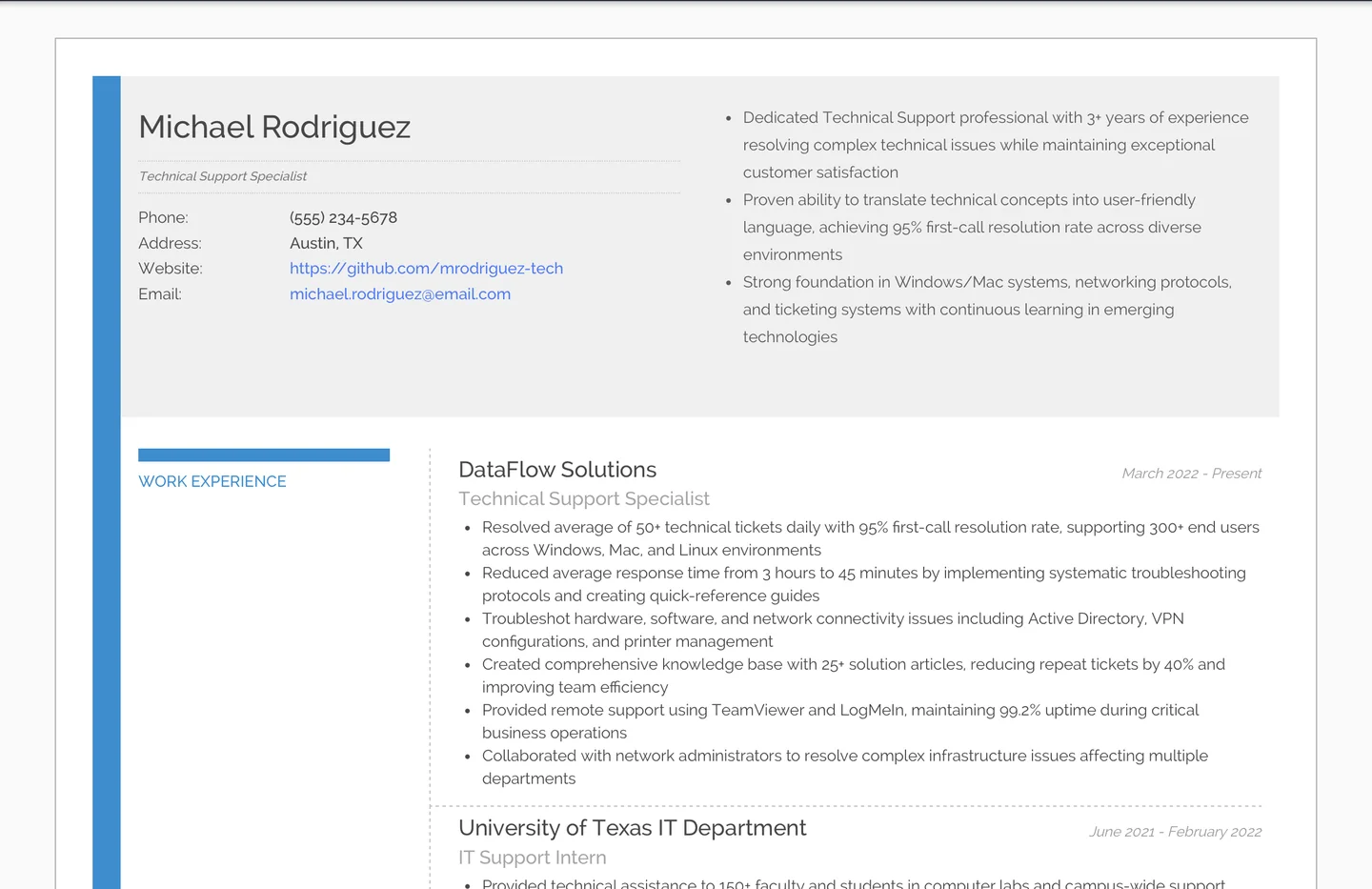
The Best Technical Support Resume Example/Sample
https://www.resumonk.com/technical-supportTechnical SupportResume Format for Technical Support Resume
For Technical Support positions, the reverse-chronological format is your best friend. Why? Because hiring managers want to see your most recent technical exposure first.
They're looking for someone who can hit the ground running with current technologies, not someone whose last relevant experience was troubleshooting Windows XP.
Structure Your Technical Support Resume Like a Troubleshooting Guide
Start with your contact information and a brief professional summary (2-3 lines maximum) that immediately signals you understand what technical support means - bridging the gap between complex technology and frustrated users. Follow this with your work experience in reverse-chronological order, then your technical skills section (crucial for this role), education, and relevant certifications.
Here's the thing about Technical Support roles - they're entry-level positions in the IT hierarchy, but they're not "easy." You're the first line of defense when technology fails, and your resume format should reflect both your technical competence and your ability to communicate clearly.
The Hybrid Approach for Career Changers
If you're transitioning from customer service, retail, or hospitality into Technical Support, consider a modified reverse-chronological format that includes a prominent "Technical Skills" or "Technical Proficiencies" section right after your summary. This immediately shows you have the technical foundation, even if your work history doesn't scream "IT professional" yet.
Remember, in the UK and Australia, you might include a brief personal statement instead of a professional summary, while in Canada and the USA, stick to the professional summary approach. Keep it to one page if you have less than 5 years of experience, two pages maximum for seasoned professionals.
Work Experience on Technical Support Resume
Your work experience section is where you prove you can actually do what Technical Support demands - solve problems, communicate solutions, and maintain composure when the server crashes at 4:59 PM on a Friday. But here's where most applicants stumble - they list duties instead of demonstrating impact.
Quantify Your Technical Impact
Technical Support isn't about sitting at a help desk waiting for calls.
It's about resolution rates, response times, and user satisfaction. When describing your experience, whether it's formal Technical Support or that time you helped implement a new POS system at your retail job, focus on measurable outcomes.
❌ Don't write vaguely about your responsibilities:
Helped customers with technical issues
Answered phone calls and emails
Fixed computer problems
✅ Do write specifically about your achievements:
- Resolved average of 45+ technical tickets daily with 94% first-call resolution rate
- Reduced average response time from 2 hours to 35 minutes by creating quick-reference guides
- Troubleshot hardware, software, and network issues for 200+ end users across Windows and Mac environments
Translating Non-Technical Experience
Maybe you're coming from retail where you troubleshot point-of-sale systems, or from administrative work where you became the go-to person for Excel problems.
These experiences matter! The key is translating them into Technical Support language.
For instance, if you worked in customer service, don't just mention you "handled customer complaints." Instead, explain how you "diagnosed customer issues through systematic questioning, documenting problems and solutions for future reference" - that's exactly what Technical Support does, just with technology as the subject matter.
❌ Don't undervalue your transferable experience:
Retail Associate - TechWorld Store
- Sold computers and accessories
- Helped customers choose products
- Processed returns
✅ Do connect your experience to Technical Support skills:
Retail Associate - TechWorld Store
- Provided technical guidance to 50+ customers daily on hardware/software compatibility
- Troubleshot customer device issues, achieving 85% in-store resolution rate
- Created simplified setup guides that reduced return rates by 30%
Demonstrating Progressive Responsibility
Even in entry-level roles, show progression.
Maybe you started answering basic password reset tickets and graduated to network troubleshooting. Perhaps you began supporting one department and expanded to company-wide support. This progression shows you're not just maintaining - you're growing.
Skills to Include on Technical Support Resume
Here's where Technical Support resumes live or die. You're walking a tightrope between proving technical competence and demonstrating you can explain why "turning it off and on again" actually works to someone who thinks the monitor is the computer.
Technical Skills - Your Foundation
List your technical skills in order of relevance to the job posting.
But here's the crucial part - be honest about your proficiency level. Technical Support interviews often include practical assessments, and claiming expertise in Active Directory when you've only reset passwords will backfire spectacularly.
Organize your technical skills into categories that make sense:
Technical Skills
- Operating Systems: Windows 10/11, macOS, Linux (Ubuntu)
- Ticketing Systems: ServiceNow, Zendesk, JIRA Service Desk
- Remote Support Tools: TeamViewer, RemotePC, LogMeIn
- Networking: TCP/IP, DNS, DHCP, VPN configuration
- Hardware: Desktop/laptop troubleshooting, printer configuration, mobile device management
- Software: Microsoft Office 365, Google Workspace, Active Directory basics
The Soft Skills That Actually Matter
Yes, everyone lists "communication skills," but in Technical Support, this isn't filler - it's essential. You need to translate "the DNS server isn't responding" into "the internet address book is having problems" without sounding condescending.
❌ Don't list generic soft skills:
- Good communication
- Team player
- Problem solver
- Patient
✅ Do demonstrate specific Technical Support soft skills:
- Technical communication: Ability to explain complex issues in user-friendly terms
- Active listening: Identifying root causes through targeted questioning
- Stress management: Maintaining professionalism during system-critical incidents
- Documentation: Creating clear, reproducible solution guides
Certifications and Continuous Learning
In Technical Support, certifications on your resume are your proof of commitment.
CompTIA A+, ITIL Foundation, or even Google IT Support Professional Certificate show you're serious about the field. But don't just list them - mention if they're current and include certification numbers if applicable.
For those in the UK, ITIL certifications carry particular weight. In the USA and Canada, CompTIA certifications are widely recognized. Australian employers often value Microsoft certifications highly. Adjust your emphasis accordingly.
Specific Considerations and Tips for Technical Support Resume
Now for the insider knowledge - the things that separate a Technical Support resume that gets callbacks from one that gets crickets.
The Home Lab Advantage
Unlike many entry-level positions, Technical Support rewards self-directed learning. If you've built a home lab, mention it! This shows initiative and genuine interest beyond just needing a paycheck. Maybe you've set up a home network with VLANs, run virtual machines to test different OS configurations, or maintain a personal documentation wiki.
These projects demonstrate you think like a Technical Support professional even outside work hours.
Personal Projects:
- Configured home network with segregated VLANs for IoT devices and guest access
- Maintain virtualized lab environment (VMware) for testing OS deployments and troubleshooting scenarios
- Created automated PowerShell scripts for common Windows maintenance tasks
The Customer Service Translation
Technical Support is unique because it's equally about technology and people. If you've worked in any customer-facing role, you have an advantage - but only if you frame it correctly.
Don't bury your customer service experience; instead, highlight how dealing with frustrated customers about billing issues directly translates to handling users whose computers won't boot.
Industry-Specific Considerations
Technical Support in healthcare requires HIPAA awareness. Financial services need someone who understands compliance. Education sector values experience with learning management systems.
Don't just apply the same resume everywhere - tailor your technical skills and experience to the industry.
❌ Don't ignore industry context:
Technical Support Specialist
- Provided IT support to users
- Resolved technical issues
- Maintained equipment
✅ Do highlight industry-relevant experience:
Technical Support Specialist - Healthcare Environment
- Provided HIPAA-compliant technical support for 150+ clinical staff
- Troubleshot EMR system issues ensuring zero clinical downtime during patient care
- Maintained medical equipment interfaces with 99.9% uptime requirement
The Availability Reality
Here's something nobody tells you - Technical Support often requires flexibility with schedules. If you're genuinely available for evening, weekend, or on-call shifts, mention it in your cover letter or summary.
This immediately puts you ahead of candidates who expect 9-to-5 Monday-Friday from day one.
The Documentation Differentiator
Every Technical Support role involves documentation, but few candidates highlight this skill effectively. If you've created knowledge base articles, quick reference guides, or even just detailed ticket notes in previous roles, showcase this.
Companies desperately need Technical Support staff who document solutions properly.
Finally, remember that Technical Support is often seen as a stepping stone to other IT roles - and that's okay. Showing ambition to grow into network administration, system administration, or security roles demonstrates you're viewing this as a career, not just a job. But balance this with genuine enthusiasm for the Technical Support role itself. Nobody wants to hire someone who's already got one foot out the door.
Your Technical Support resume isn't just a list of technical skills and job duties - it's your first opportunity to demonstrate the very skills the role requires. Clear communication, logical problem-solving presentation, and the ability to bridge technical and non-technical worlds.
Get these elements right, and you'll find yourself fielding interview calls instead of password reset tickets at your current job.
Education to List on Technical Support Resume
Let's face it - you're entering the tech world through one of its most accessible doors. Technical Support is that unique entry-level position where your passion for problem-solving meets your ability to translate "tech speak" into human language.
Whether you're fresh out of college with a shiny Computer Science degree or you're that person everyone calls when their WiFi acts up (despite having studied Philosophy), your educational background tells a story that hiring managers want to hear.
The Strategic Placement of Your Education Section
Here's where things get interesting. If you're a recent graduate, your education section is your opening act - it goes right after your resume summary. You've spent the last few years building theoretical knowledge about networks, databases, and troubleshooting methodologies, and that academic foundation is your strongest selling point.
But if you've been fixing computers since Windows XP was cool and have a few years of experience under your belt, your education slides down the resume like a supporting character who had their moment but now plays a different role.
What Educational Credentials Actually Matter
Technical Support roles are wonderfully democratic when it comes to educational requirements. Sure, a degree in Computer Science, Information Technology, or Information Systems looks fantastic, but hiring managers also love seeing degrees in Engineering, Mathematics, or even Communications - because explaining why someone needs to "turn it off and on again" requires patience and clarity that liberal arts majors often excel at.
The real secret? It's not just about the degree itself, but how you present the relevant aspects of your education. That database management course you took? Gold. The technical writing class? Absolutely relevant.
Even that psychology elective helps - understanding user frustration is half the battle in tech support.
Formatting Your Education for Maximum Impact
When listing your education, think like a troubleshooter - start with the most important information and work your way down to the details. Here's how to structure it effectively:
❌ Don't write your education like a transcript dump:
University of Texas
Bachelor of Science
Graduated 2023
GPA: 3.2
✅ Do present it with relevant context and achievements:
Bachelor of Science in Information Technology | University of Texas, Austin, TX | May 2023
- GPA: 3.6/4.0
- Relevant Coursework: Network Administration, Database Management, Systems Analysis
- Academic Project: Developed troubleshooting flowchart system that reduced ticket
resolution time by 30% in university help desk simulation
When to Include Certifications with Education
In the technical support world, certifications are like power-ups in a video game - they don't replace your main character (experience or degree), but they definitely make you more formidable. CompTIA A+, Network+, or vendor-specific certifications from Microsoft, Cisco, or Google often carry more weight than you'd think. If you're fresh out of school, listing these certifications within or immediately after your education section shows initiative. You're basically telling employers, "I didn't just learn theory - I proved I can apply it."
For those transitioning from other fields, online courses and bootcamps deserve mention too. That Google IT Support Professional Certificate you earned while working retail? It shows determination and self-direction.
Include it with pride, but be specific about what you learned:
Google IT Support Professional Certificate | Coursera | 2024
- Completed 150+ hours of instruction in troubleshooting, customer service,
 networking, operating systems, and system administration
- Hands-on labs covering Windows, Linux, and Active Directory environments
Awards and Publications on Technical Support Resume
Now here's where you might be thinking, "Publications? Awards? I'm applying for technical support, not accepting a Nobel Prize." But stick with me here. In the technical support universe, recognition comes in forms you might not immediately recognize as award-worthy, and sharing knowledge - even informally - counts as contributing to the field.
Understanding What Counts as an Award in Technical Support
Technical support professionals rarely win traditional academic awards, but the recognition you've received matters more than you think.
Were you the go-to person in your university's computer lab? Did you receive kudos from your internship supervisor for creating a troubleshooting guide that the whole team adopted? These achievements demonstrate exactly what hiring managers seek - initiative, problem-solving abilities, and the capacity to improve processes.
Think broadly about recognition. Employee of the Month at your current job (even if it's not IT-related) shows reliability. Leading your gaming clan to victory demonstrates leadership and strategic thinking. Winning a hackathon proves you can think creatively under pressure. These all translate beautifully to technical support competencies.
The Surprising Value of Documentation and Knowledge Sharing
Here's something most applicants don't realize - that troubleshooting guide you wrote for your classmates, the FAQ document you created for your internship, or even that detailed Reddit post explaining how to fix a common Windows error? These are publications in the technical support world.
They demonstrate your ability to document solutions clearly, a skill that's absolutely crucial when you're building knowledge bases and helping teams scale their support operations.
❌ Don't dismiss your knowledge-sharing activities:
Awards: None
Publications: None
✅ Do recognize and present your contributions professionally:
Recognition & Contributions:
• "Outstanding Student Technician Award" - University IT Help Desk (2023)
 Recognized for maintaining highest customer satisfaction scores (4.8/5.0)
• Created comprehensive Ubuntu troubleshooting guide adopted by Computer Science
 department, reducing lab support tickets by 40%
• Contributing author to tech blog "TechFixIt" - Published 5 articles on Windows 11
 optimization with 10,000+ combined views
Positioning Awards for Different Experience Levels
If you're fresh out of school, academic achievements like Dean's List, technical competitions, or departmental awards absolutely belong on your resume.
They compensate for limited professional experience and show you're capable of excellence. For career changers, awards from your previous field that demonstrate transferable skills - like customer service excellence or process improvement - can bridge the gap between where you've been and where you're going.
The key is relevance and recency. That "Most Likely to Fix Your Computer" superlative from high school? Maybe skip it. But the recognition you received last year for creating a streamlined inventory system at your retail job? That shows exactly the kind of systematic thinking technical support teams need.
Listing References for Technical Support Resume
Remember that professor who watched you patiently explain Python loops to struggling classmates for the fifth time?
Or that supervisor who saw you turn an angry customer into a five-star review? These people have witnessed you doing exactly what technical support is all about - solving problems while maintaining human connection. They're your professional cheerleaders, and in the technical support world, their endorsement carries serious weight.
Why References Matter More Than You Think in Technical Support
Technical support is a trust position. Companies are literally putting you on the front lines with their customers, giving you access to their systems, and counting on you to represent their brand when things go wrong.
While a developer might prove their worth through a coding test, your ability to handle pressure, maintain professionalism, and learn quickly is best vouched for by people who've seen you in action.
Here's what many applicants don't realize - technical support references are evaluated differently than other IT roles. Hiring managers aren't just confirming your technical competence; they're investigating your patience levels, your ability to explain complex topics simply, and whether you can maintain composure when someone is yelling about their crashed presentation five minutes before the board meeting.
Choosing the Right References for Technical Support Applications
The ideal technical support reference portfolio includes someone who's seen your technical skills, someone who's witnessed your customer service abilities, and someone who can speak to your ability to learn and adapt. This might be your internship supervisor, a professor who observed you helping classmates, or even a current colleague who's watched you unofficially become the office IT person.
❌ Don't list references without context or preparation:
References:
John Smith - 555-0123
Jane Doe - 555-0456
Bob Johnson - 555-0789
✅ Do provide complete, relevant reference information:
Professional References:

1. Sarah Mitchell, IT Help Desk Supervisor, University of State
- Email: [email protected] | Phone: (555) 012-3456
- Relationship: Supervised my work as Student Technical Assistant (2022-2023)
- Can speak to: Troubleshooting abilities, customer service skills, and ticket
 resolution efficiency

2. Marcus Chen, Senior Developer, TechStartup Inc.
- Email: [email protected] | Phone: (555) 098-7654
- Relationship: Mentored me during summer internship (2023)
- Can speak to: Technical knowledge, learning agility, and documentation skills
The Strategy Behind "References Available Upon Request"
In the United States and Canada, "References available upon request" has become the standard, primarily to save resume space and protect your references from unnecessary contact.
However, for technical support roles, especially entry-level positions, being proactive with a separate reference sheet can set you apart. It shows you're prepared and confident in your recommendations.
UK and Australian employers often expect references to be readily available, sometimes even requiring them with the initial application. In these markets, having your references organized and ready demonstrates the attention to detail that's crucial in technical support work.
Preparing Your References for Success
Here's the insider move that most applicants miss - brief your references about the specific role.
Send them the job description and highlight which of your skills align with the position. When a hiring manager calls asking about your problem-solving abilities, your reference should have a specific example ready about that time you diagnosed a network issue that three senior techs missed.
For technical support roles, encourage your references to prepare examples that showcase both technical competence and soft skills. The story about you staying late to help a frustrated user recover their data says more than generic praise about your "dedication." Remember, in technical support, the human element is just as important as the technical expertise, and your references should be ready to illustrate both.
Finally, maintain your reference relationships even when you're not job hunting. That quick email updating your former supervisor about your new certification, or the thank-you note to the professor who wrote your recommendation - these gestures ensure your references remain engaged and enthusiastic about supporting your career growth. In the technical support world, where networking and relationship-building are core competencies, maintaining strong reference relationships demonstrates exactly the skills employers want to see.
Cover Letter Tips for Technical Support Resume
Come, let's visualize this - you're a hiring manager sifting through dozens of technical support applications.
Everyone has "strong communication skills" and "passion for technology" plastered across their resumes. Then you open a cover letter that starts with, "Last week, I helped my grandmother video call her sister in Australia for the first time in two years. The joy in her voice when the connection finally worked reminded me why I love technical support - it's not about the technology, it's about connecting people to what matters."
Suddenly, you're not just another applicant; you're a human who gets it.
Why Technical Support Cover Letters Hit Different
Technical support is that rare field where soft skills and hard skills carry equal weight. Your cover letter is where you prove you're not just someone who can follow a troubleshooting flowchart - you're someone who can calm a frustrated user, explain complex concepts simply, and maintain composure when the entire office network crashes during quarter-end reports.
The resume shows you can do the job; the cover letter shows you understand what the job really is.
Unlike software development roles where code samples might speak louder than words, technical support hiring managers are evaluating your written communication skills through your cover letter. They're imagining you writing ticket notes, creating user documentation, and composing those delicate emails to users who insist the problem isn't on their end (when it absolutely is).
Structuring Your Technical Support Cover Letter
Forget the generic three-paragraph formula you learned in college. Technical support cover letters need to demonstrate problem-solving from the very first line. Start with a specific scenario that showcases your technical and interpersonal skills. Then, connect your experience to their needs - and be specific about their needs. Did you notice they use Zendesk? Mention your ticketing system experience. Supporting Mac and PC environments?
Highlight your cross-platform expertise.
❌ Don't write generic statements that could apply to any job:
"I am writing to apply for the Technical Support position at your company.
I have strong technical skills and enjoy helping people. I believe I would be a great addition to your team."
✅ Do demonstrate specific understanding and value:
"When I read that TechCorp is expanding its 24/7 support coverage for international clients, I immediately understood the challenge - managing time zone handoffs while maintaining consistent service quality. In my current role supporting a distributed team across three continents, I
developed a ticket annotation system that reduced re-escalation rates by 35% during shift changes."
Addressing Common Technical Support Scenarios
Career changers, here's your moment.
Your cover letter is where you connect the dots between bartending and technical support (both require multitasking under pressure), or between teaching and tech support (both involve breaking down complex concepts for diverse audiences). Don't apologize for your non-traditional background - embrace how it makes you uniquely qualified to understand and serve users who aren't tech-savvy.
For recent graduates, your cover letter should bridge the gap between academic knowledge and practical application. That senior project where you built a network? Explain how debugging it taught you systematic problem-solving. Those hours tutoring classmates in the computer lab?
That's real technical support experience, even if it wasn't paid.
Regional Differences in Cover Letter Expectations
In the United States and Canada, cover letters remain standard practice, especially for entry-level technical support roles.
Keep them to one page and focus on achievements. UK employers often call them "covering letters" and appreciate a slightly more formal tone, though the tech industry tends to be more relaxed. Australian employers value directness - get to the point about why you're suited for the role. Regardless of location, research the company's culture. A startup might appreciate humor and personality, while a financial institution probably wants to see professionalism and attention to detail.
Key Takeaways
After diving deep into the world of Technical Support resumes, here are the essential points to keep in your troubleshooting toolkit:
- Use reverse-chronological format as your foundation - Hiring managers want to see your most recent technical exposure first, proving you're current with today's technologies
- Quantify your impact with specific metrics - Replace vague duties with concrete achievements like "45+ tickets resolved daily with 94% first-call resolution rate"
- Balance technical skills with soft skills strategically - List technical competencies in order of relevance, but also demonstrate your ability to translate complex concepts into user-friendly language
- Translate non-IT experience into Technical Support language - That retail troubleshooting or office Excel expertise directly relates to technical problem-solving abilities
- Include relevant certifications and continuous learning - CompTIA A+, ITIL Foundation, or even online certificates show commitment to the field
- Showcase your home lab and personal projects - These demonstrate genuine interest and self-directed learning beyond just needing employment
- Tailor your resume to industry-specific needs - Healthcare requires HIPAA awareness, finance needs compliance understanding, education values LMS experience
- Document your documentation skills - Creating guides, knowledge base articles, or clear ticket notes is a crucial but often overlooked competency
- Position education strategically based on experience level - Recent grads lead with education, experienced professionals place it after work history
- Prepare references who can speak to both technical and interpersonal skills - Technical Support is equally about technology and human connection
Creating a compelling Technical Support resume doesn't have to feel like troubleshooting a blue screen of death without error codes. With Resumonk, you can build a professional Technical Support resume that captures both your technical expertise and your human touch. Our AI-powered recommendations help you identify the most relevant skills to highlight, while our professionally designed templates ensure your resume looks as polished as your cable management (we hope). Whether you're transitioning from customer service, fresh out of school, or ready to level up from your current support role, Resumonk's intuitive platform guides you through each section, helping you quantify achievements, organize technical skills effectively, and present your experience in the language hiring managers understand.
Ready to create your Technical Support resume that gets past the first level of screening?
Start building your professional resume with Resumonk's intelligent templates and land that Technical Support role you've been eyeing.
Get started with Resumonk today and transform your technical know-how and people skills into a resume that opens doors in the IT world.
More Information Technology (IT) resume examples
- IT Project Manager resume example
- Entry Level Help Desk resume example
- AWS resume example
- QA Automation Engineer resume example
See all Information Technology (IT) resume examples, or browse every category.
Resume writing tips
You're staring at your laptop screen at 11 PM, surrounded by empty coffee cups and roughly seventeen different browser tabs open to Technical Support job postings. Maybe you're that friend everyone texts when their WiFi mysteriously stops working, or you've just completed your CompTIA A+ certification while juggling your current retail job. Perhaps you're making the leap from customer service, where you've mastered the art of staying calm while someone screams about their expired coupon - except now, you want to channel that patience into helping someone whose email just deleted itself.
The Technical Support role is calling your name, but transforming your mix of technical knowledge, problem-solving instincts, and people skills into a resume feels like trying to explain to your mom why restarting the router actually fixes most internet problems.
Here's what most people don't realize about Technical Support positions - they're the Swiss Army knives of the IT world. You're not just "the IT person" who fixes printers (though yes, you'll definitely fix printers). You're a translator between the intimidating world of technology and the humans who just need their tools to work. You're an educator, a detective, a counselor, and sometimes a miracle worker who recovers that presentation someone definitely didn't save. And your resume needs to capture all of this while still fitting on one to two pages and speaking the language hiring managers understand.
In this comprehensive guide, we'll walk you through every element of crafting the perfect Technical Support resume. We'll start with choosing the right format - spoiler alert, reverse-chronological is your friend here - and show you exactly how to structure your information for maximum impact. Then we'll dive deep into presenting your work experience, whether you're translating retail problem-solving into IT language or showcasing your internship achievements. You'll learn which technical and soft skills actually matter (and how to prove you have them), how to position your education and certifications strategically, and even how to turn that time you built a gaming PC for your cousin into relevant experience.
We'll also cover the nuances that separate good Technical Support resumes from great ones - how to handle career transitions, what industry-specific considerations matter, and why mentioning your home lab setup might just land you the interview. From crafting a cover letter that proves you understand both routers and humans, to preparing references who can vouch for your ability to remain patient when someone insists they "didn't click anything" right before their system crashed, we've got you covered. Whether you're fresh out of school with theoretical knowledge burning bright, switching careers with transferable skills in hand, or somewhere in between, this guide will help you build a Technical Support resume that gets callbacks instead of crickets.
The Best Technical Support Resume Example/Sample
https://www.resumonk.com/technical-supportTechnical SupportResume Format for Technical Support Resume
For Technical Support positions, the reverse-chronological format is your best friend. Why? Because hiring managers want to see your most recent technical exposure first.
They're looking for someone who can hit the ground running with current technologies, not someone whose last relevant experience was troubleshooting Windows XP.
Structure Your Technical Support Resume Like a Troubleshooting Guide
Start with your contact information and a brief professional summary (2-3 lines maximum) that immediately signals you understand what technical support means - bridging the gap between complex technology and frustrated users. Follow this with your work experience in reverse-chronological order, then your technical skills section (crucial for this role), education, and relevant certifications.
Here's the thing about Technical Support roles - they're entry-level positions in the IT hierarchy, but they're not "easy." You're the first line of defense when technology fails, and your resume format should reflect both your technical competence and your ability to communicate clearly.
The Hybrid Approach for Career Changers
If you're transitioning from customer service, retail, or hospitality into Technical Support, consider a modified reverse-chronological format that includes a prominent "Technical Skills" or "Technical Proficiencies" section right after your summary. This immediately shows you have the technical foundation, even if your work history doesn't scream "IT professional" yet.
Remember, in the UK and Australia, you might include a brief personal statement instead of a professional summary, while in Canada and the USA, stick to the professional summary approach. Keep it to one page if you have less than 5 years of experience, two pages maximum for seasoned professionals.
Work Experience on Technical Support Resume
Your work experience section is where you prove you can actually do what Technical Support demands - solve problems, communicate solutions, and maintain composure when the server crashes at 4:59 PM on a Friday. But here's where most applicants stumble - they list duties instead of demonstrating impact.
Quantify Your Technical Impact
Technical Support isn't about sitting at a help desk waiting for calls.
It's about resolution rates, response times, and user satisfaction. When describing your experience, whether it's formal Technical Support or that time you helped implement a new POS system at your retail job, focus on measurable outcomes.
❌ Don't write vaguely about your responsibilities:
Helped customers with technical issues
Answered phone calls and emails
Fixed computer problems
✅ Do write specifically about your achievements:
- Resolved average of 45+ technical tickets daily with 94% first-call resolution rate
- Reduced average response time from 2 hours to 35 minutes by creating quick-reference guides
- Troubleshot hardware, software, and network issues for 200+ end users across Windows and Mac environments
Translating Non-Technical Experience
Maybe you're coming from retail where you troubleshot point-of-sale systems, or from administrative work where you became the go-to person for Excel problems.
These experiences matter! The key is translating them into Technical Support language.
For instance, if you worked in customer service, don't just mention you "handled customer complaints." Instead, explain how you "diagnosed customer issues through systematic questioning, documenting problems and solutions for future reference" - that's exactly what Technical Support does, just with technology as the subject matter.
❌ Don't undervalue your transferable experience:
Retail Associate - TechWorld Store
- Sold computers and accessories
- Helped customers choose products
- Processed returns
✅ Do connect your experience to Technical Support skills:
Retail Associate - TechWorld Store
- Provided technical guidance to 50+ customers daily on hardware/software compatibility
- Troubleshot customer device issues, achieving 85% in-store resolution rate
- Created simplified setup guides that reduced return rates by 30%
Demonstrating Progressive Responsibility
Even in entry-level roles, show progression.
Maybe you started answering basic password reset tickets and graduated to network troubleshooting. Perhaps you began supporting one department and expanded to company-wide support. This progression shows you're not just maintaining - you're growing.
Skills to Include on Technical Support Resume
Here's where Technical Support resumes live or die. You're walking a tightrope between proving technical competence and demonstrating you can explain why "turning it off and on again" actually works to someone who thinks the monitor is the computer.
Technical Skills - Your Foundation
List your technical skills in order of relevance to the job posting.
But here's the crucial part - be honest about your proficiency level. Technical Support interviews often include practical assessments, and claiming expertise in Active Directory when you've only reset passwords will backfire spectacularly.
Organize your technical skills into categories that make sense:
Technical Skills
- Operating Systems: Windows 10/11, macOS, Linux (Ubuntu)
- Ticketing Systems: ServiceNow, Zendesk, JIRA Service Desk
- Remote Support Tools: TeamViewer, RemotePC, LogMeIn
- Networking: TCP/IP, DNS, DHCP, VPN configuration
- Hardware: Desktop/laptop troubleshooting, printer configuration, mobile device management
- Software: Microsoft Office 365, Google Workspace, Active Directory basics
The Soft Skills That Actually Matter
Yes, everyone lists "communication skills," but in Technical Support, this isn't filler - it's essential. You need to translate "the DNS server isn't responding" into "the internet address book is having problems" without sounding condescending.
❌ Don't list generic soft skills:
- Good communication
- Team player
- Problem solver
- Patient
✅ Do demonstrate specific Technical Support soft skills:
- Technical communication: Ability to explain complex issues in user-friendly terms
- Active listening: Identifying root causes through targeted questioning
- Stress management: Maintaining professionalism during system-critical incidents
- Documentation: Creating clear, reproducible solution guides
Certifications and Continuous Learning
In Technical Support, certifications on your resume are your proof of commitment.
CompTIA A+, ITIL Foundation, or even Google IT Support Professional Certificate show you're serious about the field. But don't just list them - mention if they're current and include certification numbers if applicable.
For those in the UK, ITIL certifications carry particular weight. In the USA and Canada, CompTIA certifications are widely recognized. Australian employers often value Microsoft certifications highly. Adjust your emphasis accordingly.
Specific Considerations and Tips for Technical Support Resume
Now for the insider knowledge - the things that separate a Technical Support resume that gets callbacks from one that gets crickets.
The Home Lab Advantage
Unlike many entry-level positions, Technical Support rewards self-directed learning. If you've built a home lab, mention it! This shows initiative and genuine interest beyond just needing a paycheck. Maybe you've set up a home network with VLANs, run virtual machines to test different OS configurations, or maintain a personal documentation wiki.
These projects demonstrate you think like a Technical Support professional even outside work hours.
Personal Projects:
- Configured home network with segregated VLANs for IoT devices and guest access
- Maintain virtualized lab environment (VMware) for testing OS deployments and troubleshooting scenarios
- Created automated PowerShell scripts for common Windows maintenance tasks
The Customer Service Translation
Technical Support is unique because it's equally about technology and people. If you've worked in any customer-facing role, you have an advantage - but only if you frame it correctly.
Don't bury your customer service experience; instead, highlight how dealing with frustrated customers about billing issues directly translates to handling users whose computers won't boot.
Industry-Specific Considerations
Technical Support in healthcare requires HIPAA awareness. Financial services need someone who understands compliance. Education sector values experience with learning management systems.
Don't just apply the same resume everywhere - tailor your technical skills and experience to the industry.
❌ Don't ignore industry context:
Technical Support Specialist
- Provided IT support to users
- Resolved technical issues
- Maintained equipment
✅ Do highlight industry-relevant experience:
Technical Support Specialist - Healthcare Environment
- Provided HIPAA-compliant technical support for 150+ clinical staff
- Troubleshot EMR system issues ensuring zero clinical downtime during patient care
- Maintained medical equipment interfaces with 99.9% uptime requirement
The Availability Reality
Here's something nobody tells you - Technical Support often requires flexibility with schedules. If you're genuinely available for evening, weekend, or on-call shifts, mention it in your cover letter or summary.
This immediately puts you ahead of candidates who expect 9-to-5 Monday-Friday from day one.
The Documentation Differentiator
Every Technical Support role involves documentation, but few candidates highlight this skill effectively. If you've created knowledge base articles, quick reference guides, or even just detailed ticket notes in previous roles, showcase this.
Companies desperately need Technical Support staff who document solutions properly.
Finally, remember that Technical Support is often seen as a stepping stone to other IT roles - and that's okay. Showing ambition to grow into network administration, system administration, or security roles demonstrates you're viewing this as a career, not just a job. But balance this with genuine enthusiasm for the Technical Support role itself. Nobody wants to hire someone who's already got one foot out the door.
Your Technical Support resume isn't just a list of technical skills and job duties - it's your first opportunity to demonstrate the very skills the role requires. Clear communication, logical problem-solving presentation, and the ability to bridge technical and non-technical worlds.
Get these elements right, and you'll find yourself fielding interview calls instead of password reset tickets at your current job.
Education to List on Technical Support Resume
Let's face it - you're entering the tech world through one of its most accessible doors. Technical Support is that unique entry-level position where your passion for problem-solving meets your ability to translate "tech speak" into human language.
Whether you're fresh out of college with a shiny Computer Science degree or you're that person everyone calls when their WiFi acts up (despite having studied Philosophy), your educational background tells a story that hiring managers want to hear.
The Strategic Placement of Your Education Section
Here's where things get interesting. If you're a recent graduate, your education section is your opening act - it goes right after your resume summary. You've spent the last few years building theoretical knowledge about networks, databases, and troubleshooting methodologies, and that academic foundation is your strongest selling point.
But if you've been fixing computers since Windows XP was cool and have a few years of experience under your belt, your education slides down the resume like a supporting character who had their moment but now plays a different role.
What Educational Credentials Actually Matter
Technical Support roles are wonderfully democratic when it comes to educational requirements. Sure, a degree in Computer Science, Information Technology, or Information Systems looks fantastic, but hiring managers also love seeing degrees in Engineering, Mathematics, or even Communications - because explaining why someone needs to "turn it off and on again" requires patience and clarity that liberal arts majors often excel at.
The real secret? It's not just about the degree itself, but how you present the relevant aspects of your education. That database management course you took? Gold. The technical writing class? Absolutely relevant.
Even that psychology elective helps - understanding user frustration is half the battle in tech support.
Formatting Your Education for Maximum Impact
When listing your education, think like a troubleshooter - start with the most important information and work your way down to the details. Here's how to structure it effectively:
❌ Don't write your education like a transcript dump:
University of Texas
Bachelor of Science
Graduated 2023
GPA: 3.2
✅ Do present it with relevant context and achievements:
Bachelor of Science in Information Technology | University of Texas, Austin, TX | May 2023
- GPA: 3.6/4.0
- Relevant Coursework: Network Administration, Database Management, Systems Analysis
- Academic Project: Developed troubleshooting flowchart system that reduced ticket
resolution time by 30% in university help desk simulation
When to Include Certifications with Education
In the technical support world, certifications are like power-ups in a video game - they don't replace your main character (experience or degree), but they definitely make you more formidable. CompTIA A+, Network+, or vendor-specific certifications from Microsoft, Cisco, or Google often carry more weight than you'd think. If you're fresh out of school, listing these certifications within or immediately after your education section shows initiative. You're basically telling employers, "I didn't just learn theory - I proved I can apply it."
For those transitioning from other fields, online courses and bootcamps deserve mention too. That Google IT Support Professional Certificate you earned while working retail? It shows determination and self-direction.
Include it with pride, but be specific about what you learned:
Google IT Support Professional Certificate | Coursera | 2024
- Completed 150+ hours of instruction in troubleshooting, customer service,
 networking, operating systems, and system administration
- Hands-on labs covering Windows, Linux, and Active Directory environments
Awards and Publications on Technical Support Resume
Now here's where you might be thinking, "Publications? Awards? I'm applying for technical support, not accepting a Nobel Prize." But stick with me here. In the technical support universe, recognition comes in forms you might not immediately recognize as award-worthy, and sharing knowledge - even informally - counts as contributing to the field.
Understanding What Counts as an Award in Technical Support
Technical support professionals rarely win traditional academic awards, but the recognition you've received matters more than you think.
Were you the go-to person in your university's computer lab? Did you receive kudos from your internship supervisor for creating a troubleshooting guide that the whole team adopted? These achievements demonstrate exactly what hiring managers seek - initiative, problem-solving abilities, and the capacity to improve processes.
Think broadly about recognition. Employee of the Month at your current job (even if it's not IT-related) shows reliability. Leading your gaming clan to victory demonstrates leadership and strategic thinking. Winning a hackathon proves you can think creatively under pressure. These all translate beautifully to technical support competencies.
The Surprising Value of Documentation and Knowledge Sharing
Here's something most applicants don't realize - that troubleshooting guide you wrote for your classmates, the FAQ document you created for your internship, or even that detailed Reddit post explaining how to fix a common Windows error? These are publications in the technical support world.
They demonstrate your ability to document solutions clearly, a skill that's absolutely crucial when you're building knowledge bases and helping teams scale their support operations.
❌ Don't dismiss your knowledge-sharing activities:
Awards: None
Publications: None
✅ Do recognize and present your contributions professionally:
Recognition & Contributions:
• "Outstanding Student Technician Award" - University IT Help Desk (2023)
 Recognized for maintaining highest customer satisfaction scores (4.8/5.0)
• Created comprehensive Ubuntu troubleshooting guide adopted by Computer Science
 department, reducing lab support tickets by 40%
• Contributing author to tech blog "TechFixIt" - Published 5 articles on Windows 11
 optimization with 10,000+ combined views
Positioning Awards for Different Experience Levels
If you're fresh out of school, academic achievements like Dean's List, technical competitions, or departmental awards absolutely belong on your resume.
They compensate for limited professional experience and show you're capable of excellence. For career changers, awards from your previous field that demonstrate transferable skills - like customer service excellence or process improvement - can bridge the gap between where you've been and where you're going.
The key is relevance and recency. That "Most Likely to Fix Your Computer" superlative from high school? Maybe skip it. But the recognition you received last year for creating a streamlined inventory system at your retail job? That shows exactly the kind of systematic thinking technical support teams need.
Listing References for Technical Support Resume
Remember that professor who watched you patiently explain Python loops to struggling classmates for the fifth time?
Or that supervisor who saw you turn an angry customer into a five-star review? These people have witnessed you doing exactly what technical support is all about - solving problems while maintaining human connection. They're your professional cheerleaders, and in the technical support world, their endorsement carries serious weight.
Why References Matter More Than You Think in Technical Support
Technical support is a trust position. Companies are literally putting you on the front lines with their customers, giving you access to their systems, and counting on you to represent their brand when things go wrong.
While a developer might prove their worth through a coding test, your ability to handle pressure, maintain professionalism, and learn quickly is best vouched for by people who've seen you in action.
Here's what many applicants don't realize - technical support references are evaluated differently than other IT roles. Hiring managers aren't just confirming your technical competence; they're investigating your patience levels, your ability to explain complex topics simply, and whether you can maintain composure when someone is yelling about their crashed presentation five minutes before the board meeting.
Choosing the Right References for Technical Support Applications
The ideal technical support reference portfolio includes someone who's seen your technical skills, someone who's witnessed your customer service abilities, and someone who can speak to your ability to learn and adapt. This might be your internship supervisor, a professor who observed you helping classmates, or even a current colleague who's watched you unofficially become the office IT person.
❌ Don't list references without context or preparation:
References:
John Smith - 555-0123
Jane Doe - 555-0456
Bob Johnson - 555-0789
✅ Do provide complete, relevant reference information:
Professional References:

1. Sarah Mitchell, IT Help Desk Supervisor, University of State
- Email: [email protected] | Phone: (555) 012-3456
- Relationship: Supervised my work as Student Technical Assistant (2022-2023)
- Can speak to: Troubleshooting abilities, customer service skills, and ticket
 resolution efficiency

2. Marcus Chen, Senior Developer, TechStartup Inc.
- Email: [email protected] | Phone: (555) 098-7654
- Relationship: Mentored me during summer internship (2023)
- Can speak to: Technical knowledge, learning agility, and documentation skills
The Strategy Behind "References Available Upon Request"
In the United States and Canada, "References available upon request" has become the standard, primarily to save resume space and protect your references from unnecessary contact.
However, for technical support roles, especially entry-level positions, being proactive with a separate reference sheet can set you apart. It shows you're prepared and confident in your recommendations.
UK and Australian employers often expect references to be readily available, sometimes even requiring them with the initial application. In these markets, having your references organized and ready demonstrates the attention to detail that's crucial in technical support work.
Preparing Your References for Success
Here's the insider move that most applicants miss - brief your references about the specific role.
Send them the job description and highlight which of your skills align with the position. When a hiring manager calls asking about your problem-solving abilities, your reference should have a specific example ready about that time you diagnosed a network issue that three senior techs missed.
For technical support roles, encourage your references to prepare examples that showcase both technical competence and soft skills. The story about you staying late to help a frustrated user recover their data says more than generic praise about your "dedication." Remember, in technical support, the human element is just as important as the technical expertise, and your references should be ready to illustrate both.
Finally, maintain your reference relationships even when you're not job hunting. That quick email updating your former supervisor about your new certification, or the thank-you note to the professor who wrote your recommendation - these gestures ensure your references remain engaged and enthusiastic about supporting your career growth. In the technical support world, where networking and relationship-building are core competencies, maintaining strong reference relationships demonstrates exactly the skills employers want to see.
Cover Letter Tips for Technical Support Resume
Come, let's visualize this - you're a hiring manager sifting through dozens of technical support applications.
Everyone has "strong communication skills" and "passion for technology" plastered across their resumes. Then you open a cover letter that starts with, "Last week, I helped my grandmother video call her sister in Australia for the first time in two years. The joy in her voice when the connection finally worked reminded me why I love technical support - it's not about the technology, it's about connecting people to what matters."
Suddenly, you're not just another applicant; you're a human who gets it.
Why Technical Support Cover Letters Hit Different
Technical support is that rare field where soft skills and hard skills carry equal weight. Your cover letter is where you prove you're not just someone who can follow a troubleshooting flowchart - you're someone who can calm a frustrated user, explain complex concepts simply, and maintain composure when the entire office network crashes during quarter-end reports.
The resume shows you can do the job; the cover letter shows you understand what the job really is.
Unlike software development roles where code samples might speak louder than words, technical support hiring managers are evaluating your written communication skills through your cover letter. They're imagining you writing ticket notes, creating user documentation, and composing those delicate emails to users who insist the problem isn't on their end (when it absolutely is).
Structuring Your Technical Support Cover Letter
Forget the generic three-paragraph formula you learned in college. Technical support cover letters need to demonstrate problem-solving from the very first line. Start with a specific scenario that showcases your technical and interpersonal skills. Then, connect your experience to their needs - and be specific about their needs. Did you notice they use Zendesk? Mention your ticketing system experience. Supporting Mac and PC environments?
Highlight your cross-platform expertise.
❌ Don't write generic statements that could apply to any job:
"I am writing to apply for the Technical Support position at your company.
I have strong technical skills and enjoy helping people. I believe I would be a great addition to your team."
✅ Do demonstrate specific understanding and value:
"When I read that TechCorp is expanding its 24/7 support coverage for international clients, I immediately understood the challenge - managing time zone handoffs while maintaining consistent service quality. In my current role supporting a distributed team across three continents, I
developed a ticket annotation system that reduced re-escalation rates by 35% during shift changes."
Addressing Common Technical Support Scenarios
Career changers, here's your moment.
Your cover letter is where you connect the dots between bartending and technical support (both require multitasking under pressure), or between teaching and tech support (both involve breaking down complex concepts for diverse audiences). Don't apologize for your non-traditional background - embrace how it makes you uniquely qualified to understand and serve users who aren't tech-savvy.
For recent graduates, your cover letter should bridge the gap between academic knowledge and practical application. That senior project where you built a network? Explain how debugging it taught you systematic problem-solving. Those hours tutoring classmates in the computer lab?
That's real technical support experience, even if it wasn't paid.
Regional Differences in Cover Letter Expectations
In the United States and Canada, cover letters remain standard practice, especially for entry-level technical support roles.
Keep them to one page and focus on achievements. UK employers often call them "covering letters" and appreciate a slightly more formal tone, though the tech industry tends to be more relaxed. Australian employers value directness - get to the point about why you're suited for the role. Regardless of location, research the company's culture. A startup might appreciate humor and personality, while a financial institution probably wants to see professionalism and attention to detail.
Key Takeaways
After diving deep into the world of Technical Support resumes, here are the essential points to keep in your troubleshooting toolkit:
- Use reverse-chronological format as your foundation - Hiring managers want to see your most recent technical exposure first, proving you're current with today's technologies
- Quantify your impact with specific metrics - Replace vague duties with concrete achievements like "45+ tickets resolved daily with 94% first-call resolution rate"
- Balance technical skills with soft skills strategically - List technical competencies in order of relevance, but also demonstrate your ability to translate complex concepts into user-friendly language
- Translate non-IT experience into Technical Support language - That retail troubleshooting or office Excel expertise directly relates to technical problem-solving abilities
- Include relevant certifications and continuous learning - CompTIA A+, ITIL Foundation, or even online certificates show commitment to the field
- Showcase your home lab and personal projects - These demonstrate genuine interest and self-directed learning beyond just needing employment
- Tailor your resume to industry-specific needs - Healthcare requires HIPAA awareness, finance needs compliance understanding, education values LMS experience
- Document your documentation skills - Creating guides, knowledge base articles, or clear ticket notes is a crucial but often overlooked competency
- Position education strategically based on experience level - Recent grads lead with education, experienced professionals place it after work history
- Prepare references who can speak to both technical and interpersonal skills - Technical Support is equally about technology and human connection
Creating a compelling Technical Support resume doesn't have to feel like troubleshooting a blue screen of death without error codes. With Resumonk, you can build a professional Technical Support resume that captures both your technical expertise and your human touch. Our AI-powered recommendations help you identify the most relevant skills to highlight, while our professionally designed templates ensure your resume looks as polished as your cable management (we hope). Whether you're transitioning from customer service, fresh out of school, or ready to level up from your current support role, Resumonk's intuitive platform guides you through each section, helping you quantify achievements, organize technical skills effectively, and present your experience in the language hiring managers understand.
Ready to create your Technical Support resume that gets past the first level of screening?
Start building your professional resume with Resumonk's intelligent templates and land that Technical Support role you've been eyeing.
Get started with Resumonk today and transform your technical know-how and people skills into a resume that opens doors in the IT world.
More Information Technology (IT) resume examples
- IT Project Manager resume example
- Entry Level Help Desk resume example
- AWS resume example
- QA Automation Engineer resume example
See all Information Technology (IT) resume examples, or browse every category.
Resume writing tips