Power BI Developer Resume Example, Guide and Tips
Introduction
Imagine this - you've spent the last few years diving deep into data visualization, wrestling with DAX formulas until 2 AM, and transforming raw business data into insights that make executives lean forward in their chairs. Now you're ready to take your Power BI expertise to a new company, but your resume sits there like an unformatted dataset - full of potential but not quite telling the story it should.
As a Power BI Developer, you're essentially a data storyteller who bridges the gap between raw information and business intelligence. This is typically a mid-level technical role, sitting comfortably between junior data analysts and senior BI architects. You're not just creating pretty charts - you're architecting entire reporting ecosystems that drive million-dollar decisions. Whether you evolved from an Excel power user who discovered the magic of Power Query, or you're a SQL developer who realized that beautiful data presentation matters as much as efficient queries, you need a resume that captures both your technical depth and your business impact.
In this comprehensive guide, we'll walk you through every element of crafting the perfect Power BI Developer resume. We'll start with choosing the right resume format - specifically why the reverse-chronological format works best for showcasing your progression in the BI world. Then we'll dive deep into articulating your work experience with impact-driven descriptions that go beyond listing duties. We'll explore how to strategically present your technical skills, from DAX expertise to data modeling proficiency, along with the soft skills that separate good developers from great ones.
But we won't stop at the basics. We'll also cover the specific considerations that make Power BI Developer resumes unique - from showcasing your data source versatility to demonstrating your understanding of the full BI lifecycle. You'll learn how to present your educational background effectively, whether you have a computer science degree or are self-taught through Microsoft Learn paths. We'll discuss how to highlight relevant awards and publications, craft a compelling cover letter that speaks both technical and business languages, and strategically manage your professional references. By the end of this guide, you'll have everything you need to create a resume that transforms your career data into a compelling visualization of your professional journey.
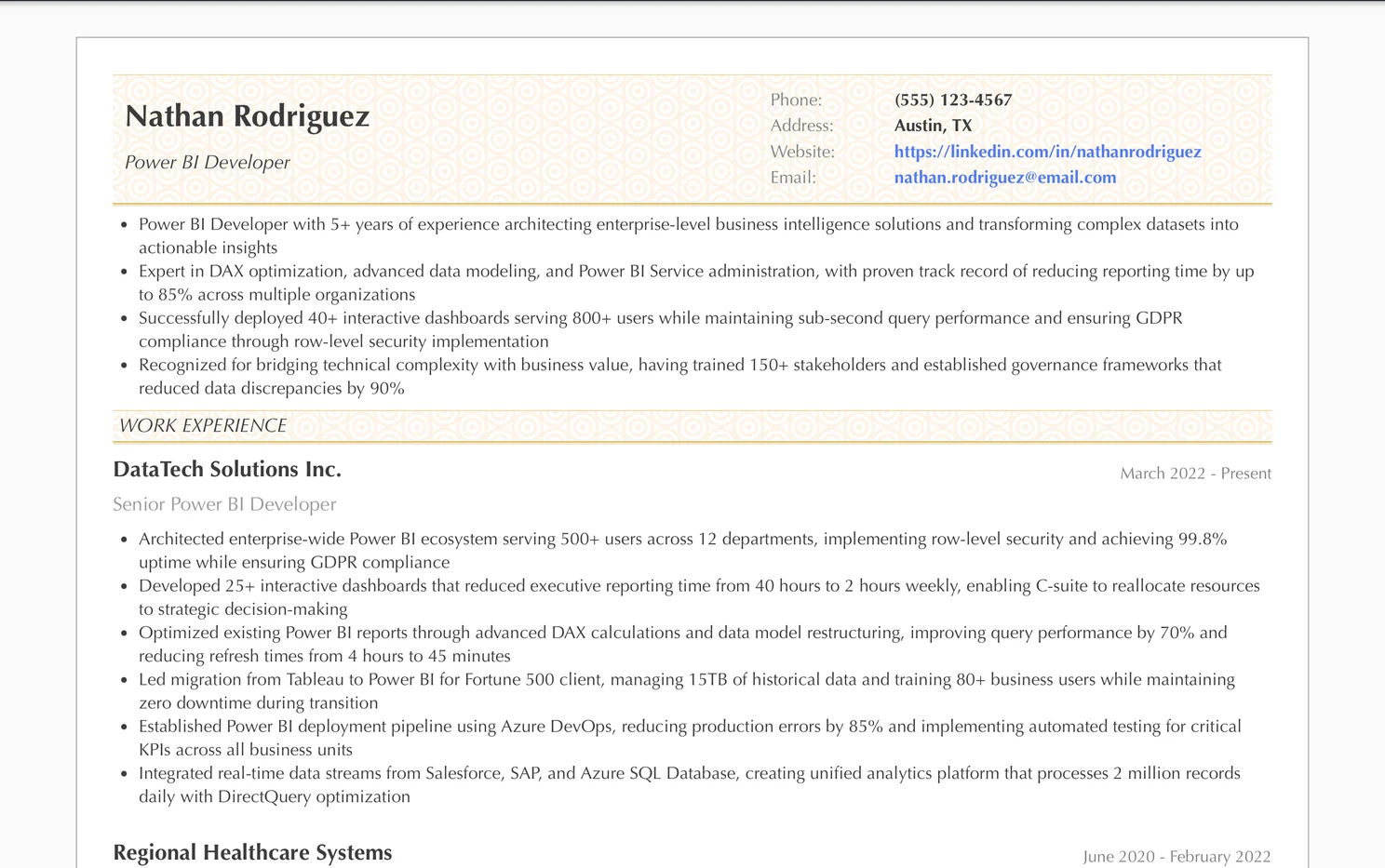
The Ultimate Power BI Developer Resume Example/Sample
https://www.resumonk.com/power-bi-developer-resumePower BI DeveloperResume Format for Power BI Developer Resume
The Reverse-Chronological Format - Your Best Friend
For Power BI Developers, the reverse-chronological format works like a perfectly optimized data model - clean, efficient, and immediately understandable.
Start with your most recent role and work backwards, because hiring managers want to see your current skill level first. They're wondering if you've worked with the latest Power BI features, if you've handled enterprise-level deployments, and whether you've kept up with Microsoft's monthly feature releases.
Your resume should flow like a well-designed Power BI dashboard - with the most critical KPIs (your recent experience) right at the top, followed by supporting details that provide context without overwhelming the viewer.
Structuring Your Power BI Developer Resume
Begin with a professional summary that reads like an executive dashboard - three to four lines that capture your total years of experience, your core Power BI competencies, and one standout achievement. Think of it as your resume's "card visual" that provides the key metric upfront.
Follow this with your work experience section, then your technical skills (crucial for this role), education, and finally certifications. This structure mirrors how you'd present data insights - start with the headline numbers, then dive into the details that support your story.
For those in the UK and Australia, remember that CVs can be slightly longer (2-3 pages) if you have extensive project details to share. However, in the USA and Canada, stick to 2 pages maximum unless you're exceptionally senior with 10+ years of dedicated Power BI experience.
Work Experience on Power BI Developer Resume
Your work experience section is where you transform from "someone who knows Power BI" into "the Power BI expert we need on our team." But here's where many developers stumble - they list their job duties like they're reading from a service manual instead of showcasing the business impact they've created.
Crafting Impact-Driven Experience Descriptions
Every bullet point under your work experience should tell a mini-story of transformation.
You didn't just "create dashboards" - you revolutionized how the sales team tracks performance, reducing report generation time from 8 hours to 15 minutes. See the difference?
Start each bullet with a strong action verb that captures the essence of what you did. Then immediately connect it to the business value you delivered. Remember, the person reading your resume might be a technical manager who understands the complexity of row-level security implementation, or it might be an HR professional who needs to understand why your work mattered to the bottom line.
❌ Don't write vague job descriptions:
• Created Power BI reports for various departments
• Maintained existing dashboards
• Worked with stakeholders on requirements
✅ Do write specific, impact-focused achievements:
• Developed 15+ interactive Power BI dashboards that reduced monthly reporting time by 75%, enabling finance team to reallocate 20 hours weekly to strategic analysis
• Architected enterprise-wide data model serving 500+ users, incorporating row-level security that ensured GDPR compliance while maintaining sub-second query performance
• Led migration from Excel-based reporting to Power BI, training 50+ business users and establishing governance framework that reduced data discrepancies by 90%
Quantifying Your Power BI Impact
Numbers are your best friend - after all, you work with data all day. Include metrics like the number of reports created, data volume handled (in GB or TB), query performance improvements, user adoption rates, or time/cost savings achieved. If you've worked with Power BI Premium, mention the workspace capacity you managed.
If you've integrated multiple data sources, specify how many and which types.
For each role, aim for 4-6 bullet points that progressively tell the story of your impact. Start with your biggest achievement, then support it with technical accomplishments that demonstrate your expertise depth.
Skills to Display on Power BI Developer Resume
The skills section of a Power BI Developer resume is like a well-organized data model - every element should have a purpose and connection to the whole. Hiring managers scan this section to quickly assess if you have the technical foundation they need, but they also look for the breadth that separates a good developer from a great one.
Core Technical Skills - The Non-Negotiables
Your technical skills should be categorized logically, making it easy for readers to find what they're looking for.
Start with your Power BI expertise level - don't just list "Power BI" like it's a checkbox. Break it down into specific capabilities that showcase your depth.
❌ Don't list skills generically:
Technical Skills:
• Power BI
• SQL
• Excel
• Data Visualization
✅ Do organize skills strategically:
Power BI Expertise:
• DAX (Complex calculations, Time intelligence, Context transition)
• Power Query/M Language (Advanced transformations, Custom functions)
• Data Modeling (Star schema, Row-level security, Incremental refresh)
• Power BI Service (Deployment pipelines, Premium features, Paginated reports)

Data Technologies:
• SQL Server, Azure SQL Database, Synapse Analytics
• Integration: REST APIs, SharePoint, Dynamics 365
• Languages: T-SQL, Python for data prep, R for statistical analysis
The Often-Overlooked Soft Skills
While you might roll your eyes at "soft skills" - thinking your DAX mastery speaks for itself - remember that Power BI Developers are translators between data and decisions. You need to show you can gather requirements from non-technical stakeholders, present insights to C-suite executives, and train users who think "measure" is something you do with a ruler.
Include skills like "stakeholder requirement analysis," "data storytelling," "cross-functional collaboration," and "user training and documentation." These differentiate you from developers who can build beautiful dashboards but struggle to understand what the business actually needs.
Certification and Version Awareness
If you hold certifications like Microsoft Certified: Data Analyst Associate (PL-300) or the older 70-778 certification, list those certifications prominently. Also, subtly indicate your awareness of Power BI's evolution - mentioning experience with features like composite models, DirectQuery over Power BI datasets, or the new Power BI Goals feature shows you're current with the platform's capabilities.
Specific Considerations and Tips for Power BI Developer Resume
Now for the insider knowledge that separates a good Power BI Developer resume from one that gets you invited to interviews at companies you're excited about. These are the nuances that most candidates miss but that make hiring managers take notice.
Showcase Your Data Source Versatility
Power BI Developers who can only connect to Excel files are like chefs who can only cook pasta - useful, but limited. Explicitly mention your experience with diverse data sources - on-premises databases, cloud platforms, APIs, and especially real-time data streams.
If you've worked with DirectQuery vs Import mode strategically, or implemented hybrid tables, these technical decisions show architectural thinking beyond basic report building.
Include specific examples of complex data integration challenges you've solved. Did you create a solution that combined SAP data with Salesforce CRM and Google Analytics?
That's the kind of multi-platform expertise that sets you apart.
Demonstrate Your Understanding of the Full BI Lifecycle
Many Power BI Developers focus solely on the development phase, but companies need someone who understands the entire lifecycle.
Reference your experience with deployment pipelines, version control (yes, even for Power BI files), and how you've handled DEV/TEST/PROD environments. If you've implemented automated testing for your reports or created documentation standards, these practices show maturity beyond just technical skills.
❌ Don't ignore the operational aspects:
• Built Power BI reports
✅ Do show lifecycle management experience:
• Established Power BI deployment pipeline reducing production errors by 80%, implementing automated testing for critical KPIs and version control through Azure DevOps
Address the Performance Engineering Aspect
Performance optimization is what separates professional Power BI Developers from enthusiastic amateurs.
Include specific examples of how you've improved report performance - whether through query folding optimization, aggregation tables, or redesigning data models for efficiency. Mention specific metrics like query response times you've achieved or data refresh durations you've optimized.
Regional Considerations and Industry Context
If you're applying in the USA, emphasize any experience with compliance requirements like SOX or HIPAA that affected your BI solutions. In the EU or UK, GDPR compliance in your data handling is crucial to highlight.
For Canadian positions, bilingual dashboard capabilities (English/French) can be a significant advantage.
Industry context matters enormously. A Power BI Developer in healthcare deals with different challenges than one in retail or manufacturing. If you've created specialized solutions - like patient flow analytics, supply chain dashboards, or financial consolidation reports - name them specifically.
This shows you understand not just the tool, but the business domain.
The Portfolio Problem
Unlike web developers who can showcase public websites, your best Power BI work likely contains confidential data. Address this by mentioning that you have a "demonstration portfolio available upon request" if you've created sanitized versions of your dashboards. Alternatively, reference any public Power BI community contributions, blog posts, or Power BI challenges you've participated in.
Including your Power BI community profile or GitHub repository with Power BI-related projects can provide tangible proof of your capabilities.
Finally, remember that Power BI evolves monthly with new features. Subtly indicating your continuous learning - whether through mentions of recent features you've implemented or your approach to staying current - shows you're not just experienced, but actively growing with the platform. This forward-thinking approach is exactly what companies need in their Power BI Developer.
Education to List on Power BI Developer Resume
Here's the truth about being a Power BI Developer - you're likely coming from one of three backgrounds.
Maybe you're that Excel wizard who discovered Power BI and never looked back. Perhaps you're a SQL developer who realized that presenting data beautifully is just as important as querying it efficiently. Or you could be fresh out of college, armed with a degree in Information Systems and ready to dive into the world of business intelligence. Regardless of your path, your education section needs to tell a coherent story about your journey to becoming a data visualization expert.
The Strategic Placement Decision
If you're new to the Power BI world with less than three years of experience, your education takes center stage near the top of your resume. But if you've been building dashboards since Power BI was still called Power Pivot, your real-world projects speak louder than your alma mater - push that education section down below your experience.
What Educational Background Actually Matters
Power BI Developers come from diverse educational backgrounds, and hiring managers know this.
Your degree doesn't need to say "Bachelor of Power BI Development" (because that doesn't exist). What matters is showing how your educational foundation supports your analytical mindset.
❌ Don't write vaguely about your education:
Bachelor of Science
University of Texas - 2019
✅ Do highlight relevant aspects that connect to Power BI development:
Bachelor of Science in Information Systems
University of Texas at Austin - 2019
Relevant Coursework: Database Management, Statistical Analysis, Data Structures, Business Analytics
Senior Project: Developed interactive dashboard for local retail chain using Microsoft BI tools
Certifications - Your Golden Tickets
In the Power BI universe, certifications often carry more weight than traditional degrees. That Microsoft Certified: Data Analyst Associate certification? That's your proof that you know your way around calculated columns and row-level security.
List these prominently, especially if your formal education isn't directly related to data or technology.
Structure your certifications chronologically with the most recent first, and always include the certification date - Power BI evolves rapidly, and a 2024 certification shows you're current with features like Copilot integration and fabric architecture.
Microsoft Certified: Power BI Data Analyst Associate (PL-300) - March 2024
Microsoft Certified: Azure Data Fundamentals - January 2024
Tableau Desktop Specialist - November 2023
The Self-Taught Developer's Dilemma
Many successful Power BI developers are self-taught, having learned through YouTube tutorials, Microsoft Learn paths, and good old trial and error.
If this is you, don't let a non-technical degree discourage you. Focus on relevant online courses, bootcamps, and certifications. List substantial online programs from recognized platforms - that comprehensive Power BI course from Coursera or the data visualization specialization from edX deserves a spot.
Awards and Publications on Power BI Developer Resume
Most Power BI developers overlook this section, thinking awards on a resume are only for salespeople who exceed quotas or academics who publish papers.
But in the data visualization world, recognition comes in many forms - from winning internal hackathons to being featured in the Power BI Community showcase. These accolades demonstrate something crucial that your technical skills section cannot - that you don't just build dashboards, you build exceptional ones that people notice.
What Counts as an Award in the Power BI World
Think beyond traditional employee-of-the-month plaques.
In the business intelligence realm, awards include being selected for Microsoft's Data Platform MVP program, winning dashboard design competitions, or even receiving internal recognition for a report that saved your company significant money. That time your executive dashboard was adopted as the company-wide template? That's award-worthy.
❌ Don't list vague or irrelevant awards:
Perfect Attendance Award - 2023
Team Player Certificate
✅ Do highlight specific, impactful recognitions:
Power BI Dashboard of the Month - Microsoft Power BI Community Gallery - June 2024
"Innovative Analytics Solution Award" - Reduced reporting time by 70% through automated Power BI workflows - Q3 2023
Selected Speaker - Local Power BI User Group - "Advanced DAX Optimization Techniques" - March 2024
Publications and Content Creation
You might not have published in the Harvard Business Review, but that detailed Medium article you wrote about implementing incremental refresh in Power BI? That counts. Your YouTube tutorial that helped 5,000 people understand CALCULATE functions? Definitely include it.
The Power BI community thrives on knowledge sharing, and your contributions matter.
When listing publications or content, focus on reach and impact. Include view counts, engagement metrics, or feedback when impressive. If you've contributed to the Power BI Community forums with solutions that earned "Accepted Answer" status multiple times, that's worth mentioning too.
"Optimizing Power BI Performance for Large Datasets" - LinkedIn Article - 15,000+ views - September 2024
Contributing Author - Power BI Tips & Tricks Blog - 12 published articles on DAX patterns
Video Tutorial Series - "Power BI for Finance Professionals" - YouTube - 50,000+ total views
Internal Recognition Matters Too
That email from the CFO praising your financial dashboard?
The spot bonus for creating a COVID-19 tracking dashboard in record time? These internal recognitions are gold. They show you deliver value in real business contexts, not just in theoretical scenarios.
Frame internal awards with business impact. Instead of just listing "Q2 Excellence Award," explain that you received it for "developing Power BI solution that automated monthly reporting, saving 40 hours per month across departments."
Listing References for Power BI Developer Resume
The references section for a Power BI Developer carries unique weight because the work is so collaborative.
Unlike a backend developer who might code in isolation, you're constantly interfacing with stakeholders, translating business speak into DAX formulas, and teaching executives how to use slicers. Your references aren't just confirming you can do the job - they're testifying to your ability to make data accessible to everyone from interns to board members.
The Modern Approach - "References Available Upon Request"
Gone are the days when you'd list three references with full contact details at the bottom of your resume.
In today's world, especially in tech roles like Power BI development, the standard practice is simply stating "References available upon request" or omitting the section entirely until asked. This approach protects your references' privacy and gives you control over when and how potential employers contact them.
However, what you should be doing is maintaining a separate references document, ready to deploy faster than a Power BI quick measure. This document should be as polished as your resume itself, formatted consistently, and updated regularly.
Choosing Your Power BI Champion Network
Your ideal reference portfolio should tell different chapters of your Power BI story.
Include someone who can speak to your technical prowess - perhaps that senior developer who watched you optimize a report from a 30-second load time to instantaneous. Add a business stakeholder who can testify to how your dashboards actually drove decisions, not just displayed data. And don't forget a peer or junior colleague who can vouch for your ability to share knowledge and collaborate.
❌ Don't list references without context:
John Smith - Manager - ABC Company - [email protected] - 555-0123
✅ Do provide context when sharing your reference sheet:
Sarah Johnson - Director of Business Intelligence - TechCorp Solutions
Email: [email protected] | Phone: 555-0123
Relationship: Direct supervisor for 2 years (2022-2024)
Context: Sarah oversaw my development of 15+ enterprise Power BI dashboards and can speak to my
ability to manage complex data models and deliver under tight deadlines.
The Strategic Reference Preparation
Before you hand over that reference list, prep your champions like you'd prep data for import into Power BI - clean, structured, and purposeful.
Send them the job description, remind them of specific projects you worked on together, and suggest key points they might mention. That comprehensive sales dashboard you built? Remind your reference about how it identified $2M in previously hidden opportunities.
Consider creating a brief "reference prep sheet" for each person, including bullet points of your key achievements while working with them, the specific Power BI capabilities you demonstrated, and any quantifiable impacts your work had on their department or organization.
International Reference Considerations
In the USA and Canada, providing references upon request is standard.
UK employers often expect references only after a job offer is made, and these references are typically more formal, sometimes requiring written letters. In Australia, verbal reference checks are common, so ensure your references are comfortable with phone conversations. Always clarify time zones if your references are in different locations - nothing undermines credibility like a reference being called at 3 AM their time.
LinkedIn Recommendations - Your Public Reference Display
While not a replacement for traditional references, LinkedIn recommendations serve as public pre-screening references.
For Power BI Developers, these are particularly valuable because they're discoverable by recruiters searching for specific skills. Cultivate recommendations that mention specific Power BI achievements, technologies you've mastered, and business problems you've solved. A recommendation stating "Transformed our monthly reporting process using Power BI, reducing preparation time by 80%" carries more weight than "Great with data."
Remember, in the Power BI world, your dashboards might be your best reference. Consider creating a portfolio of sanitized dashboard examples or maintaining a personal Power BI blog.
Sometimes, showing what you can build speaks louder than someone else describing it.
Cover Letter Tips for Power BI Developer Resume
Think of your cover letter as the executive summary dashboard of your career - it needs to highlight the key metrics, show the important trends, and most importantly, answer the business question: "Why should we hire this person to build our Power BI solutions?"
The Opening - Your KPI Snapshot
Just like a good Power BI dashboard starts with the most important metrics, your cover letter should open with your most impressive qualification.
Skip the generic "I am writing to apply for..." opening that everyone uses. You wouldn't start a dashboard with a text box explaining what a dashboard is, would you?
❌ Don't open with generic statements:
Dear Hiring Manager,
I am writing to express my interest in the Power BI Developer position at your company.
I have experience with Power BI and would like to join your team.
✅ Do lead with specific, impactful achievements:
Dear Data Analytics Team Lead,
Last month, the executive dashboard I developed in Power BI became the primary decision-making tool for a Fortune 500 company's C-suite, processing 50 million rows of data daily with sub-second response times. I'm excited to bring this same level of performance and business impact to ABC Corporation's analytics initiatives.
The Body - Your Trend Analysis
The middle section should show your career trajectory and how it aligns with the company's needs. Draw connections between their job requirements and your experience, but don't just repeat your resume.
This is where you explain the "why" behind your career moves, much like how you'd use a line chart to show trends over time.
Address the specific pain points mentioned in the job description. If they need someone to migrate from Tableau to Power BI, mention your experience with both platforms. If they emphasize real-time analytics, discuss your work with DirectQuery and automatic refresh schedules. Use specific examples but keep them concise - aim for the cover letter equivalent of a tooltip, not a detailed drill-through page.
The Technical-Business Balance
Remember, as a Power BI Developer, you're the bridge between IT and business users.
Your cover letter should reflect this bilingual ability. Yes, mention that you optimized DAX queries using variables and CALCULATE modifiers, but also explain how this helped the sales team identify revenue opportunities 60% faster.
While developing Power BI solutions at TechCorp, I didn't just create reports - I partnered with stakeholders to understand their decision-making processes. For example, I transformed the marketing team's 3-hour weekly Excel analysis into an automated Power BI dashboard that updates every hour, allowing them to respond to campaign performance in real-time rather than retrospectively.
Country-Specific Considerations
If you're applying in the UK, keep your cover letter to one page and use "Yours sincerely" when addressing a named person. In the USA, you have slightly more flexibility with length, but still aim for conciseness. Canadian employers appreciate a balance between American directness and British formality.
Australian companies often prefer a more conversational tone, but maintain professionalism.
The Closing - Your Call-to-Action Button
Just like every good dashboard needs clear next steps, your cover letter should end with a confident call to action. Express enthusiasm about discussing specific projects or challenges the company is facing.
Reference something specific about their data infrastructure or recent initiatives if you can find it - it shows you've done your homework.
Key Takeaways
After diving deep into the world of Power BI Developer resumes, here are the essential points to keep with you as you craft your own career story:
- Use the reverse-chronological format - Start with your most recent role to immediately showcase your current Power BI expertise and familiarity with the latest features
- Write impact-driven experience descriptions - Don't just list duties; quantify how your dashboards reduced reporting time, improved decision-making, or saved costs
- Organize technical skills strategically - Break down your Power BI expertise into specific capabilities (DAX, Power Query, Data Modeling) rather than generic listings
- Balance technical and soft skills - Highlight your ability to translate between data and business, including stakeholder management and data storytelling abilities
- Showcase data source versatility - Explicitly mention experience with diverse data sources, from on-premises databases to cloud platforms and APIs
- Demonstrate lifecycle management experience - Include experience with deployment pipelines, version control, and DEV/TEST/PROD environments
- Highlight performance optimization skills - Provide specific examples of query optimization, load time improvements, and efficient data model design
- Include relevant certifications prominently - Microsoft Certified: Data Analyst Associate and other BI certifications often carry more weight than degrees
- Address the portfolio challenge - Mention sanitized dashboard examples or Power BI community contributions to provide tangible proof of capabilities
- Craft a data-driven cover letter - Think of it as your first data story, leading with specific achievements and connecting your experience to company needs
Creating a powerful Power BI Developer resume doesn't have to feel like debugging a complex DAX formula. With Resumonk, you can build a professional, visually appealing resume that showcases your data visualization expertise just as elegantly as your best Power BI dashboard. Our AI-powered recommendations help you articulate your technical achievements in ways that resonate with both technical managers and HR professionals. Plus, our beautifully designed templates ensure your resume looks as polished as the reports you create - because first impressions matter, even in data.
Ready to transform your Power BI experience into a compelling career story?
Start creating your professional Power BI Developer resume with Resumonk today. Our intuitive platform and expert-designed templates will help you build a resume that gets noticed by the right employers.
→ Create Your Power BI Developer Resume with Resumonk
More Data & Systems Administration resume examples
- Data Engineer resume example
- Data Analyst resume example
- Data Scientist resume example
- Database Administrator resume example
See all Data & Systems Administration resume examples, or browse every category.
Resume writing tips
Imagine this - you've spent the last few years diving deep into data visualization, wrestling with DAX formulas until 2 AM, and transforming raw business data into insights that make executives lean forward in their chairs. Now you're ready to take your Power BI expertise to a new company, but your resume sits there like an unformatted dataset - full of potential but not quite telling the story it should.
As a Power BI Developer, you're essentially a data storyteller who bridges the gap between raw information and business intelligence. This is typically a mid-level technical role, sitting comfortably between junior data analysts and senior BI architects. You're not just creating pretty charts - you're architecting entire reporting ecosystems that drive million-dollar decisions. Whether you evolved from an Excel power user who discovered the magic of Power Query, or you're a SQL developer who realized that beautiful data presentation matters as much as efficient queries, you need a resume that captures both your technical depth and your business impact.
In this comprehensive guide, we'll walk you through every element of crafting the perfect Power BI Developer resume. We'll start with choosing the right resume format - specifically why the reverse-chronological format works best for showcasing your progression in the BI world. Then we'll dive deep into articulating your work experience with impact-driven descriptions that go beyond listing duties. We'll explore how to strategically present your technical skills, from DAX expertise to data modeling proficiency, along with the soft skills that separate good developers from great ones.
But we won't stop at the basics. We'll also cover the specific considerations that make Power BI Developer resumes unique - from showcasing your data source versatility to demonstrating your understanding of the full BI lifecycle. You'll learn how to present your educational background effectively, whether you have a computer science degree or are self-taught through Microsoft Learn paths. We'll discuss how to highlight relevant awards and publications, craft a compelling cover letter that speaks both technical and business languages, and strategically manage your professional references. By the end of this guide, you'll have everything you need to create a resume that transforms your career data into a compelling visualization of your professional journey.
The Ultimate Power BI Developer Resume Example/Sample
https://www.resumonk.com/power-bi-developer-resumePower BI DeveloperResume Format for Power BI Developer Resume
The Reverse-Chronological Format - Your Best Friend
For Power BI Developers, the reverse-chronological format works like a perfectly optimized data model - clean, efficient, and immediately understandable.
Start with your most recent role and work backwards, because hiring managers want to see your current skill level first. They're wondering if you've worked with the latest Power BI features, if you've handled enterprise-level deployments, and whether you've kept up with Microsoft's monthly feature releases.
Your resume should flow like a well-designed Power BI dashboard - with the most critical KPIs (your recent experience) right at the top, followed by supporting details that provide context without overwhelming the viewer.
Structuring Your Power BI Developer Resume
Begin with a professional summary that reads like an executive dashboard - three to four lines that capture your total years of experience, your core Power BI competencies, and one standout achievement. Think of it as your resume's "card visual" that provides the key metric upfront.
Follow this with your work experience section, then your technical skills (crucial for this role), education, and finally certifications. This structure mirrors how you'd present data insights - start with the headline numbers, then dive into the details that support your story.
For those in the UK and Australia, remember that CVs can be slightly longer (2-3 pages) if you have extensive project details to share. However, in the USA and Canada, stick to 2 pages maximum unless you're exceptionally senior with 10+ years of dedicated Power BI experience.
Work Experience on Power BI Developer Resume
Your work experience section is where you transform from "someone who knows Power BI" into "the Power BI expert we need on our team." But here's where many developers stumble - they list their job duties like they're reading from a service manual instead of showcasing the business impact they've created.
Crafting Impact-Driven Experience Descriptions
Every bullet point under your work experience should tell a mini-story of transformation.
You didn't just "create dashboards" - you revolutionized how the sales team tracks performance, reducing report generation time from 8 hours to 15 minutes. See the difference?
Start each bullet with a strong action verb that captures the essence of what you did. Then immediately connect it to the business value you delivered. Remember, the person reading your resume might be a technical manager who understands the complexity of row-level security implementation, or it might be an HR professional who needs to understand why your work mattered to the bottom line.
❌ Don't write vague job descriptions:
• Created Power BI reports for various departments
• Maintained existing dashboards
• Worked with stakeholders on requirements
✅ Do write specific, impact-focused achievements:
• Developed 15+ interactive Power BI dashboards that reduced monthly reporting time by 75%, enabling finance team to reallocate 20 hours weekly to strategic analysis
• Architected enterprise-wide data model serving 500+ users, incorporating row-level security that ensured GDPR compliance while maintaining sub-second query performance
• Led migration from Excel-based reporting to Power BI, training 50+ business users and establishing governance framework that reduced data discrepancies by 90%
Quantifying Your Power BI Impact
Numbers are your best friend - after all, you work with data all day. Include metrics like the number of reports created, data volume handled (in GB or TB), query performance improvements, user adoption rates, or time/cost savings achieved. If you've worked with Power BI Premium, mention the workspace capacity you managed.
If you've integrated multiple data sources, specify how many and which types.
For each role, aim for 4-6 bullet points that progressively tell the story of your impact. Start with your biggest achievement, then support it with technical accomplishments that demonstrate your expertise depth.
Skills to Display on Power BI Developer Resume
The skills section of a Power BI Developer resume is like a well-organized data model - every element should have a purpose and connection to the whole. Hiring managers scan this section to quickly assess if you have the technical foundation they need, but they also look for the breadth that separates a good developer from a great one.
Core Technical Skills - The Non-Negotiables
Your technical skills should be categorized logically, making it easy for readers to find what they're looking for.
Start with your Power BI expertise level - don't just list "Power BI" like it's a checkbox. Break it down into specific capabilities that showcase your depth.
❌ Don't list skills generically:
Technical Skills:
• Power BI
• SQL
• Excel
• Data Visualization
✅ Do organize skills strategically:
Power BI Expertise:
• DAX (Complex calculations, Time intelligence, Context transition)
• Power Query/M Language (Advanced transformations, Custom functions)
• Data Modeling (Star schema, Row-level security, Incremental refresh)
• Power BI Service (Deployment pipelines, Premium features, Paginated reports)

Data Technologies:
• SQL Server, Azure SQL Database, Synapse Analytics
• Integration: REST APIs, SharePoint, Dynamics 365
• Languages: T-SQL, Python for data prep, R for statistical analysis
The Often-Overlooked Soft Skills
While you might roll your eyes at "soft skills" - thinking your DAX mastery speaks for itself - remember that Power BI Developers are translators between data and decisions. You need to show you can gather requirements from non-technical stakeholders, present insights to C-suite executives, and train users who think "measure" is something you do with a ruler.
Include skills like "stakeholder requirement analysis," "data storytelling," "cross-functional collaboration," and "user training and documentation." These differentiate you from developers who can build beautiful dashboards but struggle to understand what the business actually needs.
Certification and Version Awareness
If you hold certifications like Microsoft Certified: Data Analyst Associate (PL-300) or the older 70-778 certification, list those certifications prominently. Also, subtly indicate your awareness of Power BI's evolution - mentioning experience with features like composite models, DirectQuery over Power BI datasets, or the new Power BI Goals feature shows you're current with the platform's capabilities.
Specific Considerations and Tips for Power BI Developer Resume
Now for the insider knowledge that separates a good Power BI Developer resume from one that gets you invited to interviews at companies you're excited about. These are the nuances that most candidates miss but that make hiring managers take notice.
Showcase Your Data Source Versatility
Power BI Developers who can only connect to Excel files are like chefs who can only cook pasta - useful, but limited. Explicitly mention your experience with diverse data sources - on-premises databases, cloud platforms, APIs, and especially real-time data streams.
If you've worked with DirectQuery vs Import mode strategically, or implemented hybrid tables, these technical decisions show architectural thinking beyond basic report building.
Include specific examples of complex data integration challenges you've solved. Did you create a solution that combined SAP data with Salesforce CRM and Google Analytics?
That's the kind of multi-platform expertise that sets you apart.
Demonstrate Your Understanding of the Full BI Lifecycle
Many Power BI Developers focus solely on the development phase, but companies need someone who understands the entire lifecycle.
Reference your experience with deployment pipelines, version control (yes, even for Power BI files), and how you've handled DEV/TEST/PROD environments. If you've implemented automated testing for your reports or created documentation standards, these practices show maturity beyond just technical skills.
❌ Don't ignore the operational aspects:
• Built Power BI reports
✅ Do show lifecycle management experience:
• Established Power BI deployment pipeline reducing production errors by 80%, implementing automated testing for critical KPIs and version control through Azure DevOps
Address the Performance Engineering Aspect
Performance optimization is what separates professional Power BI Developers from enthusiastic amateurs.
Include specific examples of how you've improved report performance - whether through query folding optimization, aggregation tables, or redesigning data models for efficiency. Mention specific metrics like query response times you've achieved or data refresh durations you've optimized.
Regional Considerations and Industry Context
If you're applying in the USA, emphasize any experience with compliance requirements like SOX or HIPAA that affected your BI solutions. In the EU or UK, GDPR compliance in your data handling is crucial to highlight.
For Canadian positions, bilingual dashboard capabilities (English/French) can be a significant advantage.
Industry context matters enormously. A Power BI Developer in healthcare deals with different challenges than one in retail or manufacturing. If you've created specialized solutions - like patient flow analytics, supply chain dashboards, or financial consolidation reports - name them specifically.
This shows you understand not just the tool, but the business domain.
The Portfolio Problem
Unlike web developers who can showcase public websites, your best Power BI work likely contains confidential data. Address this by mentioning that you have a "demonstration portfolio available upon request" if you've created sanitized versions of your dashboards. Alternatively, reference any public Power BI community contributions, blog posts, or Power BI challenges you've participated in.
Including your Power BI community profile or GitHub repository with Power BI-related projects can provide tangible proof of your capabilities.
Finally, remember that Power BI evolves monthly with new features. Subtly indicating your continuous learning - whether through mentions of recent features you've implemented or your approach to staying current - shows you're not just experienced, but actively growing with the platform. This forward-thinking approach is exactly what companies need in their Power BI Developer.
Education to List on Power BI Developer Resume
Here's the truth about being a Power BI Developer - you're likely coming from one of three backgrounds.
Maybe you're that Excel wizard who discovered Power BI and never looked back. Perhaps you're a SQL developer who realized that presenting data beautifully is just as important as querying it efficiently. Or you could be fresh out of college, armed with a degree in Information Systems and ready to dive into the world of business intelligence. Regardless of your path, your education section needs to tell a coherent story about your journey to becoming a data visualization expert.
The Strategic Placement Decision
If you're new to the Power BI world with less than three years of experience, your education takes center stage near the top of your resume. But if you've been building dashboards since Power BI was still called Power Pivot, your real-world projects speak louder than your alma mater - push that education section down below your experience.
What Educational Background Actually Matters
Power BI Developers come from diverse educational backgrounds, and hiring managers know this.
Your degree doesn't need to say "Bachelor of Power BI Development" (because that doesn't exist). What matters is showing how your educational foundation supports your analytical mindset.
❌ Don't write vaguely about your education:
Bachelor of Science
University of Texas - 2019
✅ Do highlight relevant aspects that connect to Power BI development:
Bachelor of Science in Information Systems
University of Texas at Austin - 2019
Relevant Coursework: Database Management, Statistical Analysis, Data Structures, Business Analytics
Senior Project: Developed interactive dashboard for local retail chain using Microsoft BI tools
Certifications - Your Golden Tickets
In the Power BI universe, certifications often carry more weight than traditional degrees. That Microsoft Certified: Data Analyst Associate certification? That's your proof that you know your way around calculated columns and row-level security.
List these prominently, especially if your formal education isn't directly related to data or technology.
Structure your certifications chronologically with the most recent first, and always include the certification date - Power BI evolves rapidly, and a 2024 certification shows you're current with features like Copilot integration and fabric architecture.
Microsoft Certified: Power BI Data Analyst Associate (PL-300) - March 2024
Microsoft Certified: Azure Data Fundamentals - January 2024
Tableau Desktop Specialist - November 2023
The Self-Taught Developer's Dilemma
Many successful Power BI developers are self-taught, having learned through YouTube tutorials, Microsoft Learn paths, and good old trial and error.
If this is you, don't let a non-technical degree discourage you. Focus on relevant online courses, bootcamps, and certifications. List substantial online programs from recognized platforms - that comprehensive Power BI course from Coursera or the data visualization specialization from edX deserves a spot.
Awards and Publications on Power BI Developer Resume
Most Power BI developers overlook this section, thinking awards on a resume are only for salespeople who exceed quotas or academics who publish papers.
But in the data visualization world, recognition comes in many forms - from winning internal hackathons to being featured in the Power BI Community showcase. These accolades demonstrate something crucial that your technical skills section cannot - that you don't just build dashboards, you build exceptional ones that people notice.
What Counts as an Award in the Power BI World
Think beyond traditional employee-of-the-month plaques.
In the business intelligence realm, awards include being selected for Microsoft's Data Platform MVP program, winning dashboard design competitions, or even receiving internal recognition for a report that saved your company significant money. That time your executive dashboard was adopted as the company-wide template? That's award-worthy.
❌ Don't list vague or irrelevant awards:
Perfect Attendance Award - 2023
Team Player Certificate
✅ Do highlight specific, impactful recognitions:
Power BI Dashboard of the Month - Microsoft Power BI Community Gallery - June 2024
"Innovative Analytics Solution Award" - Reduced reporting time by 70% through automated Power BI workflows - Q3 2023
Selected Speaker - Local Power BI User Group - "Advanced DAX Optimization Techniques" - March 2024
Publications and Content Creation
You might not have published in the Harvard Business Review, but that detailed Medium article you wrote about implementing incremental refresh in Power BI? That counts. Your YouTube tutorial that helped 5,000 people understand CALCULATE functions? Definitely include it.
The Power BI community thrives on knowledge sharing, and your contributions matter.
When listing publications or content, focus on reach and impact. Include view counts, engagement metrics, or feedback when impressive. If you've contributed to the Power BI Community forums with solutions that earned "Accepted Answer" status multiple times, that's worth mentioning too.
"Optimizing Power BI Performance for Large Datasets" - LinkedIn Article - 15,000+ views - September 2024
Contributing Author - Power BI Tips & Tricks Blog - 12 published articles on DAX patterns
Video Tutorial Series - "Power BI for Finance Professionals" - YouTube - 50,000+ total views
Internal Recognition Matters Too
That email from the CFO praising your financial dashboard?
The spot bonus for creating a COVID-19 tracking dashboard in record time? These internal recognitions are gold. They show you deliver value in real business contexts, not just in theoretical scenarios.
Frame internal awards with business impact. Instead of just listing "Q2 Excellence Award," explain that you received it for "developing Power BI solution that automated monthly reporting, saving 40 hours per month across departments."
Listing References for Power BI Developer Resume
The references section for a Power BI Developer carries unique weight because the work is so collaborative.
Unlike a backend developer who might code in isolation, you're constantly interfacing with stakeholders, translating business speak into DAX formulas, and teaching executives how to use slicers. Your references aren't just confirming you can do the job - they're testifying to your ability to make data accessible to everyone from interns to board members.
The Modern Approach - "References Available Upon Request"
Gone are the days when you'd list three references with full contact details at the bottom of your resume.
In today's world, especially in tech roles like Power BI development, the standard practice is simply stating "References available upon request" or omitting the section entirely until asked. This approach protects your references' privacy and gives you control over when and how potential employers contact them.
However, what you should be doing is maintaining a separate references document, ready to deploy faster than a Power BI quick measure. This document should be as polished as your resume itself, formatted consistently, and updated regularly.
Choosing Your Power BI Champion Network
Your ideal reference portfolio should tell different chapters of your Power BI story.
Include someone who can speak to your technical prowess - perhaps that senior developer who watched you optimize a report from a 30-second load time to instantaneous. Add a business stakeholder who can testify to how your dashboards actually drove decisions, not just displayed data. And don't forget a peer or junior colleague who can vouch for your ability to share knowledge and collaborate.
❌ Don't list references without context:
John Smith - Manager - ABC Company - [email protected] - 555-0123
✅ Do provide context when sharing your reference sheet:
Sarah Johnson - Director of Business Intelligence - TechCorp Solutions
Email: [email protected] | Phone: 555-0123
Relationship: Direct supervisor for 2 years (2022-2024)
Context: Sarah oversaw my development of 15+ enterprise Power BI dashboards and can speak to my
ability to manage complex data models and deliver under tight deadlines.
The Strategic Reference Preparation
Before you hand over that reference list, prep your champions like you'd prep data for import into Power BI - clean, structured, and purposeful.
Send them the job description, remind them of specific projects you worked on together, and suggest key points they might mention. That comprehensive sales dashboard you built? Remind your reference about how it identified $2M in previously hidden opportunities.
Consider creating a brief "reference prep sheet" for each person, including bullet points of your key achievements while working with them, the specific Power BI capabilities you demonstrated, and any quantifiable impacts your work had on their department or organization.
International Reference Considerations
In the USA and Canada, providing references upon request is standard.
UK employers often expect references only after a job offer is made, and these references are typically more formal, sometimes requiring written letters. In Australia, verbal reference checks are common, so ensure your references are comfortable with phone conversations. Always clarify time zones if your references are in different locations - nothing undermines credibility like a reference being called at 3 AM their time.
LinkedIn Recommendations - Your Public Reference Display
While not a replacement for traditional references, LinkedIn recommendations serve as public pre-screening references.
For Power BI Developers, these are particularly valuable because they're discoverable by recruiters searching for specific skills. Cultivate recommendations that mention specific Power BI achievements, technologies you've mastered, and business problems you've solved. A recommendation stating "Transformed our monthly reporting process using Power BI, reducing preparation time by 80%" carries more weight than "Great with data."
Remember, in the Power BI world, your dashboards might be your best reference. Consider creating a portfolio of sanitized dashboard examples or maintaining a personal Power BI blog.
Sometimes, showing what you can build speaks louder than someone else describing it.
Cover Letter Tips for Power BI Developer Resume
Think of your cover letter as the executive summary dashboard of your career - it needs to highlight the key metrics, show the important trends, and most importantly, answer the business question: "Why should we hire this person to build our Power BI solutions?"
The Opening - Your KPI Snapshot
Just like a good Power BI dashboard starts with the most important metrics, your cover letter should open with your most impressive qualification.
Skip the generic "I am writing to apply for..." opening that everyone uses. You wouldn't start a dashboard with a text box explaining what a dashboard is, would you?
❌ Don't open with generic statements:
Dear Hiring Manager,
I am writing to express my interest in the Power BI Developer position at your company.
I have experience with Power BI and would like to join your team.
✅ Do lead with specific, impactful achievements:
Dear Data Analytics Team Lead,
Last month, the executive dashboard I developed in Power BI became the primary decision-making tool for a Fortune 500 company's C-suite, processing 50 million rows of data daily with sub-second response times. I'm excited to bring this same level of performance and business impact to ABC Corporation's analytics initiatives.
The Body - Your Trend Analysis
The middle section should show your career trajectory and how it aligns with the company's needs. Draw connections between their job requirements and your experience, but don't just repeat your resume.
This is where you explain the "why" behind your career moves, much like how you'd use a line chart to show trends over time.
Address the specific pain points mentioned in the job description. If they need someone to migrate from Tableau to Power BI, mention your experience with both platforms. If they emphasize real-time analytics, discuss your work with DirectQuery and automatic refresh schedules. Use specific examples but keep them concise - aim for the cover letter equivalent of a tooltip, not a detailed drill-through page.
The Technical-Business Balance
Remember, as a Power BI Developer, you're the bridge between IT and business users.
Your cover letter should reflect this bilingual ability. Yes, mention that you optimized DAX queries using variables and CALCULATE modifiers, but also explain how this helped the sales team identify revenue opportunities 60% faster.
While developing Power BI solutions at TechCorp, I didn't just create reports - I partnered with stakeholders to understand their decision-making processes. For example, I transformed the marketing team's 3-hour weekly Excel analysis into an automated Power BI dashboard that updates every hour, allowing them to respond to campaign performance in real-time rather than retrospectively.
Country-Specific Considerations
If you're applying in the UK, keep your cover letter to one page and use "Yours sincerely" when addressing a named person. In the USA, you have slightly more flexibility with length, but still aim for conciseness. Canadian employers appreciate a balance between American directness and British formality.
Australian companies often prefer a more conversational tone, but maintain professionalism.
The Closing - Your Call-to-Action Button
Just like every good dashboard needs clear next steps, your cover letter should end with a confident call to action. Express enthusiasm about discussing specific projects or challenges the company is facing.
Reference something specific about their data infrastructure or recent initiatives if you can find it - it shows you've done your homework.
Key Takeaways
After diving deep into the world of Power BI Developer resumes, here are the essential points to keep with you as you craft your own career story:
- Use the reverse-chronological format - Start with your most recent role to immediately showcase your current Power BI expertise and familiarity with the latest features
- Write impact-driven experience descriptions - Don't just list duties; quantify how your dashboards reduced reporting time, improved decision-making, or saved costs
- Organize technical skills strategically - Break down your Power BI expertise into specific capabilities (DAX, Power Query, Data Modeling) rather than generic listings
- Balance technical and soft skills - Highlight your ability to translate between data and business, including stakeholder management and data storytelling abilities
- Showcase data source versatility - Explicitly mention experience with diverse data sources, from on-premises databases to cloud platforms and APIs
- Demonstrate lifecycle management experience - Include experience with deployment pipelines, version control, and DEV/TEST/PROD environments
- Highlight performance optimization skills - Provide specific examples of query optimization, load time improvements, and efficient data model design
- Include relevant certifications prominently - Microsoft Certified: Data Analyst Associate and other BI certifications often carry more weight than degrees
- Address the portfolio challenge - Mention sanitized dashboard examples or Power BI community contributions to provide tangible proof of capabilities
- Craft a data-driven cover letter - Think of it as your first data story, leading with specific achievements and connecting your experience to company needs
Creating a powerful Power BI Developer resume doesn't have to feel like debugging a complex DAX formula. With Resumonk, you can build a professional, visually appealing resume that showcases your data visualization expertise just as elegantly as your best Power BI dashboard. Our AI-powered recommendations help you articulate your technical achievements in ways that resonate with both technical managers and HR professionals. Plus, our beautifully designed templates ensure your resume looks as polished as the reports you create - because first impressions matter, even in data.
Ready to transform your Power BI experience into a compelling career story?
Start creating your professional Power BI Developer resume with Resumonk today. Our intuitive platform and expert-designed templates will help you build a resume that gets noticed by the right employers.
→ Create Your Power BI Developer Resume with Resumonk
More Data & Systems Administration resume examples
- Data Engineer resume example
- Data Analyst resume example
- Data Scientist resume example
- Database Administrator resume example
See all Data & Systems Administration resume examples, or browse every category.
Resume writing tips