Will AI Replace Accountants? What Is Changing, and What to Show on Your Resume
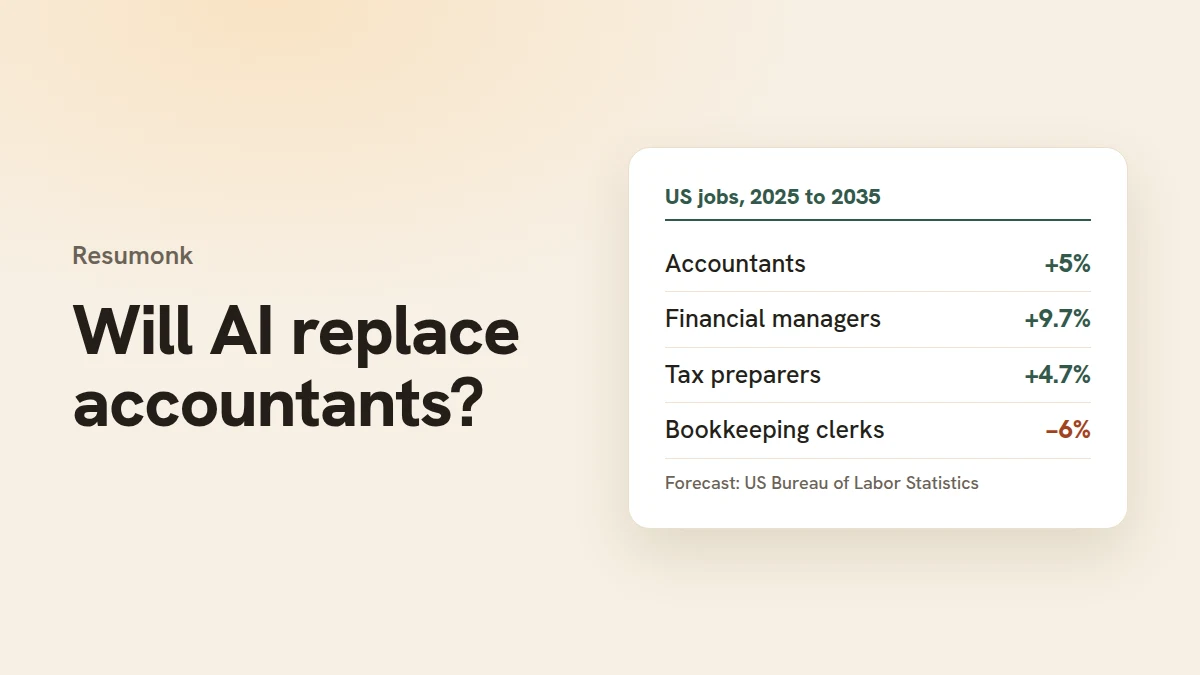
AI is not expected to replace accountants. The Bureau of Labor Statistics (BLS) projects 5% more accountant and auditor jobs from 2025 to 2035.
The work is changing all the same. QuickBooks now suggests a category for transactions, and Excel has an AI of its own. If those tasks fill your week, you want to know what is left for you.
Below you will find the numbers, a month-end close with AI in it, and resume lines to copy. Bookkeeping clerks get a section of their own, because their forecast points down.
In short
- BLS counted 1,595,200 accountant and auditor jobs in 2025 and projects 79,400 more by 2035.
- BLS says AI may automate some routine tasks, and does not expect that to cut overall demand.
- Jobs for bookkeeping, accounting and auditing clerks are projected to fall 6%.
- BLS expects advice and analysis to become more prominent as tasks such as data entry are automated.
- Checks, analysis and advice are what to show on an accounting resume.
Will AI take over accounting jobs?
AI is not forecast to take over accounting jobs as a whole. One large job is expected to shrink, though. BLS projects these changes from 2025 to 2035:
- Accountants and auditors: up 5%, with about 115,300 openings a year.
- Financial managers: up 10%, with about 65,600 openings a year.
- Financial analysts: up 7%, with about 29,500 openings a year.
- Tax preparers: up 5%, or about 4,500 jobs.
- Bookkeeping, accounting and auditing clerks: down 6%, with about 144,100 openings a year.
Two details matter here. First, growth makes up a small part of the openings. The 79,400 new accountant jobs come to about 7,900 a year, out of 115,300 openings. Most of the rest replace people who change occupations or leave work, such as to retire.
Second, the two biggest jobs on the list part ways. 79,400 more accountants and auditors and 85,600 fewer clerks nearly cancel out. BLS says software has automated many clerk tasks, so fewer people can do the same work. For accountants, it says some routine tasks may be automated. It expects advice and analysis to become more prominent.
Pay differs as well. In May 2025 the median was $83,680 for accountants and auditors and $50,670 for clerks.
A forecast is not a promise, and this one gets replaced: BLS publishes its next one in 2027.
Are accounting jobs safe from AI?
Accounting jobs rank high for AI exposure. BLS sorts jobs into four groups by AI exposure. Accountants, auditors, tax preparers and bookkeeping clerks are all in the highest, "Very high" (Excel file).
Exposure is easy to misread, though. In the top group, AI can assist with or complete a larger share of the tasks. BLS says that does not imply job loss, likely automation or a change in pay.
Accounting shows why. Accountants and clerks share a group, yet one job is projected to grow and the other to shrink.
Will AI replace accountants by 2030?
BLS has no separate forecast for 2030. Its forecast runs to 2035 and shows growth for accountants. When you read a figure for 2030, look for who made it, and how.
How is AI changing accounting work?
AI is moving accountants' time from routine processing to higher-value work, one study found. Stanford and MIT researchers surveyed 277 accountants and read task data from 79 small and mid-sized firms. With AI:
- Accountants spent 8.5% less time on routine back-office processing.
- They finished monthly statements 7.5 days faster.
- Firms reported with 12% more detail.
Worries came with it. In the survey, 62% named AI errors, 43% data security and 37% job stability.
Put the two findings side by side. The gain is time, and the top worry is mistakes. Somebody has to find those mistakes, and that is work you can put on a resume.
What does a month-end close look like with AI?
Here is an example, made up to show the steps. A staff accountant closes ten entities every month.
- Before: codes about 2,000 bank lines by hand, reconciles the accounts, then writes a note on each large change.
- With AI: the software suggests a category for each line, and Copilot in Excel drafts the notes.
- What is left: reconciling the accounts, testing a sample of the coded lines, and checking each note.
- What to write: "Tested AI-coded entries for ten entities a month and cut wrong codes from 6% to 2%."
The typing shrank and the checking grew. The job is still there, but the part worth showing has moved.
Will AI replace tax accountants?
The forecast for the closest job points up. BLS counts tax preparers, not tax accountants, and projects 5% more of them by 2035.
The rules are still being written. The IRS issued AI guidance for tax practitioners in 2026, and its advisory council now wants it expanded. If you work in tax, read that guidance before an interview.
What should an accountant show on a resume now?
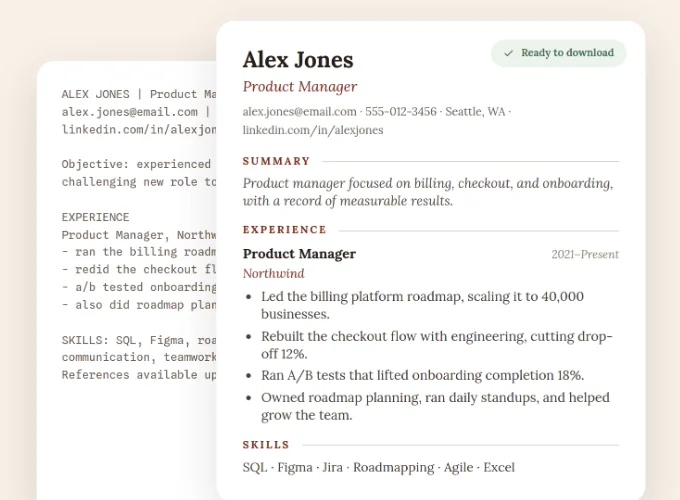
An accounting resume should show your checks, your judgment and what came of them. Name AI where it helped, with your own check beside it. Compare two lines about the same work:
- ❌ Used AI tools for bookkeeping
- ✅ Reviewed AI-coded entries for 14 clients each month and corrected 3%
The first line could belong to anyone. The second says how much work there was and what you did with it. It also says that you caught mistakes. More lines to copy and change:
- Close: Cut the month-end close from nine days to six with Copilot in Excel and a review checklist
- Advice: Built cash forecasts that helped a client build a $40,000 reserve in one year
- Controls: Wrote the firm's AI rules: no client data in public tools, a second check on AI entries
Skills line: Intuit AI in QuickBooks (categories), Copilot in Excel (variance notes), CoCounsel Tax (tax research)
A summary to copy and change:
- Staff accountant with six years in retail companies. Closes ten entities a month, checks AI-coded entries and explains the numbers to store managers.
The people and numbers in these lines are made up. Use one only if you did that work, with your own figures and no client names. For more lines, see how to list AI skills on your resume.
Show your accounting work on a resumeStart from a blank page, an old resume file or your LinkedIn profile.
Build your resume
Full samples: staff accountant resume example, CPA resume example and accounting assistant resume example.
What if you are a bookkeeper or an accounting clerk?
Clerks face the harder forecast. Their jobs are projected to fall by about 85,600 by 2035, from 1,532,400. Even so, BLS expects about 144,100 openings a year. All of them replace people who move on or leave work.
The same page says where the work is going. As routine tasks are automated, BLS expects clerks to take on more analysis and advice. You may do some of that already, without giving it a line. Look for times you found out why a number was wrong, taught someone, or explained a figure:
- Checked 900 bank feed entries a month and fixed the rules behind the wrong ones
- Set up QuickBooks for three new clients and trained their staff
- Wrote a one-page cash note each month that two owners used to plan payroll
Put lines like these above the data entry, not below it. A full sample is on the bookkeeper resume example page.
Which AI course helps an accountant?
A short beginner course is enough to start. It gives you a line while you build results of your own. Two to choose from:
- Google AI Essentials: no experience needed, under five hours, and paid, after a free trial.
- AI Fluency: Framework and foundations: 14 lessons, about four hours, with a completion badge. Claude Academy's courses are free.
List the course with its issuer and year under Certifications, below your work. A result from your own desk says more than either.
What might an interviewer ask about AI?
An interviewer may ask about any AI line on your resume, so prepare one true story for each. Useful questions to practice:
- Which entries did the tool get wrong, and how did you find them?
- What client data did you keep out of it?
- How would you close the month without it?
- Who signed off on the work?
An answer to the first one might sound like this: "It kept coding software renewals as office supplies. I found nine in a test of 300 lines. I changed the rule and tested the next month again."
Common questions about AI and accounting jobs
Can AI replace accountants?
BLS does not expect AI to reduce overall demand for accountants. It says some routine tasks may be automated, and that advice and analysis will matter more.
Is AI taking accounting jobs now?
BLS does not say so for accountants. For clerks, it says software has automated many tasks and expects fewer jobs by 2035.
How do you find AI accounting jobs?
Search job boards for "accountant" with "AI" or "automation", and read what the post asks you to check. Then put the checks you did on AI entries near the top of your resume.
Is accounting still worth studying?
Accountant and auditor jobs are projected to grow 5% by 2035. Median pay was $83,680 in May 2025. Courses that teach analysis and advice fit the direction BLS describes.
Will AI eliminate entry-level accounting jobs?
BLS forecasts whole occupations, not entry-level jobs. Clerk jobs are projected to fall 6%. So let an early resume show judgment, such as errors you found.
What to do next
BLS expects advice and analysis to count for more, so let your resume lean that way too. Write down the errors you caught and the numbers you explained this month. Then create your resume in Resumonk, with the lines above as a pattern.
Keep reading
job hunting.
Resumonk polishes your resume, discovers matching jobs and finds connections inside companies.
Get started free- Indeed
- Greenhouse
- + more